
How to Simplify Hiring With Recruitment Process Automation
Learn how to simplify your hiring process with recruitment process automation. Discover how TextUs can help you hire the best candidates via SMS.

Written by
Adam Hamdan
Published
July 28, 2026

Recruiting top talent requires more than just posting jobs and waiting for applications. As competition for skilled candidates increases, manual processes quickly become a bottleneck.
Automation helps address these time-consuming tasks by simplifying key areas such as job distribution, applicant screening, candidate outreach, and onboarding.
In this article, we’ll explore where recruitment process automation delivers the greatest impact and how to implement it within your team.
You'll also find why combining automation and text-based engagement can help you hire faster and communicate better at every stage.
TL;DR
- Recruitment automation improves communication, reduces manual work, keeps hiring consistent, and shows where the process needs improvement.
- Automation supports workforce planning, candidate communication, job distribution, sourcing, application management, screening, background checks, interviews, candidate evaluation, offer management, and onboarding.
- Recruitment automation tools include applicant tracking systems, messaging platforms, AI sourcing software, and interview and assessment tools.
- To implement recruitment automation, you need to map your process, identify gaps, set goals, choose integrated tools, train your team, and track performance over time.
- TextUs connects with your ATS or CRM to automate candidate texts, manage replies, and keep hiring conversations moving from first contact to offer.
Why More Hiring Teams Are Turning to Automation
Talent acquisition leaders are under growing pressure to fill roles faster, improve candidate engagement, and manage large volumes of applicants without increasing headcount.
Here are the many benefits of recruitment automation for busy recruiters:
Improve Candidate Communication
Speed matters when you want to keep candidates engaged. Slow follow-ups or long gaps between updates may cause promising candidates to lose interest or accept another offer.
Automation helps maintain consistent communication at every step, making sure no one feels ignored.
You can build in responses, reminders, and next steps without relying on someone to remember every task.
Text-based communication also improves your recruiting process.
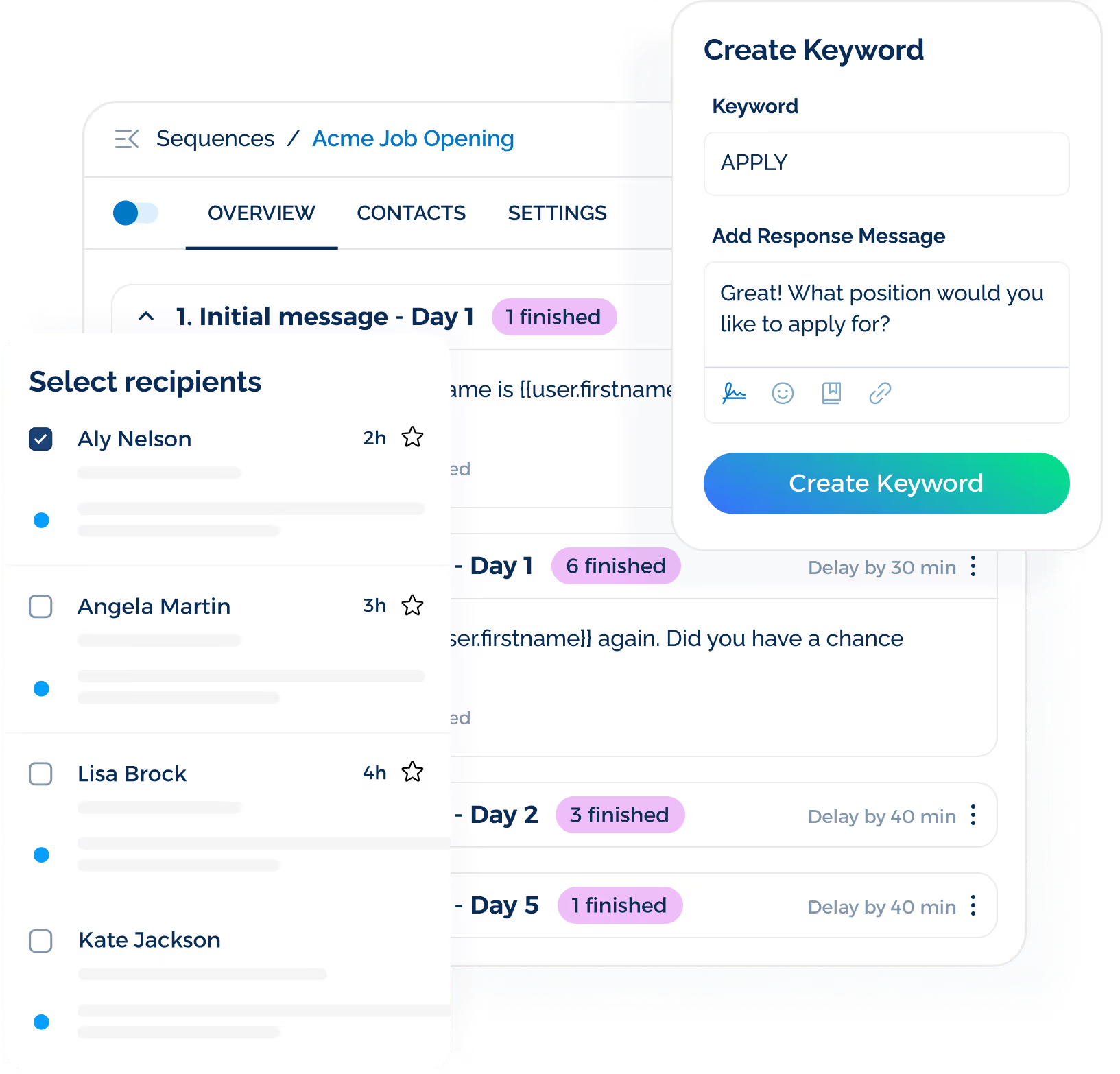
With SMS, it's easier for candidates to confirm interviews, answer screening questions, or respond to next steps without sorting through email threads.
Book a demo with TextUs today and bring SMS automation into your automated hiring workflows!
Streamline Repetitive Hiring Tasks
Your recruiters spend too much time on administrative tasks. Tasks like resume sorting, scheduling, and status updates take hours, even though they don’t require complex decisions.
Automating these steps helps your recruiting team move faster while focusing more energy on qualified candidates and strategic conversations.
Protect the Human Side of Hiring
Automation doesn’t remove the personal aspect of recruiting. It rather clears space for them.
When manual tasks run automatically, you can focus on relationship building, collaboration with hiring managers, and thoughtful decision-making.
Build a Consistent Process
When different hiring managers or recruiters run their own processes, it creates gaps and delays.
Automation standardizes key parts of your workflow, so candidates get a reliable experience. It also makes it easier to scale hiring in departments or locations without losing control of quality.
Get Visibility Into What’s Working
When you automate recruiting processes, you gain access to data about where potential candidates are dropping off, how long each step takes, and which channels are driving results.
This kind of insight helps you make smarter final hiring decisions, spot weak points early, and adjust your strategy based on real numbers.
Common Recruitment Processes You Can Automate
You don’t need to automate everything, only the parts that slow your team down without adding value. Here are the common areas where automation creates real impact during your hiring process.
Workforce Planning and Hiring Approval
Automation can spot hiring needs earlier and move approved roles forward without chasing updates via email threads or spreadsheets.
HR teams submit job requests through a standard form that captures the role, budget, required skills, and target start date.
From there, the request moves to HR, finance, or leadership for review through an automated system based on your approval process.
Candidate Outreach and Communication
The speed and clarity of your recruitment messages shape how job candidates perceive an employer brand.
Automation makes sure that communication stays consistent, even as your team handles hundreds of applicants.
While email is still widely used, it’s not always the most effective channel. Texting adds speed and makes it easier to engage candidates.
TextUs is text recruiting software that connects with your applicant tracking system (ATS) or candidate relationship management (CRM) to keep candidate conversations tied to each stage of the hiring process.
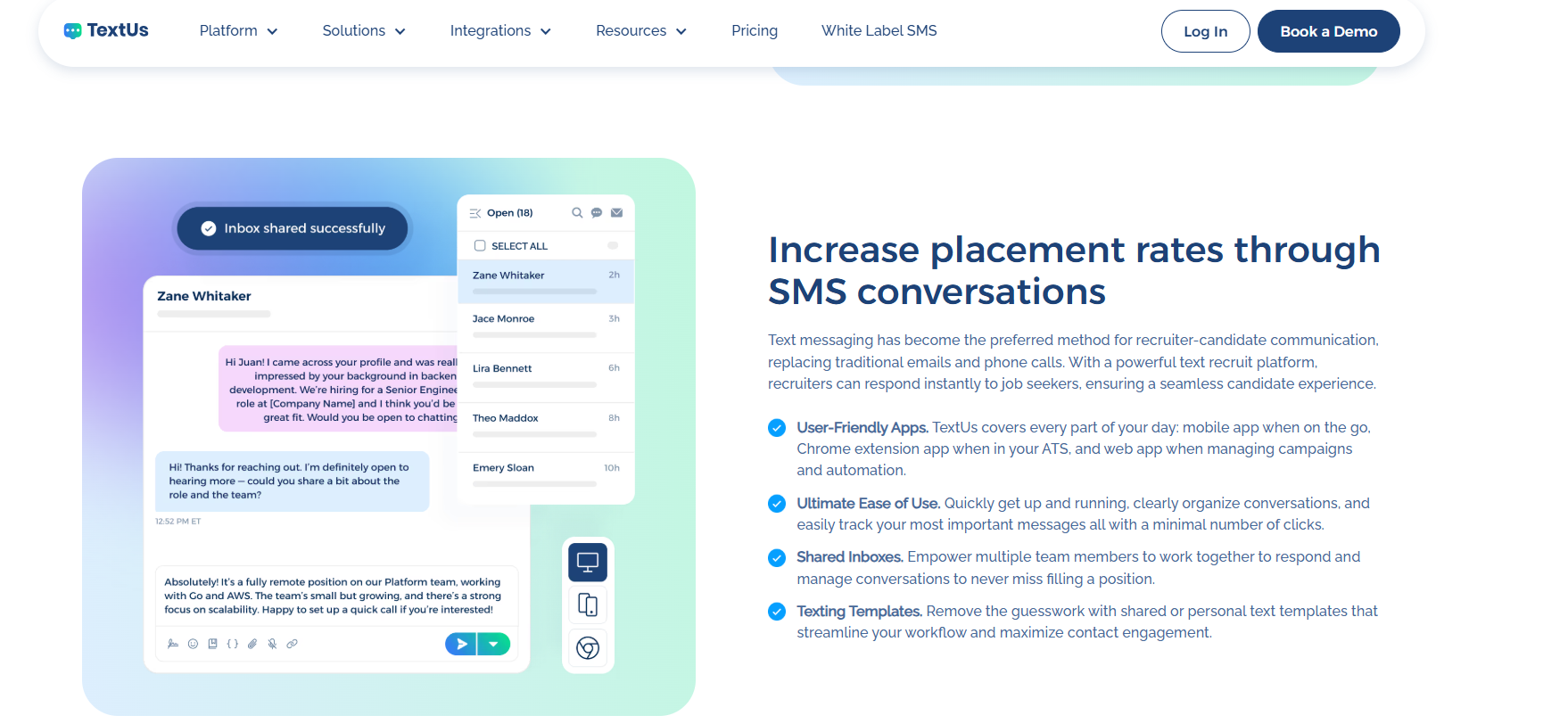
The platform lets you send application confirmations, screening questions, interview invitations, reminders, status updates, and offer follow-ups based on where each candidate sits in the pipeline.
SMS keywords such as “APPLY” or “JOBS” can trigger automated replies, route the best candidates to the appropriate recruiter, or start a screening sequence.
Rather than chasing down confirmations or availability, you manage more conversations while keeping outreach personal and responsive.
Book a demo with TextUs today and move hiring forward with less back-and-forth!
Job Creation and Distribution
Automation reduces the manual work involved in creating and publishing job openings on multiple job boards and recruitment channels.
Job descriptions can be built from approved templates, reviewed through internal workflows, and distributed on job boards, career pages, and social platforms.
This allows your team to publish openings faster without logging in to each platform or repeating the same setup work.
Candidate Sourcing
Automation also supports candidate sourcing by helping your team search talent databases, identify passive candidates, and revisit past applicants who may match current openings.
Sourcing tools that use machine learning can compare candidate profiles with job requirements. It can also surface people whose skills, experience, and employment history align with the role.
Recruiters spend less time on manual searches and more time engaging potential candidates.
Application Management
Automation transforms this part of the process by handling repetitive tasks.
Parsing tools extract key information such as work history, skills, and education, then organize it into structured profiles within your ATS.
It creates a more organized application process and keeps candidate information accessible as applicants move through each hiring stage.
Candidate Screening and Shortlisting
Resume-matching tools can rank applicants based on predefined role requirements.
Pre-screening questions can also be sent automatically after an application is submitted. This helps filter out candidates who do not meet basic requirements.
Automation also supports more objective screening by applying standardized scoring criteria for all applicants.
While it doesn’t remove human judgment, it does help reduce bias by making sure every candidate is measured against the same set of qualifications.
Background and Reference Checks
Automation supports background and reference checks by sending requests, collecting authorization forms, tracking completion, and notifying your team when results are available.
Reference check platforms may also distribute standardized questionnaires and organize responses in the candidate record. You should still review the results and handle any concerns that require context or direct discussion.
Interview Scheduling and Coordination
These steps rely on judgment, but automation helps speed up the process. Therefore, you can focus on interviewing candidates instead of managing logistics.
Scheduling tools compare candidate availability with recruiter and hiring manager calendars, send interview invitations, and provide rescheduling options.
Automated confirmations and reminders also help reduce missed interviews and last-minute coordination.
Interviews and Assessments
One-way video interviews allow candidates to record responses at their convenience while giving your team the flexibility to review submissions when schedules permit.
Skill assessments or behavioral evaluations can be scored automatically based on predefined criteria.
These tools may also support technical tests, work samples, screening questionnaires, and other role-specific evaluations.
Candidate Evaluation and Selection
Automation organizes interview notes, assessment results, scorecards, and recruiter feedback in one candidate profile.
It may also route feedback to the appropriate hiring team members and flag missing evaluations before a decision is made.
The final selection should remain a human decision based on job-related criteria, documented feedback, and the candidate’s overall fit for the role.
Offer Management
Automation allows your team to move quickly once a hiring decision is made.
Offer letters can be generated using pre-approved templates that include compensation details, employment terms, legal language, and required compliance information.
Once approved, the letter can be sent automatically for e-signature, cutting delays and keeping the process moving.
Preboarding and Onboarding
Trigger-based workflows let you send documents such as tax forms, background check instructions, policy acknowledgments, and payroll information as soon as the offer is accepted.
Preboarding tasks such as collecting equipment preferences, sharing team introductions, or providing a day-one checklist can be delivered through an organized and welcoming automated flow.
Once the new hire is ready to begin, automation can transfer candidate information into your human resources information system (HRIS), notify internal teams, assign onboarding tasks, and share orientation details before the employee’s first day.
Types of Recruitment Automation Tools
There’s no single tool that handles every part of recruitment automation. This is why understanding the different categories is important when building your tech stack.
Below are the main categories of recruitment automation software your team should consider.
Applicant Tracking Systems
An applicant tracking system is the foundation of most talent acquisition operations.
It helps organize applications, track candidate progress, and automate tasks like posting job openings and screening resumes.
Many modern ATS platforms also offer built-in scheduling software, reporting dashboards, and integration with sourcing and communication tools.
TextUs supports automated and one-to-one candidate texting through ATS and CRM integrations.
You can trigger messages based on hiring stages, manage replies through a shared inbox, assign conversations, schedule follow-ups, and use custom keywords.
Communication and Messaging Platforms
Strong communication keeps candidates engaged and your application process moving.
Automation tools in this category include email campaign software, chatbots, and dedicated texting software.
SMS for recruiting has become one of the most effective tools for reaching job seekers quickly.
Unlike email, which often goes unread, text messages are opened and answered almost immediately.
Platforms like TextRecruit, Jobvite Text, and Emissary offer capabilities such as bulk messaging, automated replies, and AI-driven engagement.
But if you need more flexibility and better integration, TextUs is a business texting solution built for recruitment teams. You can automate messages for key stages while keeping the tone conversational.
This SMS platform also allows your team to manage conversations from a shared inbox and trigger texts based on where a candidate is in the hiring pipeline.
This helps your recruiters move faster and avoid candidate ghosting, all while staying organized.
AI-Powered Sourcing Tools
AI recruiting tools use artificial intelligence to enhance candidate sourcing. These tools scan job boards, resume databases, and even social media platforms to surface qualified talent.
Instead of relying on manual search and filters, your team receives a shortlist of candidates based on skill relevance, job history, and likelihood to engage.
AI also improves the communication side of recruiting, especially when paired with SMS. Hiring teams can automate personalized outreach, follow up with no-shows, and send time-sensitive updates.
AI in texting analyzes patterns in candidate behavior, such as response times and message engagement, to help you identify who to prioritize and when to follow up.
Interview and Assessment Tools
Interview and assessment tools take pressure off your team by automating the most time-consuming parts of the interview process.
These platforms handle everything from pre-screening questionnaires to scheduling interviews.
Many tools now provide candidates the flexibility to respond on their own time while allowing your team to review submissions when it fits their schedule.
Timed assessments can also be built in to evaluate technical or role-specific skills.
How to Implement a Recruitment Automation Process
Bringing automation into your hiring process doesn’t require a full system overhaul. Below are the steps to implement automation in a way that fits your hiring goals and internal workflows.
Step #1: Map Out Your Current Process
Start by documenting your hiring workflow from job posting to onboarding. Identify every step where your team interacts with candidates, inputs data, or moves candidates forward.
It gives you a better view of where time is being spent and where delays are happening.
You also need to look closely at steps that are repeated often, require manual follow-up, or break down when volume increases.
Step #2: Identify the Gaps Automation Can Solve
Once your automated workflow is clear, you need to pinpoint the areas where automation will bring the most value.
You can automate resume screening, job posting distribution, interview scheduling, and candidate communication.
Make sure to focus on the steps that slow your team down or cause inconsistent candidate experiences. These are the most critical opportunities for automated recruitment.
Step #3: Set Goals and Metrics
Before choosing any recruiting automation software, you need to define what success looks like.
Are you trying to reduce time-to-hire, improve candidate response rates, or eliminate manual scheduling?
You have to set measurable goals so you can track the results of each automation change. This helps you stay focused, improve overall talent acquisition, and justify the investment as you scale.
Step #4: Choose Tools That Work With Your Existing Systems
You need to look for the best recruitment automation software that integrates with your recruiting systems.
It could be resume-parsing tools, assessment platforms, SMS software, or calendar-based scheduling solutions.
Strong integration with your HRIS empowers recruiters with easier access to candidate data, faster handoffs, and a more consistent process from first contact to final offer.
Text automation software adds a strong communication layer when integrated with your ATS or CRM.
You can also send and receive texts from the candidate record, manage replies through a shared inbox, and keep the full conversation history with role-based access control.
Step #5: Roll Out Gradually and Train Your Team
You don't need to automate everything at once. You can start with one part of the recruiting process, like automating interview scheduling or follow-up messaging, and evaluate how it performs.
You can train your team to use the recruitment technology tools and explain how automation is there to support their work.
Also, make sure to collect feedback early so you can refine the setup as you expand automation into other areas.
Step #6: Track Performance and Adjust Over Time
You will need to monitor the results of your automation efforts by looking at key hiring metrics like time-to-hire, response rates, and candidate drop-off.
You can use that to fine-tune your data-driven hiring decisions. Automation should evolve with your hiring needs, so revisit your process regularly to spot new opportunities for improvement.
Close the Communication Gaps in Your Hiring Process With TextUs
If your team is managing multiple open roles or feeling the pressure during periods of high-volume hiring, automation alone won’t solve the challenge.
You also need a communication strategy that keeps candidates informed and moving forward.
From application to offer, TextUs allows you to send SMS updates, reminders, and follow-ups tied to specific job requirements and hiring stages.
This SMS platform integrates with your existing recruiting and HR technology software. It allows you to manage outreach from within your ATS without switching platforms.
TextUs also supports broader enterprise automation efforts by helping you deliver consistent communication.
Book a demo today and see how it transforms the way you hire!
Continue Reading



Frequently Asked Questions
What are the seven stages of the recruitment process?
While the exact steps can vary by company, the standard seven stages typically include:
Recruitment automation can speed up many of these stages, especially sourcing, screening, communication, and offer management.
What is an ATS vs CRM?
An applicant tracking system (ATS) is built to manage candidates who have applied for open roles. It helps track their progress through the hiring funnel, store resumes, and automate steps.
A candidate relationship management (CRM) system is designed to manage long-term relationships with passive candidates or prospects. It supports ongoing outreach, engagement, and talent pipeline development.
What is the 70/30 rule in hiring?
The 70/30 rule suggests hiring someone who meets about 70% of the role requirements and developing the remaining 30% through training and experience.
The term does not have one universal definition. Some recruiters may use it to describe a different balance between technical qualifications and interpersonal skills.
Business Texting
Built for Results
Create and convert pipeline at scale through industry leading SMS software