
How to Roll Out an Automated Message Without Over-Messaging
Learn how to roll out an automated message without over-messaging in seven easy steps. Discover how TextUs can help automate your follow-ups.

Written by
Adam Hamdan
Published
October 2, 2026

An automated message can change how your business communicates with leads and customers.
Instead of relying on manual follow-ups, you can create automated messages that respond instantly when a prospect takes an action.
When you're sending automated messages at specific moments, you stay responsive without adding extra workload for your staff.
In this article, we will cover the common types of automated messages, how to set up a complete system, and the best practices to implement for better response rates.
You will also learn how the best SMS marketing platform uses advanced automation features to build workflows, personalize texts, and improve your marketing efforts over time.
TL;DR
- Automated messages are sent automatically after a trigger, such as a form submission, missed call, appointment booking, or CRM update.
- Automated messaging can be sent through SMS, email, chat, in-app messages, push notifications, voice, and social media, with SMS standing out for fast two-way replies.
- When setting up an automated message system, you need to choose the best channel, define trigger events, write message templates, build workflows, connect your CRM, test everything, then launch and improve using performance data.
- Automated messages get better results when they stay professional, focus on one goal, include clear context, follow smart timing, apply reply and no-reply logic, and undergo regular template updates.
- TextUs is an SMS service that supports automated text workflows, CRM integrations, and mass texting so customer conversations stay active without constant monitoring.
What Is an Automated Message?
An automated message is a message that is sent automatically after a specific action occurs.
You set the rules once, and the system sends the message each time that action takes place, including when new subscribers enter your database.
Instead of relying on the support team to remember to send a follow-up, the system can automatically send the right message based on system events.
Types of Automated Messages
Automated messages can be used in several channels, and each message type supports a different kind of customer action.
The best choice depends on your audience, your goal, and how fast you need a response.
SMS Messages
An automated SMS message is a text sent after a trigger, such as a new lead, a booked appointment, or a missed call.
Since the message goes straight to a phone number, SMS reaches the customer as directly as possible.
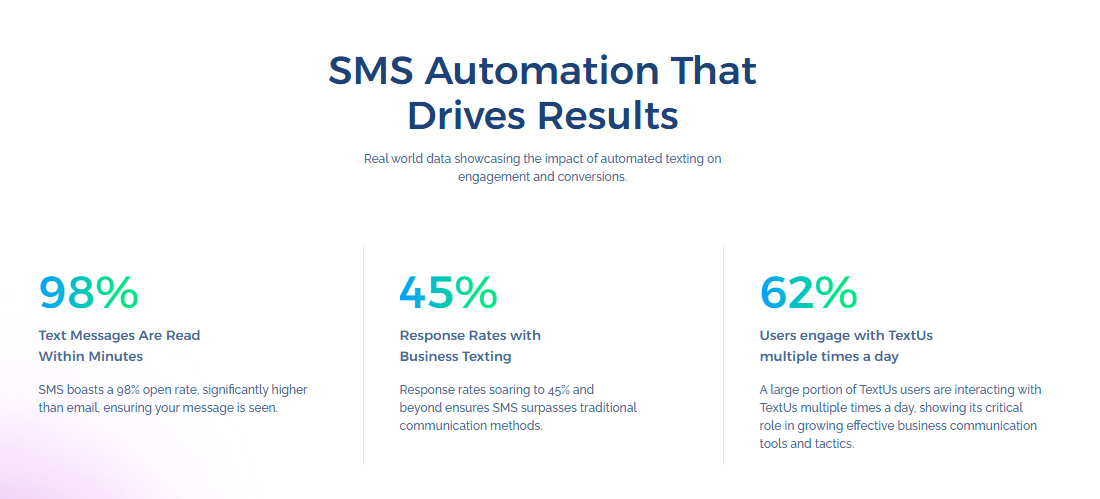
Even though the SMS message is automated, it still supports a personal touch. Customers receive text messages with names, appointment times, or request details for a more personal experience.
Ready to improve follow-up speed and increase reply rates? Book a demo today and start texting with TextUs!
Email Messages
An automated email message is sent through email marketing or customer relationship management (CRM) systems after a trigger.
Email is a good option for longer content, detailed updates, onboarding steps, and marketing campaigns that need images or attachments.
Chat Messages
An automated chat message appears in a website chat widget or a customer support chat tool.
You can use chat automation to greet website visitors, answer common questions, qualify leads, and route conversations to staff.
In-App Messages
An automated in-app message appears inside a product or customer portal. These messages are used for onboarding, feature tips, account notices, and subscription updates while the user is logged in.
Push Notifications
An automated push notification is sent to a mobile device through an app. These messages are short and used for alerts, reminders, and quick prompts that bring a user back into the app.
Voice Messages
An automated voice message is sent through a call system, voice drop, or phone automation tool.
Voice messages are common in healthcare, education, and service businesses where phone calls are still part of the process.
Social Media Messages
An automated social message is sent through platforms like Facebook Messenger or Instagram. These messages are used for customer support, order confirmation, and lead follow-up from paid ads.
They can also support cross-channel messaging when a conversation continues through SMS, email, or another channel.
How to Set Up an Automated Message System
A strong setup prevents gaps in communication and keeps every message tied to your business goal. You can follow these steps to build a system that runs smoothly and drives results.
Step #1: Choose the Right Channel for Your Automated Message
Different channels support various goals. The best choice depends on your target audience, your desired outcome, and how fast you need a response.
Email marketing is commonly used for longer updates, onboarding sequences, and messages that require detailed explanations.
But email response time is usually slower, and you may need to rely on other channels if open rates decline.
SMS marketing stands out because it fits naturally into daily communication habits and supports stronger customer engagement.
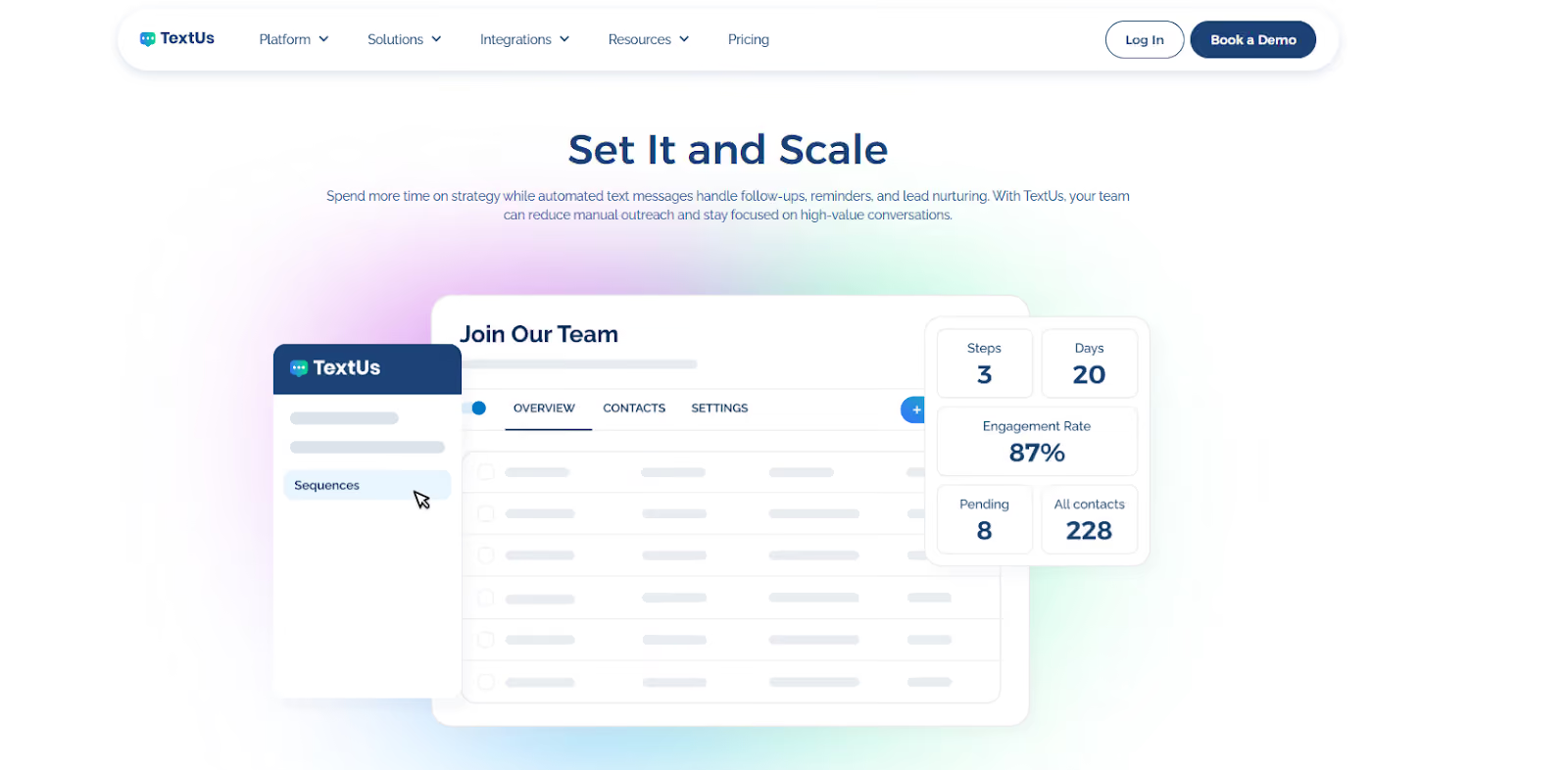
People read and respond to text messages quickly. This makes SMS ideal for confirmations, reminders, lead follow-ups, billing alerts, and time-sensitive updates.
If you want fast customer engagement and reliable response rates, SMS is the strongest channel for automation.
Compare features, customization options, integration capabilities, reporting, and support options before selecting an automation platform.
TextUs provides key features that allow you to build automated SMS marketing workflows, connect your CRM, and manage two-way conversations in one platform.
If you want to see how automated text messaging can support lead response and follow-up sequences, book a demo with TextUs today!
Step #2: Define Your Trigger Events
Without defined triggers, automation can be difficult to manage.
Start by identifying key moments in your customer process. Common message triggers include:
- Form submission: Sends a confirmation or follow-up right after someone fills out a contact form, demo request, or download form
- Appointment booked: Sends a confirmation and can schedule automated reminders before the appointment
- Lead created in CRM: Sends a welcome message or follow-up reminder as soon as a new lead is added to your CRM
- Missed call: Sends an automatic text asking the caller if they want to schedule a call back or speak with someone
- Payment failed: Sends a billing reminder asking the customer to update payment details
- Purchase activity: Uses purchase history to trigger follow-ups based on previous orders or recent customer activity
- Order shipped: Sends a shipping notification with tracking information and delivery status
- Customer replies “YES”: Starts the next step in the workflow, such as confirming an appointment or completing an opt-in
- Time-based follow-up: Sends the next message after a set number of hours or days if no reply or action happens
Trigger planning also prevents overload from too many messages. You can focus on moments that impact revenue, customer experience, or response speed.
Step #3: Write Your Message Templates
Message templates keep your communication professional while saving your support team's valuable time. They also reduce errors, since your staff doesn't need to rewrite the same messages every day.
Start by writing one template for each trigger event, such as form submission, appointment confirmation, missed call follow-up, or payment reminder.
Keep the message content focused on one goal. Add specific details like the recipient’s name, appointment time, or order reference so the message is connected to the situation.
Templates should also support structured drip campaigns, not just one-time outreach. You can write follow-up templates for no reply, reschedule requests, confirmations, and opt-outs.
Step #4: Build the Messaging Workflow
An automated messaging workflow outlines the full path from the first trigger to the final result. It defines what happens after the initial message and how the system responds to incoming messages.
If the recipient replies, decide whether the system sends an automatic text message, routes the conversation to the right team member, or issues automated replies for common questions.
If there's no reply, you can schedule follow-ups. SMS drip campaigns are valuable at this stage as they allow you to send reminders and check-ins over time.
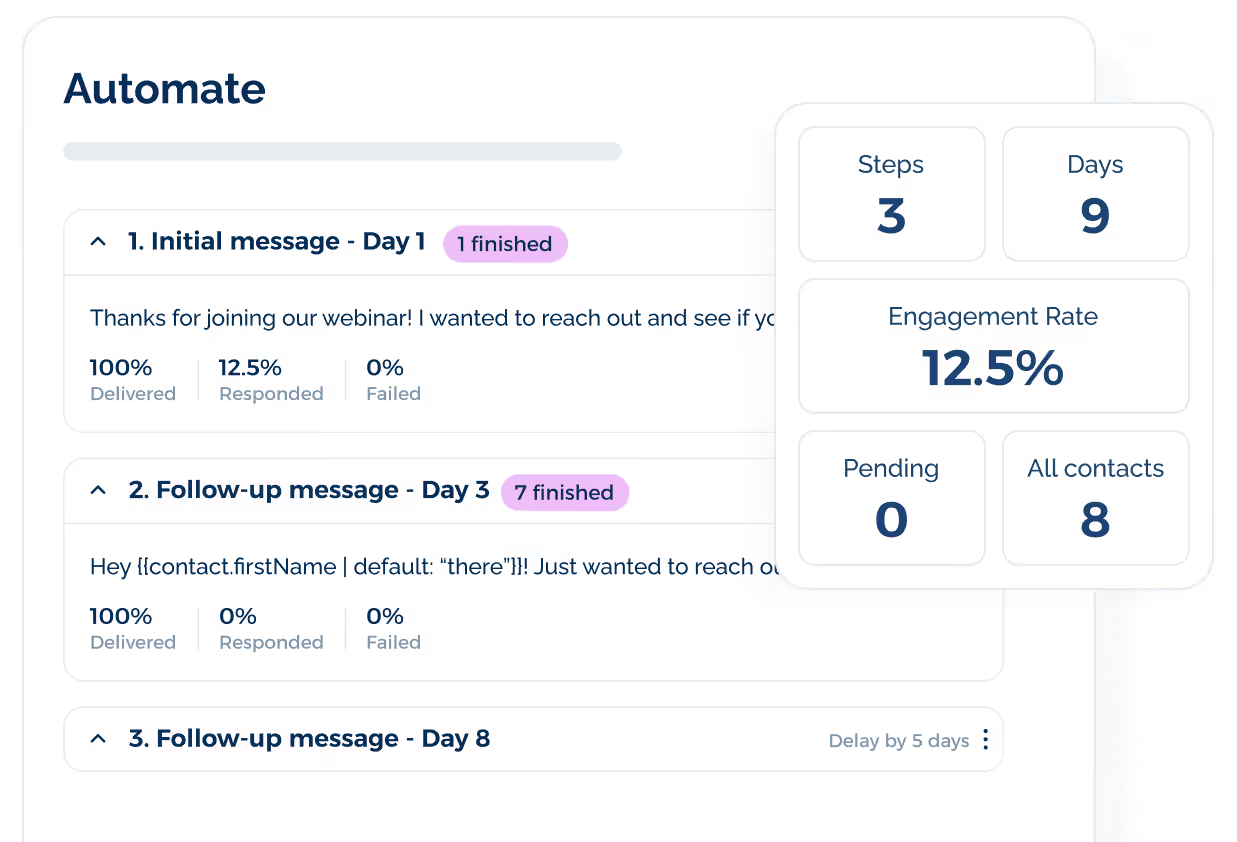
For example, a lead may receive an initial introduction, a reminder, and then a final check-in message. Spacing your drip sequence properly increases engagement without overwhelming the recipient.
Workflow logic should also define stop conditions to ensure SMS compliance. If someone opts out, all future automated messages should stop.
A structured workflow helps prevent overload and supports compliant communication strategies.
Step #5: Connect Your CRM and Tools
CRM integration allows trigger events to activate in real time based on customer activity, such as a new lead, status update, purchase, or payment issue.
Your CRM should act as the main data source. When contact records are updated, the automated message system should receive that information instantly.
Most providers offer a web dashboard or an application programming interface (API) that lets you set up, manage, and send your automated text messages based on live data.
However, messaging automation can create problems if messages are irrelevant or sent at the wrong time. It can also lead to technical issues such as incorrect contact data or broken personalization fields.
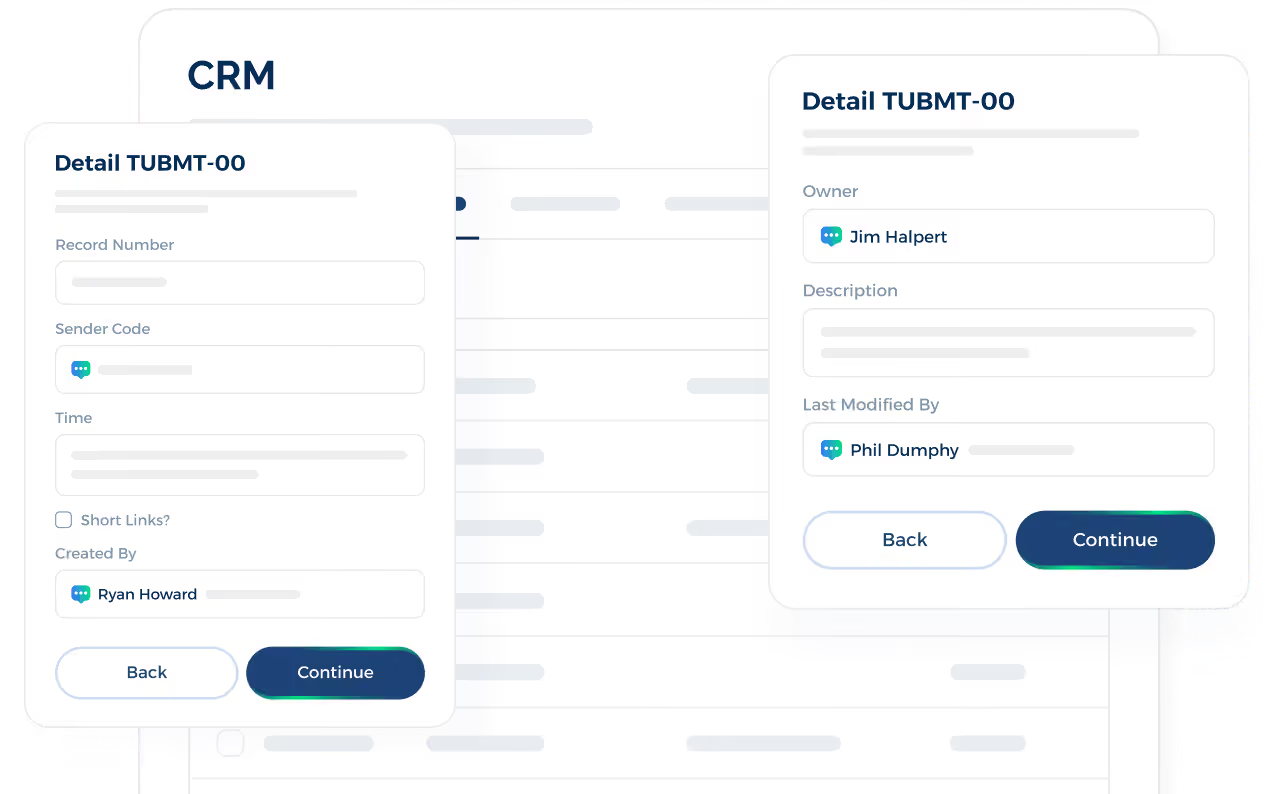
Choosing the right text automation software that integrates with your existing systems reduces these risks. TextUs connects your texting workflows to accurate customer data and real actions.
Once integrated with your CRM, it can pull accurate details such as first name, lead status, assigned rep, appointment time, or recent activity.
Step #6: Test Every Message Before Launch
Even a small error in wording, personalization, or timing can affect customer trust and response rates.
You can send internal test messages to confirm that names, dates, links, and dynamic fields populate correctly. Review formatting on different devices to make sure the message displays properly.
An automated texting service like TextUs helps you catch risky wording before a message goes live.
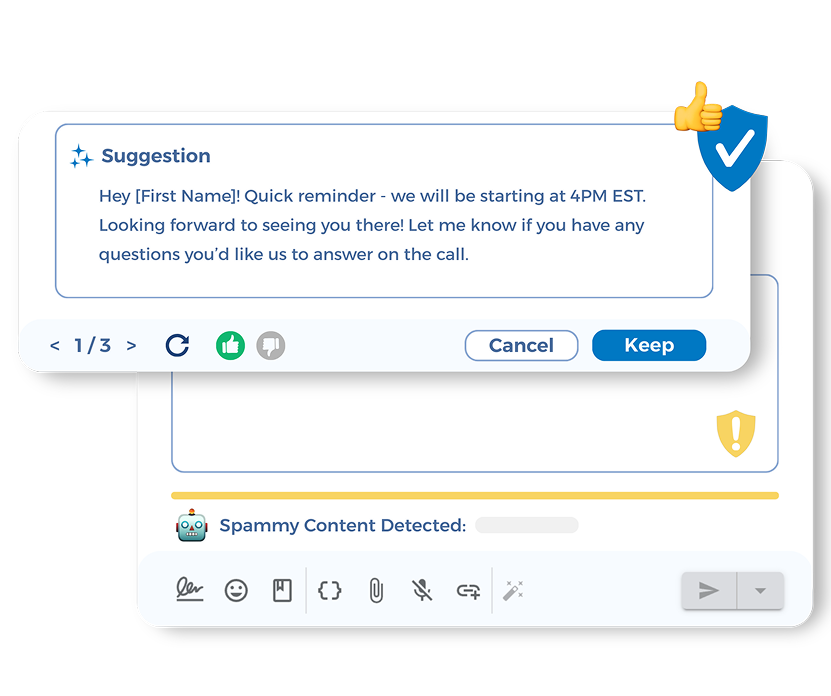
Its AI-powered Smart Messaging flags high-risk messages and provides immediate rewrite suggestions to reduce compliance risk without losing your brand voice.
You also need to confirm that responses route to the correct inbox or rep and that follow-up rules trigger as expected. TextUs can support this process by automating routine messages, logging conversations, and creating reports.
Testing both reply and no-reply scenarios prevents issues once the system goes live.
Step #7: Launch, Monitor, and Improve
Once testing is complete, you can activate your automated workflows and begin sending personalized messages to real customers.
Launching is the point where real performance data starts to guide your next decisions.
After launch, you have to monitor key metrics such as delivery rate, reply rate, click rate, opt-outs, and conversions.
Performance data helps marketing teams improve messaging campaigns without changing every workflow at once. You may also compare customer feedback with reply and conversion data before changing templates.
Small refinements to message copy, timing rules, or workflow logic can also produce stronger results.
How to Write an Automated Message That Gets Replies
An automated message should sound natural and make it easy for someone to respond. Here are the best practices for writing an effective automated message:
Maintain a Professional Tone
An automated response represents your business, even when it is sent without a person typing it in real time. The tone should sound respectful and business-appropriate, especially when reaching new users for the first time.
Professional tone comes from simple wording, correct spelling, and an easy-to-read message structure. It also supports a positive first impression, which is important for lead follow-up and customer communication.
Text abbreviations should also be used with care. Acronyms like “FYI,” “ASAP,” or “ETA” are widely understood in business settings, so they can be used when they improve readability.
You need to avoid slang-style abbreviations such as “u,” “r,” “lol,” or “ttyl,” since they can make the message look unprofessional and reduce credibility.
If you choose to shorten messages and use abbreviations, keep them consistent with your brand voice and only use specific keywords your audience will recognize.
Keep One Goal per Message
Each automated text should guide the recipient toward one specific action. A focused message makes it easier to engage customers without overwhelming them.
For example, a confirmation message should only ask the person to confirm. A scheduling message should only ask the person to choose a time.
Single-purpose messages are easier to read, allowing recipients to respond quickly. That simplicity supports instant replies and strengthens campaign performance at every stage of the sales funnel.
Provide Clear Context
Recipients need to understand why they are receiving an automated message. Without context, even a good business text message can seem random, which leads to higher SMS opt-out rates.
You can mention the action that triggered the message, such as a form submission, appointment booking, missed call, or order update.
That small detail reassures the recipient that the message is legitimate and connected to past interactions.
Context also saves time and reduces back-and-forth. If the message includes a quick reminder of the request or event, the recipient does not need to ask what the message is about.
Align Timing Based on Customer Behavior
Timing influences how people respond to automated SMS campaigns. A confirmation should be sent immediately after the action occurs, such as submitting a form or booking an appointment.
Business audiences respond during work hours, while retail customers may engage more in the late afternoon or early evening.
Timing should also respect business hours unless your customer base expects after-hours communication.
For appointments or events, you can schedule reminders around the specific date so the message arrives when it's most relevant.
Understanding the best time to send marketing messages helps increase response rates. You can test different time intervals to see which timing leads to better engagement for your customers.
Set Rules for Replies and No Replies
You need defined rules for what happens after someone replies and what happens if they do not.
Without structured follow-up logic, conversations stop or require manual correction. This slows down response time and affects customer satisfaction.
If a recipient replies, the system should route that response to the right person or trigger the next step in the workflow.
Automated replies can handle simple confirmations, while more complex questions can be routed to a live rep for immediate assistance.
For example, a YES reply means a confirmed appointment, while a question can notify a sales rep. Fast routing prevents missed opportunities and keeps communication structured.
If there's no reply, a scheduled follow-up can re-engage the recipient after a reasonable gap. The timing and number of follow-ups should be controlled to avoid overwhelming the contact.
Review and Update Your Templates
User behavior changes, offers change, and business goals change. You need to review templates on a regular schedule to keep your messaging aligned with current objectives.
You have to look at reply rates, click-through rates, opt-outs, and conversions to see which messages perform well and which ones need adjustment. This review process also provides valuable insights into what your contact list responds to.
Template reviews also prevent outdated information from being sent. You can check links, pricing references, names, and dates to confirm accuracy.
Automate Follow-Ups and Increase Reply Rates With TextUs
When every lead, appointment, and customer update triggers the right message automatically, your business stays responsive even during busy hours.
TextUs helps you build automated SMS workflows for form submissions, appointment reminders, CRM updates, and other key customer actions. You can send SMS messages based on real activity instead of relying on manual follow-ups.
This automated text messaging service also offers strong integration capabilities with your CRM and other existing workflows. This keeps customer data, conversations, and follow-up actions connected across your process.
If you want to use message sequences to increase replies, automate repetitive tasks, and keep follow-up consistent, TextUs is built for efficient business communication.
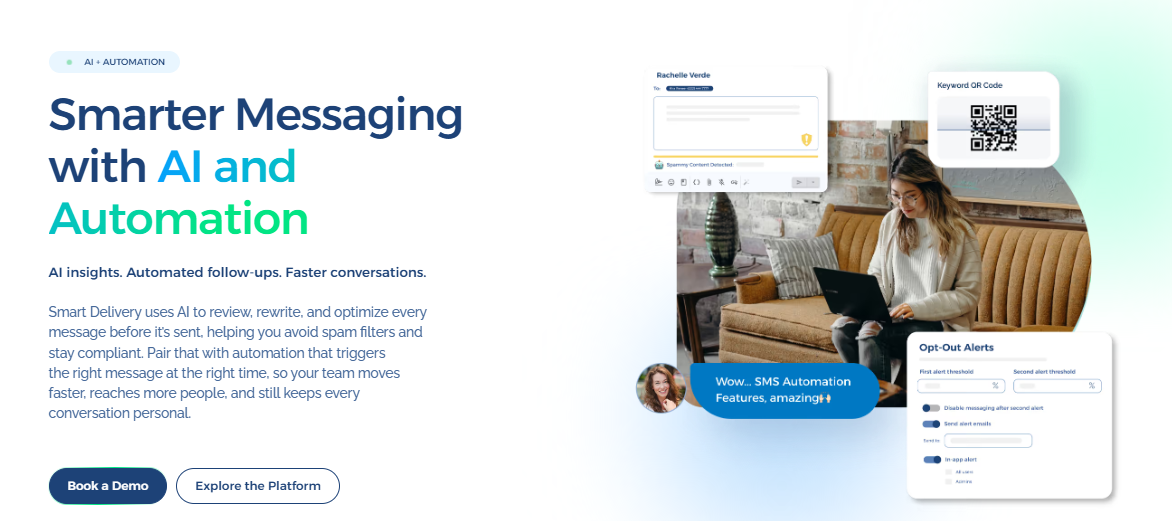
Book a demo today to see how automated texting workflows can fit your sales, marketing, and service processes!
FAQs About Automated Messages
What is an automated message?
An automated message is a pre-written message sent after a specific trigger. This could include a form submission, appointment, CRM update, or abandoned cart.
These messages reduce manual follow-up and keep communication consistent. Over time, that consistency can help strengthen brand loyalty.
How to make automated text messages?
Choose an SMS marketing software that supports message triggers. Define the action that starts the workflow, write a short template, add personalization fields, and set the timing and stop rules.
Once activated, the system can send automated text messages whenever the trigger occurs. You can use a branded short code or dedicated business number to deliver your auto-texts consistently.
How do I turn on automated messages on my iPhone?
You can set a basic auto-reply on an iPhone using Driving Focus. Go to Settings > Focus, select Driving, then tap Auto-Reply to write your message and choose who will receive it.
However, this feature only sends simple replies and doesn't support business triggers, CRM connections, or follow-up sequences. You need to use an SMS platform that connects to your CRM and supports advanced automated message workflows.
What is a good automatic reply message?
A good automated reply message is short, professional, and focused on one action. It explains why the recipient is receiving the message and makes the next step evident.
Example: “Hi Sarah, your appointment is confirmed for Tuesday at 2 PM. Reply YES to confirm or NO to reschedule."
Continue Reading



Frequently Asked Questions
Business Texting
Built for Results
Create and convert pipeline at scale through industry leading SMS software