
SMS Appointment Reminders: Text Templates and Best Practices
Use SMS appointment reminders to confirm bookings and reduce no-shows. Get setup steps, templates, timing tips, and TextUs guidance.

Written by
Adam Hamdan
Published
September 1, 2026
People juggle work, meetings, errands, and personal commitments every day. Yet, even a scheduled appointment can slip their mind.
A well-timed SMS appointment reminder brings that appointment back to someone’s attention before the scheduled time.
SMS marketing sends messages directly to recipients’ phones, allowing them to read and respond without answering a call. This makes your outreach simple and easy to act on.
In this article, we will cover the impact of SMS appointment reminders and a few examples you can use for different situations.
We will also look at how a texting software can automate SMS appointment reminders and keep communication organized.
TL;DR
- SMS reminders offer a faster, more direct way to confirm visits and manage schedule changes than email or phone calls.
- Reminder texts can cover confirmations, first reminders, rescheduling, missed appointments, post-appointment follow-up, and much more.
- An effective reminder text includes the essential booking details, stays short, uses relevant personalization, and makes confirmation and rescheduling easy; matches the appointment type and latest schedule, and includes preparation or privacy considerations when needed.
- You have to send appointment reminders early enough for customers to prepare, confirm, or change their plans before the appointment.
- TextUs automates appointment follow-up with personalized sequences, connected integrations, and shared inboxes. You spend less time sending reminders and more time keeping customer conversations moving.
The Cost of Appointment No-Shows for Businesses
A missed appointment leaves more behind than an empty time slot. Staff time has already been reserved, resources have been prepared, and another customer may have missed the chance to book that opening.
Over time, repeated no-shows can lead to lost revenue, disrupted schedules, and extra work spent trying to fill unexpected gaps.
Reminder outreach helps reduce that risk. But the communication channel makes a difference.
Email appointment reminders give you more space for forms, policies, and detailed instructions, yet recipients may not see them before the appointment.
Phone calls create a personal interaction. Yet they take more staff time and lead to voicemail or repeated attempts when people are unavailable.
SMS marketing fits the middle ground between speed and convenience.
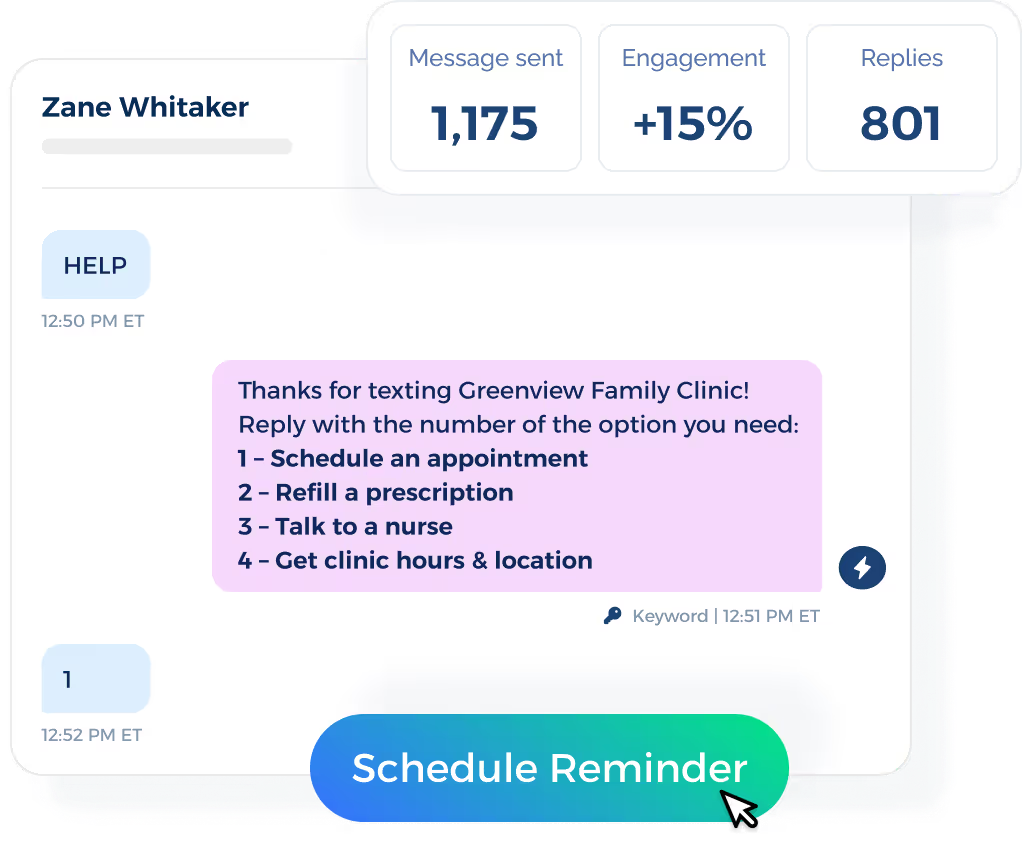
Texts reach people on a device they check throughout the day. Two-way replies also make confirmation or schedule changes easier to handle.
If you run an appointment-based business, texting is a more cost-effective way to save your team hours, keep schedules fuller, and lessen the manual effort tied to missed visits.
Book a demo with TextUs today to see how this powerful tool fits into your scheduling workflow!
50+ Text Appointment Reminder Templates for Every Scenario
Automated reminders need to match the situation. Use these free message templates as a starting point and adapt them to fit your communication style.
New Booking Confirmation
New booking confirmation texts reassure the recipient that the appointment is set while providing the core information they need to reference later.
- Hi [Name], you’re all set with [Company] for [Day] at [Time]. If your plans change, just reply to this text and let us know.
- Hi [Name], your booking with [Company] is confirmed for [Day] at [Time]. Your meeting location is [Location].
- Thanks for booking with [Company], [Name]. Your appointment is set for [Day] at [Time]. Contact us at [Phone Number] if anything changes.
First Appointment Reminder
The first reminder brings the appointment back to the recipient’s attention with enough time to make changes if needed.
- Hi [Name], this is a reminder about your appointment with [Company] on [Day] at [Time]. Please let us know if you need to make a change.
- Hi [Name], a quick note from [Company] about your visit on [Day] at [Time]. We’ll see you then, and you’re welcome to reply if you need any help before your appointment.
- Hi [Name], a reminder that your scheduled appointment is on [Day] at [Time]. Reply if you have any questions before your visit.
48-Hour and 24-Hour Reminder
A friendly reminder sent one or two days before the appointment gives recipients time to review the schedule and make changes before the last minute.
- Hi [Name], your appointment with [Company] is in 48 hours on [Day] at [Time]. Reply if you need to change your booking.
- Hi [Name], a reminder that we will see you tomorrow at [Time] for your appointment with [Company].
- Hi [Name], your appointment is scheduled for tomorrow at [Time]. Please arrive a few minutes before your scheduled time.
Same-Day Appointment Reminder
A same-day message focuses on the time, appointment type, and any final information the recipient needs before arriving or joining.
- Good morning, [Name]. Your [Service] appointment with [Company] is today at [Time]. We look forward to seeing you.
- Hi [Name], your appointment starts today at [Time]. Please arrive at [Location] a few minutes before your scheduled time.
- Hi [Name], your appointment with [Company] is later today at [Time]. Reply if you need assistance before your visit.
Appointment Confirmation Request
A confirmation request makes it easy for clients to reply with a short answer that tells staff whether the appointment is still on.
- Hi [Name], your appointment with [Company] is scheduled for [Day] at [Time]. Reply YES to confirm your attendance.
- Hi [Name], please reply C to confirm you are still available for your appointment on [Day] at [Time].
- Hi [Name], we have you scheduled for [Day] at [Time]. Reply YES if you plan to attend or CHANGE if you need another time.
Cancellation and Rescheduling Confirmation
A cancellation or rescheduling message acknowledges the change and removes uncertainty about the old or new appointment time.
- Hi [Name], your previous appointment has been removed from our schedule. Contact [Company] when you are ready to choose another time.
- Hi [Name], your appointment has been moved to [New Day] at [New Time]. Please reply YES to acknowledge the new schedule.
- Hi [Name], your requested schedule change is complete. We now have you booked for [New Day] at [New Time].
No-Response Follow-Up
A no-response follow-up gives the recipient another chance to respond before staff decides whether more outreach is needed.
- Hi [Name], we have not heard back about your appointment on [Day] at [Time]. Please reply YES if you still plan to attend.
- Hi [Name], we are checking in about your upcoming appointment with [Company]. Reply CONFIRM to keep the scheduled time.
- Hi [Name], your appointment is still scheduled for [Day] at [Time]. Please let us know if your plans have changed.
Last-Minute Schedule Change
A last-minute schedule change puts the updated time or meeting information near the start so the recipient doesn't rely on the old schedule.
- Hi [Name], your appointment time today has changed from [Old Time] to [New Time]. Please reply YES to acknowledge the update.
- Hi [Name], there has been a change to today’s schedule. Your new appointment time is [New Time]. Contact us if that time does not suit you.
- Hi [Name], your appointment with [Company] has been moved to [New Time] today. We apologize for the short notice.
Virtual Appointment Reminder
A virtual automatic text reminder makes the start time and meeting link easy to find without filling the text with extra instructions.
- Hi [Name], your virtual appointment with [Company] starts at [Time] on [Day]. Join here: [Link].
- Hi [Name], your online meeting is scheduled for [Day] at [Time]. Access the meeting here: [Link].
- Hi [Name], we will meet online at [Time] today. Please use this link when it is time to join: [Link].
Arrival and Location Reminder
An arrival message provides the location and any business details that could prevent delays when the recipient reaches the appointment.
- Hi [Name], your appointment is at [Time] at [Street Address]. Please check in at reception when you arrive.
- Hi [Name], we will see you at [Time] at [Location]. Parking is available in [Parking Area].
- Hi [Name], your appointment is at [Time] in Suite [Number]. Please enter through [Entrance] and check in at the front desk.
Preparation and Document Reminder
A preparation reminder focuses on the forms, identification, records, or other items the recipient needs to bring before the appointment begins.
- Hi [Name], please bring your photo ID and completed forms to your appointment on [Day] at [Time].
- Hi [Name], a reminder to bring [Required Document] to your upcoming appointment with [Company].
- Hi [Name], please complete this form before your appointment at [Time]: [Link]. Bring any requested documents with you.
Payment and Deposit Reminder
A payment reminder explains the amount and deadline without adding unrelated promotions or unexpected late fees.
- Hi [Name], your appointment with [Company] is reserved for [Day] at [Time]. A deposit of [Amount] is due before your visit: [Payment Link].
- Hi [Name], a balance of [Amount] is due for your upcoming appointment. Payment can be completed here: [Link].
- Hi [Name], your booking requires a [Amount] deposit to hold the scheduled time. Please complete payment here: [Link].
Recurring Appointment Reminder
A recurring appointment reminder reinforces the next scheduled visit without making each repeated message feel unnecessary.
- Hi [Name], your next recurring appointment with [Company] is scheduled for [Day] at [Time].
- Hi [Name], your regular [Service] appointment is coming up on [Day] at [Time]. Let us know if your schedule has changed.
- Hi [Name], we will see you again for your scheduled appointment on [Day] at [Time]. Reply if you need another time.
Waitlist Opening Notification
A waitlist notification tells recipients that an earlier slot has opened and explains how they can claim it before someone else does.
- Hi [Name], an earlier appointment has opened on [Day] at [Time]. Reply YES if you would like this time.
- Hi [Name], we have an opening at [Time] on [Day]. Reply TAKE IT if you would like us to move your appointment.
- Hi [Name], a spot has become available with [Company] on [Day] at [Time]. Reply YES if you want the opening.
Missed Appointment Follow-Up
A missed appointment message acknowledges the absence without sounding harsh and provides a path back to the schedule.
- Hi [Name], we missed you at your appointment today. Reply BOOK if you would like help choosing a new time.
- Hi [Name], it looks like you were unable to make your appointment with [Company]. Contact us when you are ready to book another visit.
- Hi [Name], we noticed you missed your scheduled appointment today. Here is a link to choose another time: [Link].
Rebooking Reminder
A rebooking reminder reconnects with people who are due for another appointment but have not scheduled their next visit.
- Hi [Name], it may be time to book your next appointment with [Company]. Choose a time here: [Link].
- Hi [Name], your next [Service] visit is due soon. Reply BOOK, and we can help you find an available time.
- Hi [Name], we would be happy to see you again. Your next appointment can be booked here: [Link].
Post-Appointment Follow-Up
A post-appointment message continues the conversation after the visit with a useful next step such as feedback, care information, or another booking.
- Hi [Name], thanks for visiting [Company] today. We would appreciate your feedback here: [Link].
- Hi [Name], thank you for your appointment today. Please review your post-visit information here: [Link].
- Hi [Name], we hope your appointment went well. When you're ready, your next visit can be booked here: [Link].
How to Write an Effective Appointment Reminder Text Message
An effective reminder text should make the key appointment details easy to understand without overloading the recipient. Here are the main elements to consider when you write a reminder message:
Include the Essential Appointment Information
Each text should identify your business name and include the scheduled date, time, and location or meeting link when relevant.
For example, appointments synced from Google Calendar need to reflect the latest booking information. This prevents customers from checking several Google Calendar events to find the correct appointment.
The amount of information may change based on the appointment itself. A short consultation may need only a time and location, while a service visit also requires arrival instructions or a contact number.
Keep the Message Short and Focused
Too much information can bury the part someone needs. One main action and a few useful details make the message easier to scan.
Long policies, preparation steps, or forms fit better behind a clickable URL when they take up too much space. Text messages can introduce what the recipient needs to know, then point them toward the extra information.
Personalize the Message With Relevant Information
Personalization feels more valuable when it connects to the booking. Custom fields pull in details such as the recipient’s name, appointment time, location, service, provider, recruiter, or staff member.
There's no need to fill every available field. A few relevant details make the text specific without turning it into a data-heavy message.
Give Recipients a Simple Way to Confirm
A short reply option takes the guesswork out of attendance. If you need to confirm appointments, you can ask for a response such as YES, CONFIRM, or another keyword.
Two-way texting also keeps the conversation open when clients reply with a question or a scheduling issue. Staff can step in when the response needs more than an automated acknowledgment.
Make Cancellation and Rescheduling Easy
Plans change, and the reminder needs to account for that. A reply option, booking link, or contact number allows someone to cancel or choose another time instead of missing the appointment altogether.
Earlier notice also gives you more valuable time to recover from last-minute cancellations. For a small business, even one recovered appointment can protect a meaningful part of the day’s schedule.
Match the Message to the Appointment
Not every booking needs the same information. A virtual meeting needs an access link, an in-person visit may need parking instructions, and a service appointment may require an arrival window.
The reminder also needs to match the latest information in the existing calendar app. If the appointment changes but the reminder doesn't, the message creates confusion instead of preventing it.
Include Preparation Instructions When Needed
Some appointments require forms, identification, documents, or other preparation before the visit.
A short text provides customers with enough time to prepare without filling the reminder with unnecessary information.
Medical providers also need extra care when healthcare texting involves Protected Health Information (PHI).
If a third-party texting or software provider handles PHI on behalf of a covered entity, HIPAA generally requires a Business Associate Agreement (BAA) and appropriate safeguards for that information.
When to Send SMS Appointment Reminders
Timing affects whether a reminder arrives early enough to be useful without fading from memory before the appointment.
Bookings made one week or more ahead benefit from an early message that restates the schedule, while shorter booking windows need fewer touchpoints.
A reminder sent 48 to 72 hours before the visit gives people time to adjust work, transportation, childcare, or preparation requirements.
Early text reminders also give your office more time to refill an opening if someone changes plans. Then, a 24-hour message works as a final check-in for the time, location, and attendance status.
Same-day messages fit appointments where timing or arrival information needs extra attention, such as virtual meetings, interviews, or service visits.
If you need to send reminders at this stage, include a meeting link, parking note, check-in point, or arrival window, with the send schedule kept within appropriate business time for the recipient.
TextUs Supports Automated SMS Appointment Reminders
Appointment schedules don't always follow one fixed pattern.
A recurring visit needs a different reminder sequence than a same-day booking or an appointment scheduled several weeks ahead.
Therefore, timing needs to reflect when the booking was made and how much notice the recipient needs.
TextUs lets you schedule appointment reminders through automated sequences instead of relying on someone to send each message by hand.
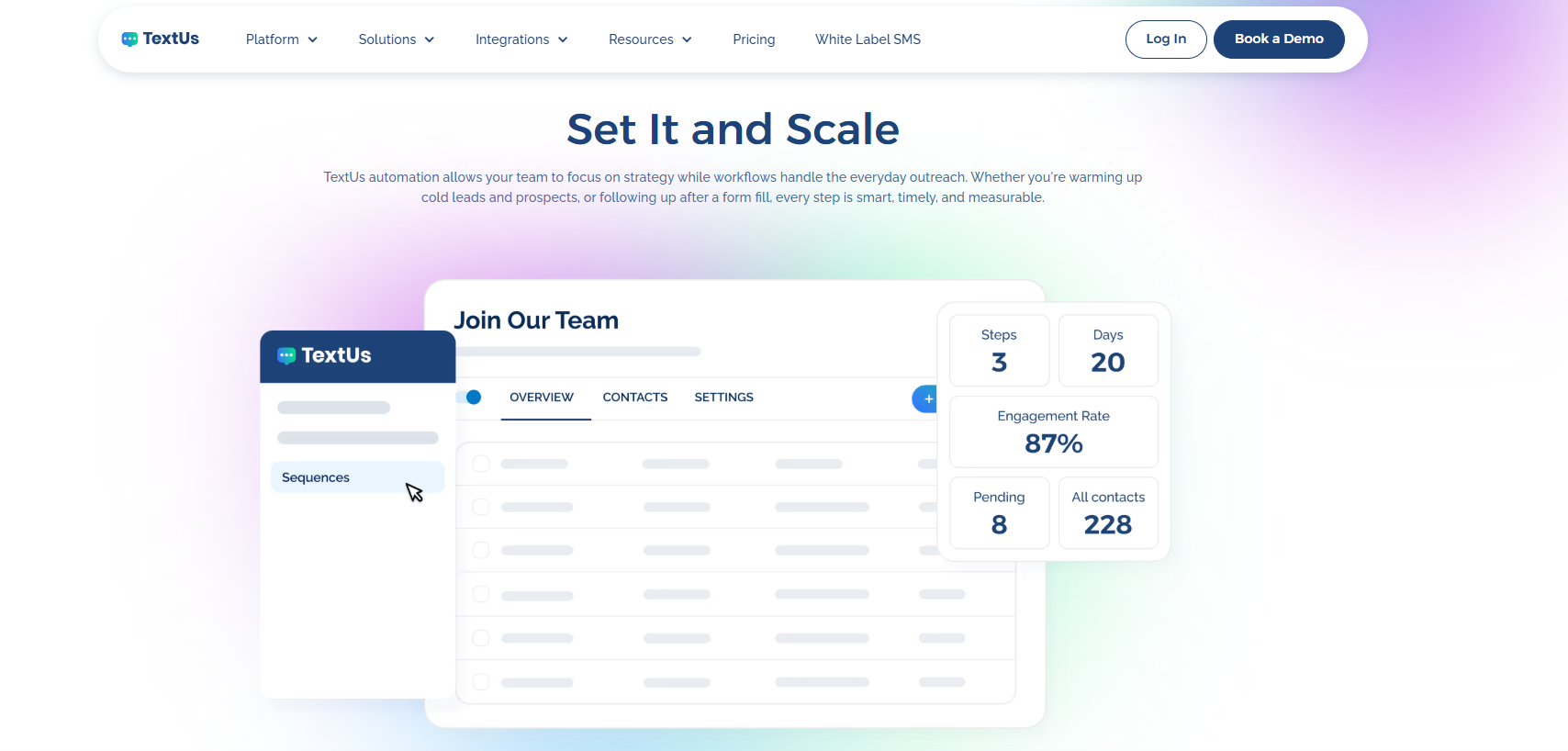
Different schedules can be set for recurring, last-minute, and booking reminders, while personalization fields keep each text connected to the correct appointment.
This approach saves staff from repetitive reminder work and keeps client communication moving without filling the recipient’s inbox with unnecessary messages.
TextUs also keeps replies connected to the conversation. Staff can step in when someone needs to change a booking, ask a question, or request another time.
With campaign scheduling, two-way texting, shared conversations, and SMS automation in one place, you can easily manage reminder workflows while spending more time on important tasks.
Turn Appointment Follow-Up Into a Connected SMS Workflow With TextUs
Manual appointment follow-up should not take up hours of your team’s day. TextUs turns repetitive outreach into automated workflows.
With TextUs, you can automatically send appointment reminders based on the timing you choose instead of relying on manual follow-up.
Sequences let you build a series of personalized messages, set the timing between each touchpoint, and track performance through response and engagement metrics.
TextUs allows the sender to choose whether the sequence ends or continues after a reply. This prevents follow-ups from continuing after the conversation has already moved forward.
TextUs also connects with CRM, ATS, HRIS, and other core systems to keep contact information and conversations connected to existing workflows.
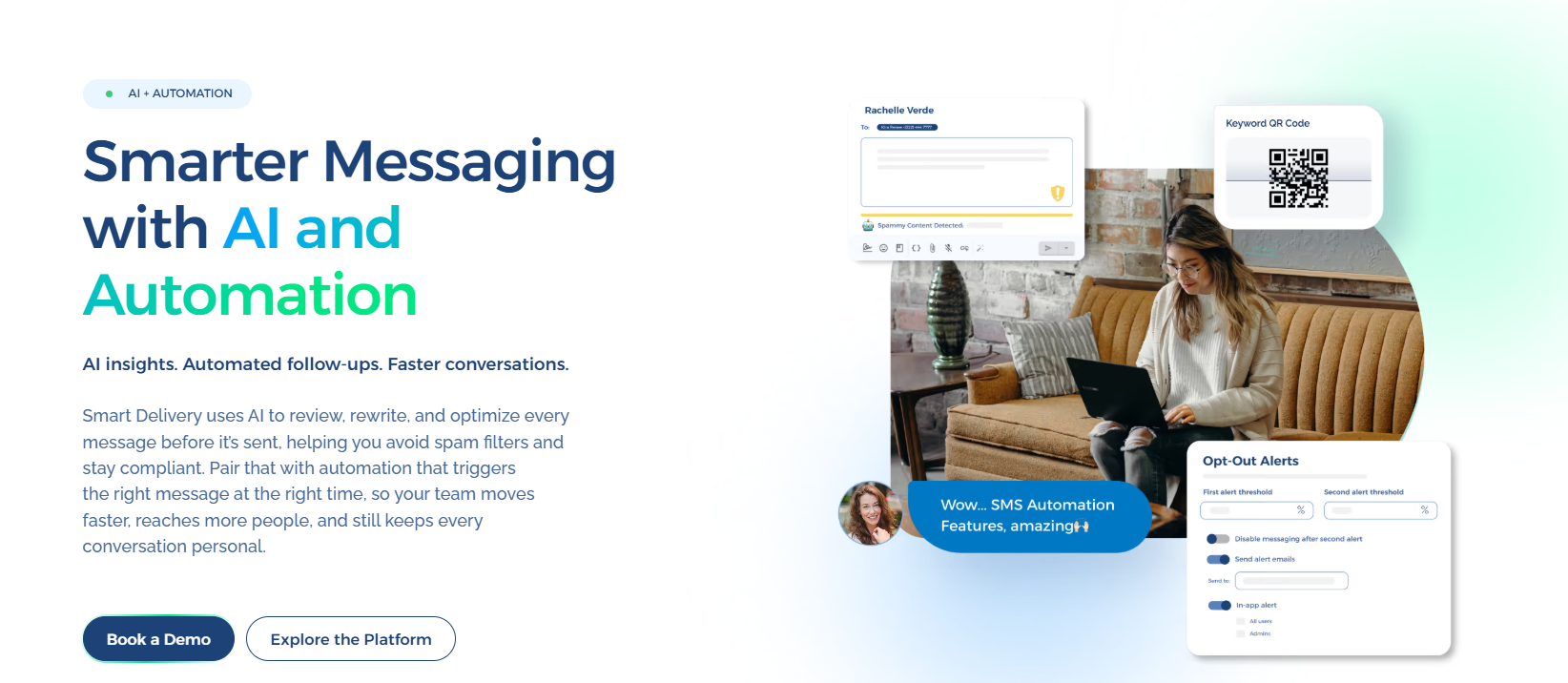
Automation doesn't have to remove the human side of appointment outreach. Keywords and automated responses trigger follow-up actions, while replies remain available through shared and individual inboxes.
Book a demo with TextUs today to see how this platform reduces manual follow-up and keeps schedules organized!
Continue Reading



Frequently Asked Questions
How can I set up text message reminders for appointments?
A text automation software can connect appointment data with scheduled SMS messages, so reminders go out at set times before each booking.
TextUs has an intuitive interface that makes it easier to create message sequences, adjust timing, and manage replies.
Can appointment reminders be sent via text?
Yes. SMS lets you share the date, time, location, meeting link, or confirmation request in a short message.
Texting can also complement your email reminders when customers need longer instructions or documents. SMS works better for updates that need fast attention, while email has more room for detail.
How do you write a reminder text for an appointment?
A good reminder identifies the sender, states the appointment time, and includes one simple next step. You’ll ask the recipient to confirm, reschedule, or contact you if their plans change.
Short wording keeps the important information easy to find. Better attendance and earlier schedule changes also increase revenue that could otherwise be lost to unused time slots.
Business Texting
Built for Results
Create and convert pipeline at scale through industry leading SMS software