
SMS Campaign Scheduling: A Better Way to Plan Marketing Textus
Learn how SMS campaign scheduling improves timing, engagement, automation, compliance, and response rates for marketing texts.

Written by
Adam Hamdan
Published
May 20, 2026

A last-minute text can lead to poor timing, weak copy, broken links, or a message that reaches the wrong audience.
Scheduling SMS messages should not feel rushed or hard to manage.
A planned text message schedule gives you more control over each send. You can choose who gets the message, what action they should take, and how each campaign supports your goals.
In this article, we will walk through the value of SMS campaign scheduling, best practices for building a better schedule, and how an SMS marketing platform can make campaign planning easier.
TL;DR
- SMS campaign scheduling turns one-off text sends into a more organized marketing system for better timing, cleaner campaign setup, fewer errors, stronger response, and improved multi-location marketing.
- Scheduled SMS campaigns can include promos, reminders, welcome texts, drip campaigns, seasonal offers, re-engagement texts, loyalty messages, and feedback requests.
- To build an SMS campaign schedule, you have to choose an SMS platform, segment contacts, pick the campaign type, write impactful messages, choose the send time, set frequency limits, add personalization, track SMS links, check for compliance, and then schedule the campaign.
- Better results come from reviewing scheduled texts, using a campaign calendar, pausing sends when needed, testing send times, tracking opt-outs, and preparing staff for replies.
- TextUs supports SMS scheduling with one-time and recurring campaigns, personalization tools, performance review, and scheduled sends.
How Campaign Scheduling Improves SMS Marketing Results
SMS campaign scheduling can turn random text sends into a planned marketing system. Here are the main ways SMS scheduling can support stronger customer response:
Better Timing for Customer Engagement
SMS timing can affect how many people read, click, and reply. Customers are more open to messages when the send time fits their day and the offer matches their needs.
For example, a restaurant can schedule lunch offers before noon, while a salon can send appointment reminders the day before a visit.
More Control Over Campaign Planning
SMS campaign scheduling lets you plan messages around sales, events, holidays, launches, and service dates. You can map each campaign to a goal, audience, offer, and send time before the message goes out.
Your business can also avoid sending too many texts in a short period. A campaign calendar shows what is planned, which audience will get each message, and how each send fits into your larger marketing plan.
Fewer Last-Minute Message Errors
Rushed SMS campaigns can lead to broken links, wrong dates, missing opt-out text, expired offers, or poor audience choices. Scheduling gives your staff more time to review each message before it reaches customers.
A pre-send check can catch small issues before they hurt results. Your staff can test links, preview the message, check merge fields, confirm offer details, and review compliance needs.
Stronger Team Collaboration
Scheduled SMS campaigns make it easier for sales, marketing, service, and support staff to know what customers will receive. Everyone can see the campaign goal, send date, message copy, and customer group before launch.
Good planning also helps staff prepare for replies after a text goes out. If a campaign asks customers to book, reply, or claim an offer, your staff can be ready to answer and follow up.
Better Support for Multi-Location Businesses
Multi-location businesses need more care with campaign scheduling because each branch can have different hours, offers, services, and local needs.
Location-based scheduling lets your business send SMS messages based on branch, city, time zone, or service area. Each customer can receive messages tailored to their local store, appointment window, or offer.
Types of SMS Campaigns You Can Schedule
Scheduled SMS campaigns can support many goals, from sales promos to appointment reminders. These are the main types of SMS campaigns you can schedule:
Promotional SMS Campaigns
Promotional offers can be scheduled around holidays, paydays, seasonal demand, or store events. SMS also supports email campaigns when you want to remind customers about a sale they may have missed.
Reminder Campaigns
Reminder campaigns keep customers aware of appointments, events, renewals, payments, or deadlines. Since most people check texts fast, reminders can help cut missed appointments and late actions.
Welcome Campaigns
Welcome campaigns greet new subscribers after they join your SMS list. They can confirm the opt-in, set message expectations, and share a first offer.
Drip SMS Campaigns
Drip SMS campaigns send a set of messages over several days or weeks. They are useful for lead follow-up, onboarding, education, product tips, and customer reactivation.
Seasonal SMS Campaigns
Seasonal marketing campaigns match key dates, holidays, and demand cycles. Examples include Black Friday, Cyber Monday, back-to-school season, tax season, summer promos, and year-end offers.
Re-Engagement Campaigns
Re-engagement campaigns target past customers, inactive leads, or subscribers who have not bought or replied for a while. The goal is to bring them back with a useful offer or reminder.
Loyalty and VIP Campaigns
Loyalty and VIP campaigns reward your best customers with early access, birthday offers, points reminders, or member-only deals. They can also support long-term campaign success because loyal customers are more likely to respond to offers that match their interests.
Customer Feedback Campaigns
Customer feedback campaigns ask for reviews, survey answers, or service ratings after a purchase, visit, or appointment. They can help your business learn what customers liked and what needs work.
How to Build an Effective SMS Campaign Schedule
A well-planned SMS campaign schedule gives each text a purpose before it reaches customers. Here are the steps to build your SMS marketing campaign schedule:
Step 1: Choose an SMS Scheduling Platform
The texting software you choose can decide how simple or hard your SMS campaign scheduling process becomes.
You need a tool that helps you plan the audience, message, send time, and follow-up before the campaign goes out.
TextUs makes scheduled SMS campaigns easier to manage from start to send. It allows you to create one-time or recurring campaigns, choose recipients, check message quality, and schedule the campaign for the best send time.
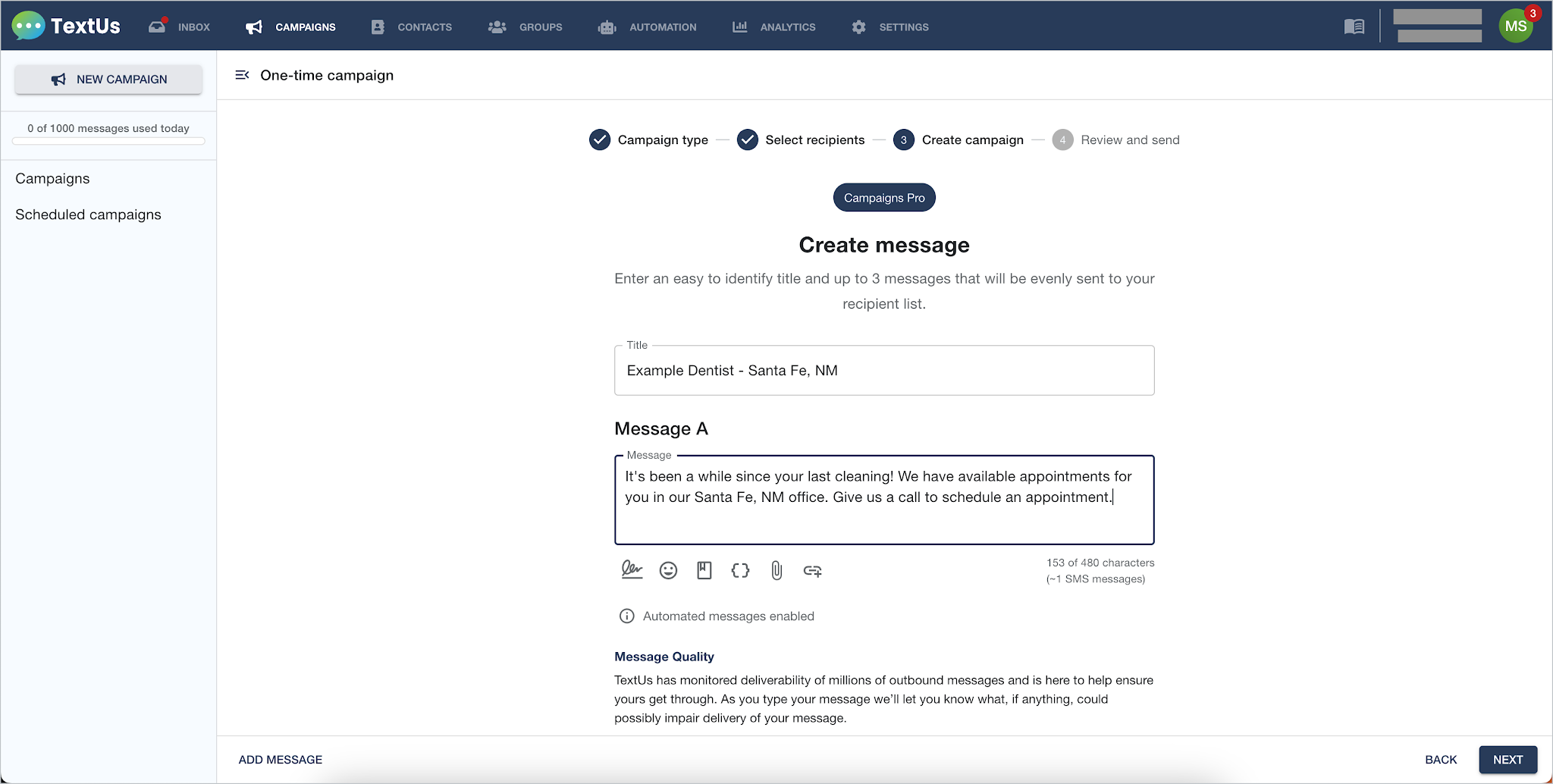
To schedule and send an automated text message with TextUs:
- Go to the Campaigns tab and click New Campaign
- Choose a one-time or recurring campaign
- Select your recipients from a group, upload, or saved contact list
- Add a campaign title and write your message
- Check Message Quality Insights for any content warnings
- Review the campaign preview, including copy, personalization, and opt-out text
- Choose the send date and time
- Set campaign assignment options if you use a multi-user account
- Click Send to schedule or send the campaign
Ready to plan better SMS campaigns without the last-minute rush? Book a demo with TextUs today!
Step 2: Segment Your Audience
SMS segmentation makes the message more useful because each customer gets a text based on their needs, status, or past actions.
Your target audience can be grouped using location, purchase history, lead stage, appointment date, service type, signup source, or past engagement.
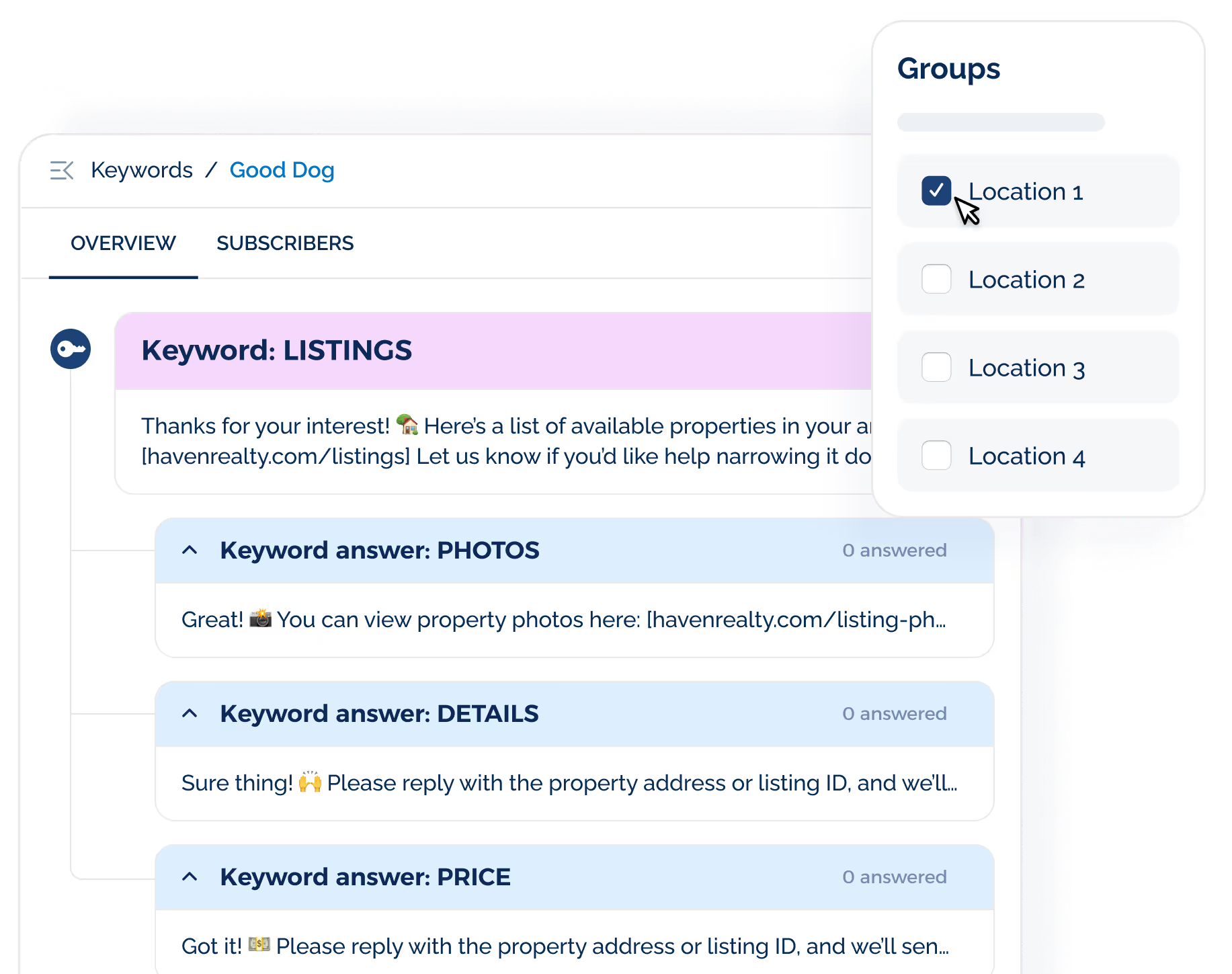
For example, a first-time buyer may need a welcome offer, while a past customer may need a reorder reminder or loyalty reward.
Audience segments also prevent poor timing and poor message fit. You avoid sending a renewal reminder to someone who already renewed or a welcome text to someone who has been subscribed for months.
Step 3: Pick the Campaign Type
Before you schedule the message, ask which campaign type fits the goal best. If you want more repeat visits, a loyalty campaign may fit better than a one-time promo.
New subscribers may need a welcome campaign that introduces your business and sets expectations for future texts.
Leads or new customers may need a drip campaign with a short series of messages for follow-up, onboarding, or product education.
You can also plan seasonal campaigns, loyalty campaigns, review requests, and re-engagement texts. A recurring message can work for routine reminders, renewals, or monthly updates.
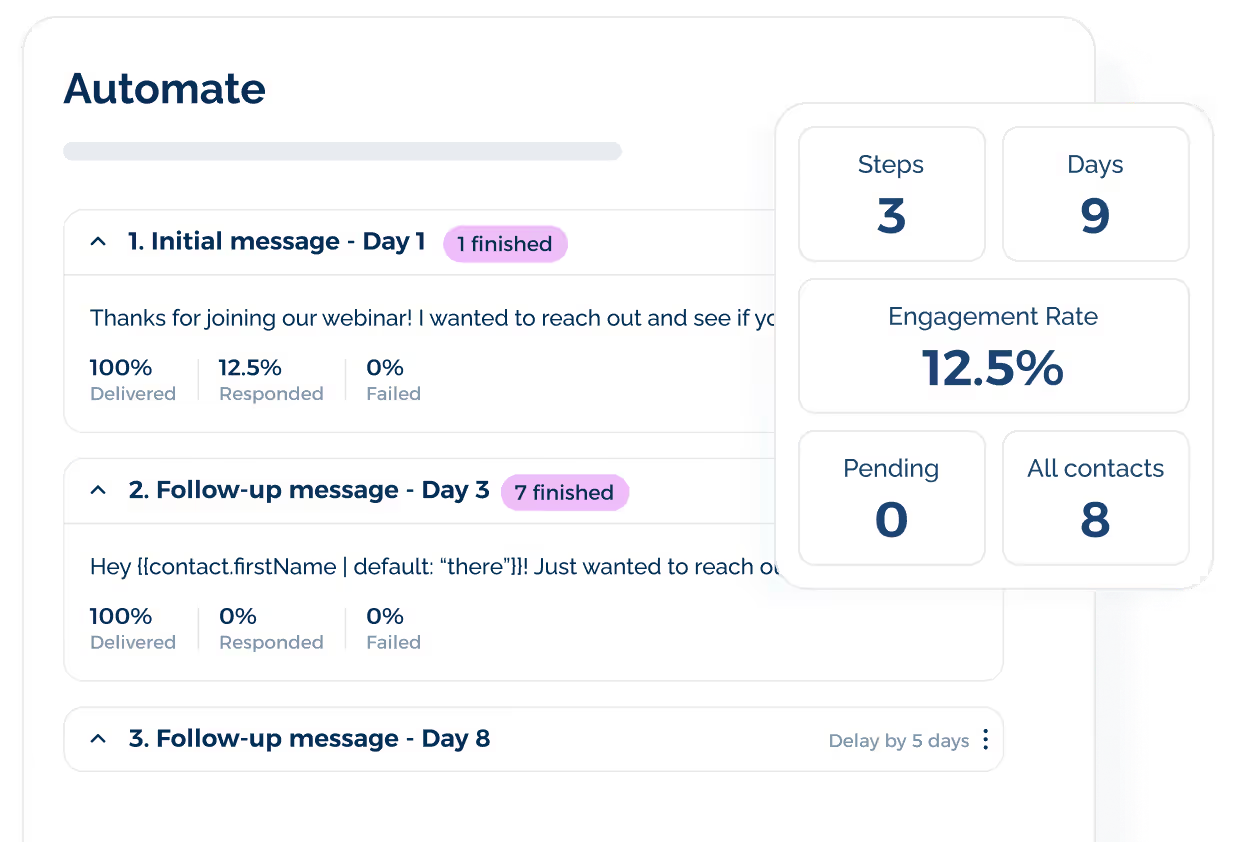
SMS tools like TextUs include marketing automation features that let follow-up texts send automatically after a signup, reply, booking, or other action.
Step 4: Write Impactful SMS Message
A good business text message includes your business name, the offer or update, a CTA, and opt-out text for marketing messages.
A good tip is to write the CTA first. If the main action is “book now,” “reply YES,” “claim offer,” or “leave a review,” build the rest of the message around that action.
You also have to check the message on a phone before it goes out. Look at the length, link, merge fields, spelling, and opt-out text so the final send looks polished.
An SMS marketing software like TextUs adds another safety check with Message Quality Insights, or MQI. It uses red, yellow, and green scoring in real time to flag SMS content that may hurt deliverability or raise spam concerns.
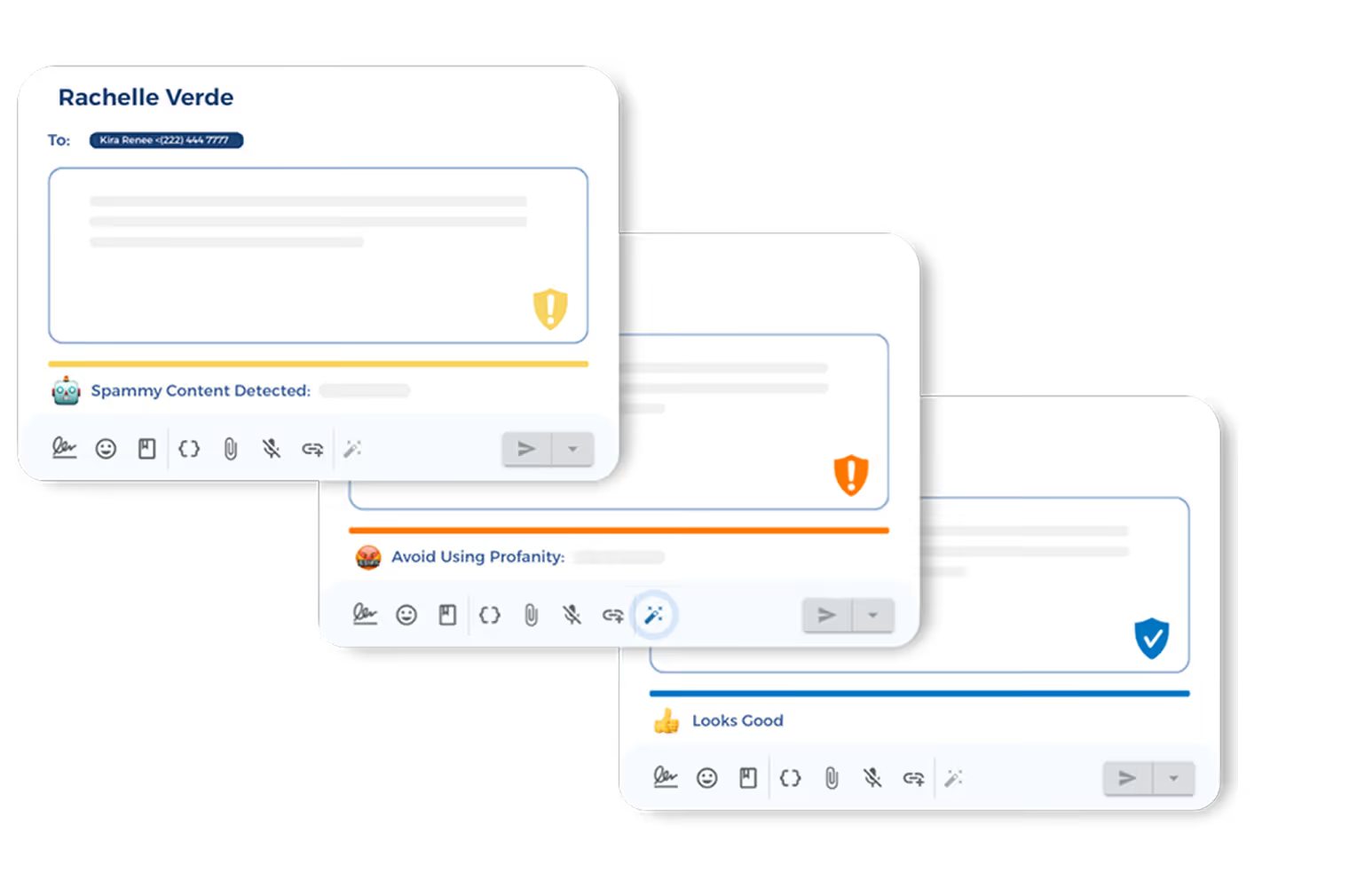
Your staff can also set custom spam rules based on your brand needs. If a message gets a warning, AI rewrite tools can suggest cleaner SMS copy before the campaign is sent.
Step 5: Choose the Best Send Date and Time
A text sent during a busy work hour may get ignored, while a text sent at the right time can get more clicks, replies, and sales.
For many businesses, the best time to send marketing messages is 9 AM-12 PM or 5 PM-9 PM on weekdays. Weekend campaigns can start with 10 AM -12 PM on Saturday or 4 PM -7 PM on Sunday.
You can use those windows as your first test for an SMS campaign schedule. Then adjust based on your audience, offer, industry, and local time zone.
Location can also affect the best send time. If you serve more than one city or state, schedule your multi-channel campaigns based on each customer’s local time so no one gets a text too early or too late.
Step 6: Set Frequency Limits
Too many messages can push people to opt out, even if your offers are good.
To avoid over messaging, start with a simple rule for each campaign type. Limit promo texts to once per week, appointment reminders to a set sequence, and lead follow-ups to a few planned messages over several days.
Frequency limits also help control SMS opt-outs. Even when your opt-in form explains how many texts contacts may receive, some customers may still think the volume is too high once messages start arriving.
If opt-out rates rise, lower your send volume and adjust your strategy based on message value, audience fit, and timing.
Less frequent messaging can also lower unsubscribe chances because many contacts opt out right after they receive a text. A short pause or lower send volume can give your business time to fix the schedule before more contacts leave your contact list.
Step 7: Add Personalization and Dynamic Fields
A text with the customer’s name, appointment date, store location, product name, or assigned rep can feel more specific than a generic blast.
Dynamic fields pull contact details into the message at send time.You can turn “Hi [First Name], your appointment is on [Date] at [Time]” into a message with each customer’s real name and booking details.
TextUs also supports message tools that add more context to each text. You can add a signature, emojis, saved templates, attachments, shortened links, and contact or user personalizations from the message toolbar.

Personalization can also save time because staff do not need to edit each message one at a time. Use it where it adds value, such as names, dates, locations, rep names, or offer codes.
Step 8: Add Tracking Links
Tracking links show what happens after your SMS campaign goes out. They can track clicks, form visits, bookings, demo requests, purchases, review submissions, or other actions tied to your campaign goal.
You can use a tracking link when the next step sends customers to a landing page, product page, booking page, survey, or event form.
A clickable URL can also make the SMS easier to read because long URLs take up space and can make the message look messy.
TextUs supports short link tracking, so you can see how many contacts clicked the short link in your campaign message. You can review link activity in an analytics dashboard and use the data to compare campaign results.
Step 9: Review Compliance Requirements
SMS compliance covers the rules your business must follow for consent, sender identity, opt-outs, message timing, and honest content. It protects customers from unwanted texts and helps you avoid complaints, carrier issues, and legal risk.
Every marketing text should include an easy opt-out path. A line like “Reply STOP to opt out” tells contacts how to leave your SMS list, and your business should process opt-out requests as soon as possible.
TextUs adds Smart Delivery to help spot risky opt-out patterns in real time and pause campaigns before delivery issues grow.

Message content also needs a careful check before launch. Review the sender name, offer details, expiration date, terms, link, and any claim in the text before the campaign goes live.
Step 10: Schedule the SMS Campaign
Once the message, audience, timing, links, and compliance checks are done, you can schedule the SMS campaign inside your SMS marketing platform.
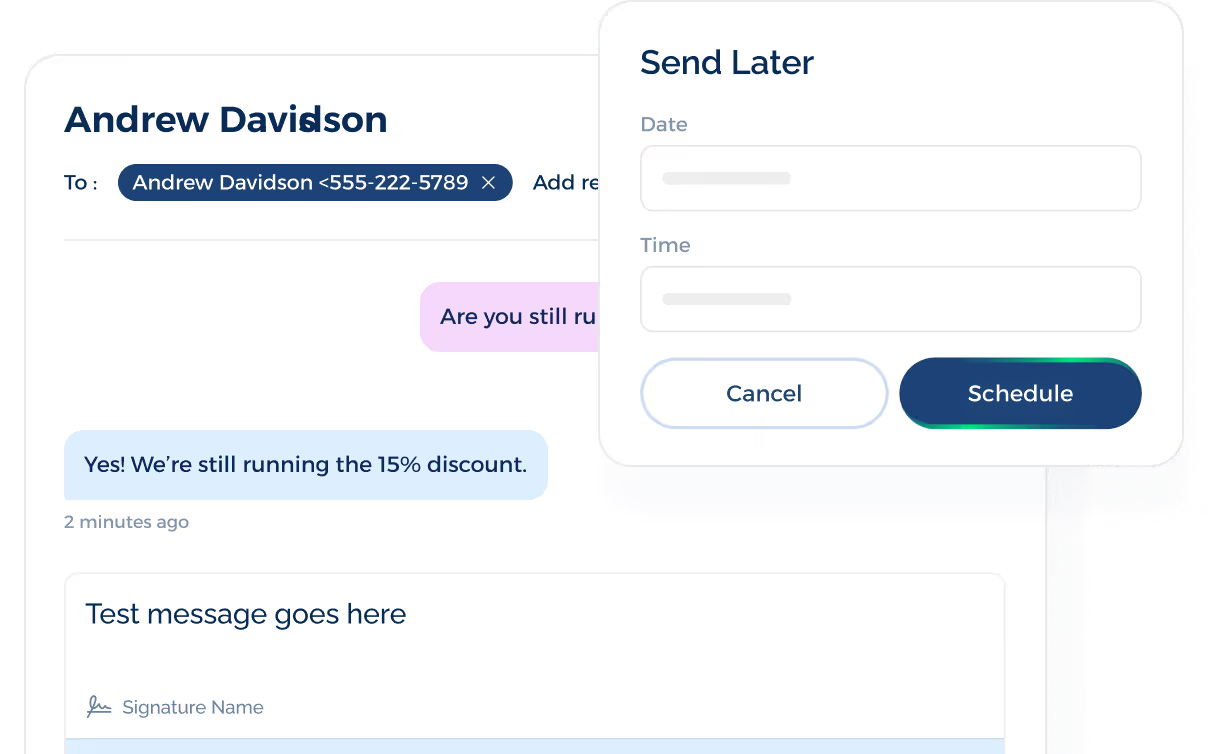
A final test is worth doing before the campaign goes live. Send the text to yourself or your staff, open it on a phone, click the link, check the merge fields, and confirm the opt-out text appears as planned.
TextUs also gives you a campaign view where scheduled messages can be managed from one dashboard. Staff can review what is planned, see campaign details, and keep each campaign tied to the correct audience and goal.
After the SMS campaign is scheduled, add it to your campaign calendar with the goal, audience, send time, owner, and status. Then review the results after launch so the next scheduled SMS campaign can improve.
SMS Campaign Scheduling Tips for Higher Response
SMS campaign scheduling works best when your business plans ahead, reviews each message, and tracks how people respond after every send. Here are best practices you can follow:
Avoid Scheduling Too Far Ahead
Planning ahead is useful, but SMS campaigns should not sit untouched for too long. Offers can expire, product stock can change, links can break, and event details can shift before the send date arrives.
A good rule is to review your scheduled text messages a few days before they go live. Check the audience, offer, link, coupon code, and opt-out text so the message still fits the campaign goal.
If you plan many weeks ahead, place a review task on your calendar before anyone can hit send. That final check helps you catch old details before recipients see the message.
Use a Campaign Calendar
An SMS campaign calendar keeps your planned messages in one place. It can show the campaign name, audience, goal, send date, send time, owner, copy status, and results.
You can use the calendar to spot message overlap before it causes problems.
For example, if one customer group already has promotions planned for Friday, you can move a review request or loyalty text to another day.
Pause Campaigns During Sensitive Events
Scheduled texts should not always go out just because they are planned. Weather issues, public emergencies, local crises, or major news events can make a promo message seem out of place.
You have to review active campaigns when something sensitive happens in a location you serve. Pause or move messages that could come off as poorly timed, then resume campaigns once the timing feels more appropriate for your audience.
A good SMS strategy should still allow room for human review. Even a planned campaign needs judgment before you send messages to a large group.
Test Send Times and Message Variations
Different audiences respond to different send times, offers, and calls to action.
It's best to test a few send windows, such as morning, late afternoon, or early evening. Then compare campaign response, engagement rates, and unsubscribe patterns.
You can also test message variations. Try a shorter CTA, a different offer, a personalized line, or a new link placement to see which version gets a better response.
Monitor Opt-Outs After Every Campaign
A sudden jump in unsubscribes may point to too many sends, poor audience fit, weak copy, or a send time that missed the mark.
You should track opt-outs after every SMS campaign, not just major promos. If unsubscribes rise, lower send volume, review segments, and update your campaign calendar before your next scheduled send.
Also, use content preferences from SMS subscribers when planning future campaigns. People who only want appointment texts should not receive messages about offers they did not ask for.
Keep Human Support Ready After Sends
Scheduled SMS campaigns can lead to replies, questions, booking requests, and sales interest.
Your staff should be ready to respond once the campaign goes out, especially when the message asks people to reply.
Before launch, decide who will watch the inbox and how replies will be handled. Fast follow-up can turn campaign interest into booked appointments, completed purchases, and better customer service.
Take Control of Your SMS Campaign Schedule With TextUs
Text campaigns should not depend on rushed copy, weak lists, or unclear send times.
TextUs gives you a reliable way to plan SMS campaign scheduling to ensure you can send the right message at a better time.
With TextUs, you can send text messages to your contact lists, add personalization, track short link clicks, and review message quality before delivery. It also helps your staff manage phone numbers, check risky SMS content, and connect scheduled campaigns with customer follow-up.
If you want to get started quickly, TextUs can help you build a better SMS scheduling process without creating extra complexity for your team. Book a demo today!
Continue Reading



Frequently Asked Questions
How far in advance should I schedule and send SMS messages?
You can schedule SMS campaigns a few days or a few weeks ahead, depending on the campaign type.
Sales promos, event texts, and seasonal campaigns may need more lead time, while reminders and follow-ups can be scheduled closer to the send date.
Can SMS campaign scheduling work with automation?
Yes. SMS campaign scheduling can work with automation when messages need to send based on dates, actions, or customer stages.
For example, you can schedule a promo for Friday morning, then use automation for follow-up texts after someone clicks, books, replies, or joins a list.
How can I manage replies after a scheduled SMS campaign?
Scheduled campaigns can lead to replies, clicks, and calls.
With call forwarding, calls made to your business texting number can route to the line your staff uses for customer calls. This keeps follow-up easier to manage after each send.
Business Texting
Built for Results
Create and convert pipeline at scale through industry leading SMS software