
How SMS Employee Communication Reduces Workplace Delays
Learn how SMS employee communication reduces workplace delays and see how TextUs can help you keep your workforce in sync.

Written by
Adam Hamdan
Published
December 1, 2025

Most workplaces try to juggle several communication channels, but that often creates more problems than it solves.
When every minute counts, workers need updates that arrive quickly and fit smoothly into their day, without extra apps, long log-ins, or sifting through email.
In this article, we’ll break down why employee communication through SMS has become the most reliable way to reach teams in motion and how to put it to work inside your organization.
You’ll also see how the right employee text messaging software can simplify daily operational updates and increase employee engagement.
Why Is SMS Becoming Essential for Workforce Updates
Deskless staff make up over 80% of all workers across the globe. But many companies still rely on traditional communication methods that only fit office jobs.
When most staff spend their shift moving, lifting, serving, driving, or caring for customers, long emails do not match how they work.
Many companies also face rising pressure to train staff, support safe job sites, and protect staff well-being. When updates are slow or hidden behind accounts people rarely open, problems spread across teams and weaken internal employee communications.
SMS software helps fix these gaps. You can send SMS messages at the right moment and point staff to the right guide, training step, or support option during rough times.
SMS text messaging also helps managers keep shifts, tasks, and movements on track. Missed emails can lead to late arrivals when plans change. A text message reaches staff right away, which leads to faster replies and fewer delays.
When you keep your messages short and match the way staff work, they feel more supported. Deskless roles leave little room for long messages, so short texts are easy to check during quick pauses.
If you need a simple way to elevate HR and employee engagement, an employee text messaging system offers a setup that helps you stay connected with staff all day.
Book a demo with TextUs and start texting today!
When to Use SMS for Employee Communication
SMS works well during moments when staff need direct texts that reach mobile phones fast. Each template keeps your texts easy for your staff to read and helps your entire workforce stay on the same page.
Shift Reminders and Schedule Changes
SMS helps workers stay on top of new start times, open slots, shift swaps, and quick updates from managers. A short text can stop missed shifts, late arrivals, and last-minute stress.
You can also use early-morning or evening texts to keep staff informed before busy hours begin.
New Policy Announcements
Staff rarely open long emails during active shifts. A simple text pointing to new rules, quick updates, or short guides helps teams adjust.
You can send a brief text paired with a link to more details so staff can read at a time that works for them, even if their internet connection is limited during the day.
Safety Alerts, Weather Notifications, and Emergency Updates
When time matters, SMS stands out. Weather shifts, hazards, power cuts, or sudden risks need fast notice.
You may also keep preset urgent messages ready, so you can notify employees in seconds and keep frontline workers aware of changing conditions.
Onboarding and Training Reminders
New employees balance many steps in the first days. Short texts can point them to forms, training clips, or check-ins with managers.
The same approach helps long-term staff when refreshers or new skill steps roll out.
Team Check-Ins and Quick Polls
You can send short questions to gather feedback, confirm staffing levels, or check on progress. Workers reply fast, which helps you make small adjustments during active hours.
HR Updates and Company-Wide Announcements
Many HR teams send short texts covering pay reminders, open enrollment dates, employee benefits, wellness support, or general notices.
SMS helps reach every worker, even those without computer access. Therefore, it’s easier to inform employees during busy periods.
Event Reminders and Meeting Notifications
Texts work well for simple event nudges such as team huddles, training days, town halls, or small gatherings. Workers see the reminder at once, which leads to stronger attendance and fewer missed sessions.
Crisis Management Communications
During sudden closures, supply issues, facility damage, or urgent problems, you need a fast way to reach staff.
SMS helps keep everyone aligned so teams know where to go, who to contact, and what step comes next.
IT Outages and System Downtime Alerts
When your main business communication tools fail, staff need quick notice. SMS helps teams shift to backup plans without long delays.
A short text also reduces call volume to IT teams because staff already know what happened and what to do next.
How to Create an Effective Employee Communication Strategy
Your communication plan should guide staff with SMS updates that match the pace of their workday. Here's how you can shape a strong communication strategy and enhance workforce management through SMS:
Segment Employees by Department, Role, or Location
Your retail staff, warehouse teams, and field crews all rely on different kinds of updates to keep the day moving. SMS segmentation by department helps you communicate with employees in a way that fits how they work.
Your warehouse team may need supply alerts, while your front-end teams may need customer traffic updates or shift coverage messages.
Location matters just as much. If you run many sites, each one deals with different weather, staffing levels, traffic, and on-site needs. Sending one broad message to everyone may confuse people or cause workers in one area to act on something that does not apply to them.
When you take time to group your people well, you send fewer messages, get faster replies, and build employee SMS flows that your staff trusts. It also helps you boost employee engagement by keeping the right people in the loop.
Balance Mass Alerts With Personalized Messaging
It's efficient to mass text employees during shift changes, safety issues, or building updates.
But if you rely only on broad group messages, your staff may start to feel like every text is meant for someone else.
Personalized messaging fills this gap by providing each worker with a text that speaks directly to their role, task, or location. It also helps frontline employees who may not check Slack or Microsoft Teams during active shifts.
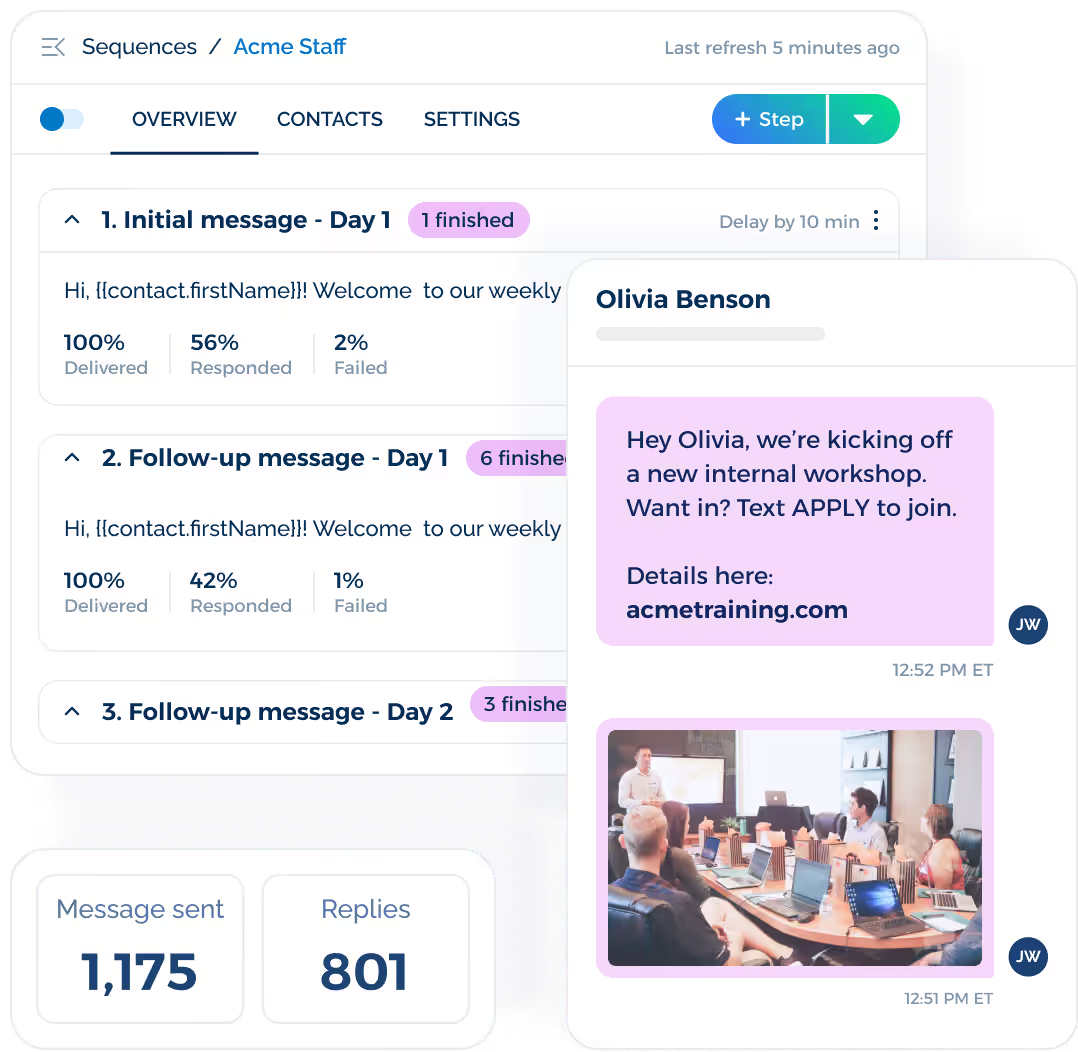
An internal SMS tool like TextUs helps you send automated sequences that let you build a series of targeted drip employee messages. Each worker moves through steps in order, such as training, reminders, or follow-ups.
Book a demo with TextUs today!
Set SMS Frequency Guidelines
You can start by planning the best time to send SMS messages around your daily operations. Thoughtful timing supports enhanced communication without crowding your staff’s day.
If your shifts begin early, you may want to send schedule texts the night before. If your team handles mid-day changes or customer rushes, you might send updates right before peak hours.
You should also decide which updates deserve an instant text and which can wait. Urgent alerts, shift changes, or safety messages should go out at once. But general reminders, training links, and soft nudges can follow a set weekly or daily schedule.
When you control message frequency with intention, you protect your staff from message fatigue and keep your SMS channel strong.
Use SMS Keywords
When you add keywords to your SMS text messaging plan, it provides staff an easy way to get the info they want without waiting for a manager.
A simple SMS keyword like “BENEFITS,” “TRAINING,” or “SHIFTS” can trigger an automatic reply with the right details.
Your staff can also reply to a quick poll or sign up for alerts. It helps you keep track of who saw your message and who responded, without any extra tools or long forms.
Keep Replies Open for Two-Way Conversations
When your workers can reply to your texts, they'll be able to ask questions or report small problems before they grow. It also helps you reach employees who may not use email or mobile apps during active shifts.
Two-way texting helps workers feel more supported. A quick “Got it,” “On break,” or “Need help” gives you the info you need without long detours, calls, or waiting for someone to check email.
Conversational SMS also keeps your team more responsive because messages turn into simple chats instead of one-sided alerts. You can respond immediately during moments that matter, especially when shift workers need quick guidance.
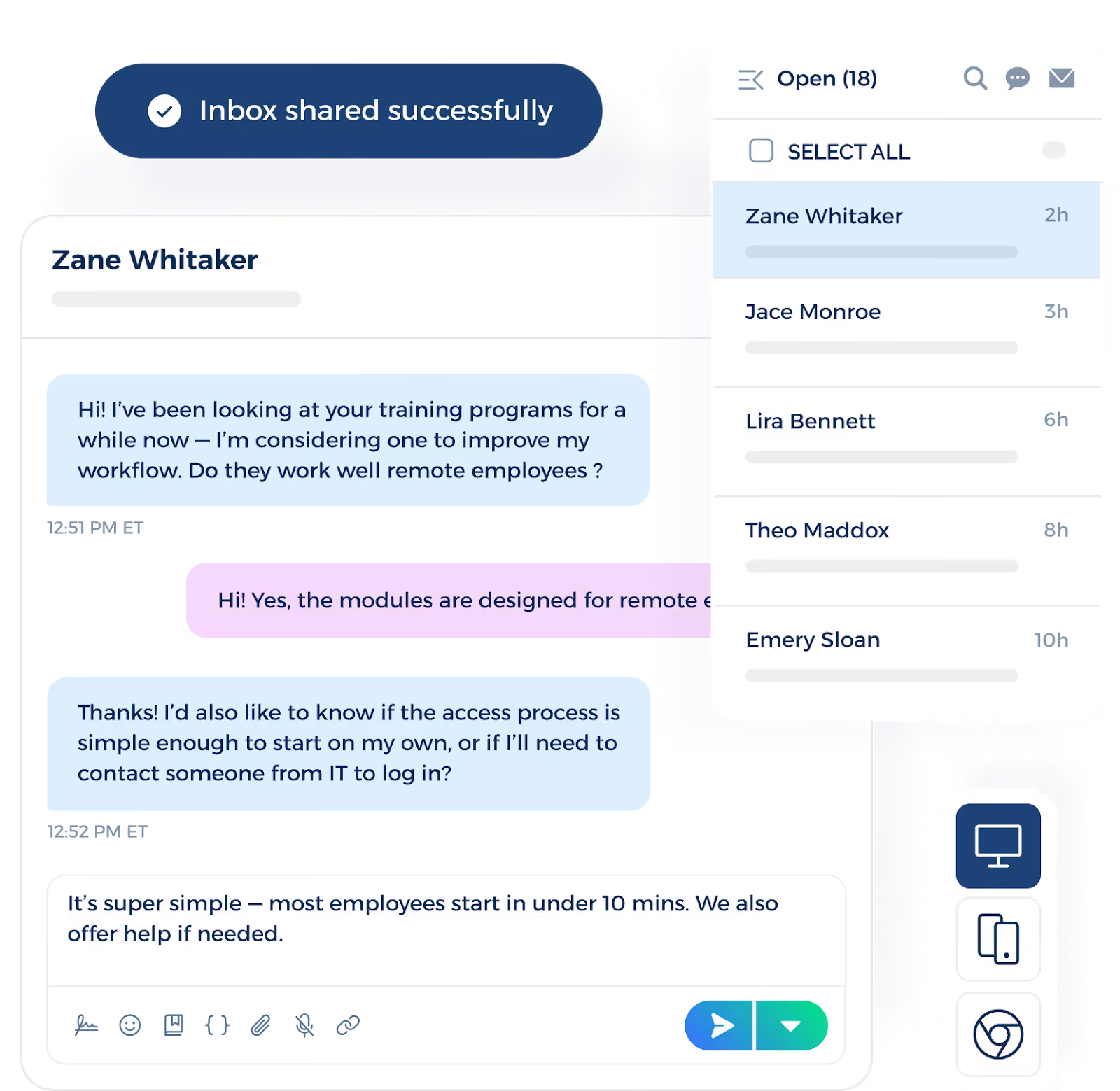
TextUs makes internal communication even smoother through its shared inbox. Your team can stay connected from both desktop and mobile. They can watch conversations, hand off messages, and reply right away without switching between tools.
Create Ready-to-Send Text Templates
Shift reminders, safety prompts, HR notes, or quick check-ins follow the same structure each time. Instead of rewriting them during busy hours, you can keep a library of simple templates that your managers can send with one click.
You can build SMS templates for many needs: shift swaps, training reminders, event nudges, safety notes, or onboarding steps. When your staff sees these familiar formats, they read and respond faster because the message is simple and easy to follow.
Direct Employees to Handbooks, Schedules, or Portals
You can use SMS to guide your staff to the resources they need without long searches or back-and-forth questions.
When you send links via SMS, employees can easily tap to access what they need. It works well for staff who rarely sit at a desk, such as retail teams, field crews, or warehouse workers.
You can also send links that support HR steps, onboarding, safety rules, time-off forms, or training clips. When staff know they can rely on SMS to point them to the right place, they’re less likely to ask repeat questions or delay tasks.
Use SMS in Combination With Email and Internal Tools
You get the best results when you treat SMS as part of a wider communication setup. Texts work well for urgent updates, quick nudges, and short reminders.
You can use SMS to point workers toward full guides or documents that live in your email or portal. A short text can send staff to forms, long updates, or training clips without forcing them to search.
Email works well for bigger topics, such as policy updates, long instructions, or detailed notes. SMS keeps everyone on track during the day. Internal tools help store the info staff need, and your texts act as a simple doorway that leads them to the right page.
SMS Employee Communication Examples
Below are simple, ready-to-use examples that help you send important messages that fit real moments in your workday. Each template keeps your texts easy for your staff to read during fast shifts.
HR Message Templates
HR texts cut down on common questions and guide employees to the needed info fast. It also helps you remind employees without relying on slow phone calls or long emails.
Examples
- “Reminder: Time-off requests for next month are due soon. Tap here to submit: [link].”
- “Need your benefit info? Text BENEFITS for fast details.”
- “Please check your hours today. Payroll closes at 6 PM.”
Scheduling and Operations Templates
These texts support smooth shift coverage and quick staffing changes. Employees get updates right away, which helps remind them and reduces no-shows.
It's also beneficial for hourly employees who depend on same-day updates to stay ready for changes.
Examples
- “Your shift starts at 7 AM tomorrow. Reply YES to confirm.”
- “A shift opened for Friday at 3 PM. Reply PICKUP if you want it.”
- “Today’s plan: Team A in inbound, Team B in packing. Ask if you need help.”
PTO (Paid Time Off) Request Templates
PTO texts help you guide employees through request steps and reminders in a simple way. It keeps your employee comms easy to manage in a timely manner.
Examples
- “Your PTO request from April 4 to April 10 has been approved. Enjoy your break!”
- “Hi [Employee Name], your PTO starts next week. Please make sure your tasks are covered.”
- “Your PTO request is being reviewed. You’ll get an update soon.”
Emergency Alert Templates
Emergency texts help you reach your team fast during weather issues, safety problems, or sudden changes on-site. This keeps workers informed at the moment they need it most.
Examples
- “Severe weather is coming. Stay inside and wait for updates.”
- “Safety risk in Zone 4. Please avoid that area.”
- “Power issue at your site. Use the south entrance.”
Onboarding and Training Templates
These messages help new hires stay organized during their first days and support ongoing training for current staff. Workers get the right steps without searching through long emails.
Examples
- “Welcome to the team! Tap here for your first-day steps: [link].”
- “Your training module is due today. Tap to finish: [link].”
- “How is your first week going? Reply with any questions.”
Company Update Templates
Short company-wide texts help you share key company announcements without slowing down your staff. This makes it easier to keep your workforce connected each day.
Examples
- “New break-time rules are now live. Tap here to read: [link].”
- “Reminder: Team meeting at 2 PM in the lunch room.”
- “Holiday hours start this weekend. Tap for the full schedule: [link].”
Why Choose TextUs for Better Employee Engagement
TextUs gives you a full set of SMS tools that help you reach your staff fast, cut down on manual work, and keep your entire team aligned across every site and shift. It also supports a stronger company culture by providing seamless communication across all roles.
Here's how this employee texting platform supports workforce communication.
Real-Time Two-Way Texting
You can reach your employees at once and get an immediate response in seconds. Two-way texting helps you confirm shifts, answer questions, and solve problems right when they appear.
Automated SMS Sequences for Hands-Off Outreach
TextUs makes SMS automation simple for your staff communication needs. You can build drip sequences for shift steps, use keyword-triggered replies for fast confirmations, or schedule messages that support broad staff updates and one-on-one check-ins.
Unlimited Campaign Sizes for Large Workforce Messages
When you need to reach your full workforce across many sites, departments, or shifts, TextUs handles it. You can send personalized SMS updates to big groups of workers without limits. Every worker gets the update at the same time, and no one gets left out.
Custom Keywords for Instant Employee Self-Service
Instead of calling HR or asking a supervisor, employees can text a keyword like “BENEFITS,” “SHIFTS,” or “PTO” and get the info they need right away. SMS keywords reduce common questions and give employees a simple way to help themselves anytime.
Rich Media and Branded Links for Stronger Engagement
TextUs supports MMS messaging and branded links, which gives you the option to send images, short clips, and shortened links that match your company's style. These additions help your texts stand out and make it easier for your staff to know what the link leads to.
Templates and Scheduled Messages
TextUs gives you an easy way to store and send ready-made SMS templates, so your team can keep communication fast without typing the same messages each day. It helps you stay organized and keeps your texting steady even during your busiest moments.
Flexible Integration With Your Existing Tools
TextUs fits into the systems you already use. Contacts stay updated, messages sync, and your team moves faster because everything works together without manual steps.
Reporting Tools to Track Staff Engagement
You can see who replied, who tapped links, and which messages performed best. These signs help you adjust your communication so your staff stays responsive.
Keep Your Workforce in Sync—Start Texting With TextUs!
If you're trying to keep your team informed, TextUs lets you send text messages to communicate quickly without slowing them down.
With TextUs, you get an SMS communication platform that helps you confirm shifts, share updates, send reminders, and keep your workforce synchronized effortlessly.
Managers spend less time chasing people down, and employees stay informed without digging through long threads.
When your messages reach people the moment they matter, your whole operation runs smoother.
Book a demo with TextUs today and see how it keeps your team supported in real time!
FAQs About SMS Employee Communication
What is SMS in communication?
SMS is a short text message sent to a mobile phone and works even if internet access is limited.
In employee communication, an SMS-based platform helps you reach employees fast on their personal devices with short updates they can read during busy moments.
SMS texting works well for shift reminders, safety reminders, quick check-ins, and short links that guide workers to forms or training steps.
How do you send a mass text message to employees?
You can send messages in bulk by using an SMS platform that lets you reach groups of workers at once.
A bulk text messaging platform like TextUs lets you upload or sync your staff list, choose your message, and send it to your whole team or a selected group. Staff get the text at the same time, and you can track replies in one place.
Does SMS have a 98% open rate?
Yes, SMS is widely known to reach high open rates of 98%. This is why many companies use text messages for shift changes, safety alerts, and time-sensitive updates.
SMS also avoids the spam folder, which gives you more reliable message delivery than email. It's valuable when you need action during shift scheduling.
What is SMS in HR?
HR leaders use texting for onboarding, time-off reminders, training steps, wellness updates, payroll notices, and employee check-ins.
It helps them reach staff fast, cut down on repeated questions, and keep communication simple for workers who may not check email often.
HR can also use it to collect employee feedback, manage employee data, and support smoother crisis communication when fast responses matter. This is where leveraging SMS makes a real impact on daily workflows and boosts employee satisfaction.
Continue Reading



Frequently Asked Questions
How does SMS reduce workplace communication delays?
SMS reaches employees directly on their phones with messages they see immediately — unlike email that may sit unread for hours. For frontline workers, shift changes, urgent updates, and operational alerts delivered by text reach the right people faster than any other channel.
What types of employee communications work best over SMS?
Shift schedule changes, overtime requests, emergency alerts, policy reminders, benefits enrollment deadlines, and performance recognition all perform well over SMS because they're concise, time-sensitive, and benefit from immediate visibility on employees' personal phones.
How does employee SMS compare to email for internal communication?
For operational, time-sensitive messages to frontline workers, SMS dramatically outperforms internal email in read rates and response speed. Email remains better for detailed policy documents, complex announcements, and formal communications that benefit from formatting and file attachments.
Business Texting
Built for Results
Create and convert pipeline at scale through industry leading SMS software