
AI in Recruitment: Use Cases, Integration, Best Practices
Learn how to improve your hiring with AI in recruitment processes. Explore use cases and discover how TextUs can help you reach out to candidates.

Written by
Adam Hamdan
Published
July 23, 2026

Small delays usually build up during the hiring process. Resumes pile up, follow-ups get missed, and strong candidates lose interest.
Artificial intelligence (AI) in recruitment offers a faster way to handle that pressure by taking on repetitive tasks and keeping hiring work moving.
Therefore, recruiters have more time for interviews, judgment, and candidate relationships.
In this article, we will cover how AI solves recruitment problems, how it supports different stages of hiring, how to use it responsibly, and how to put it into practice.
TL;DR
- AI helps you screen large applicant pools, automate routine tasks, find stronger candidate matches, and create more consistent interviews.
- AI supports candidate outreach, job descriptions, employer branding, sourcing, screening, matching, workforce planning, chatbots, scheduling, interview preparation, transcription, assessments, scoring, analytics, and onboarding.
- A strong AI rollout starts with a specific use case, a mapped hiring process, measurable goals, legal and data checks, suitable tools, and proper team training.
- Responsible AI recruitment requires human oversight, job-based criteria, tool audits, candidate disclosure, data protection, content checks, and clear policies.
- TextUs combines AI-powered message review, automated recruiting texts, ATS integrations, shared inboxes, and message templates to improve candidate communication.
How AI Solves Common Recruitment Problems
Recruitment slows down when small problems start piling up during the hiring process.
AI brings together machine learning, generative AI, and human intelligence to improve hiring outcomes and keep people involved in the process.
Here are the common recruitment problems AI technology addresses.
Sorts Large Applicant Pools Faster
A busy job post can leave your team with more resumes than they can read in a reasonable amount of time.
Some job seekers may not meet the basic requirements. But recruiters still have to open each file, check work history, look for certifications, and compare experience.
AI can screen candidates and use predictive analytics to pull out the details that matter for the role. It can show which candidates meet the required qualifications and which applications need a closer look.
Reduces Repetitive Recruitment Tasks
Recruiters lose hours to work that has little to do with deciding who should be hired.
They update records, request availability, send reminders, chase interview feedback, collect documents, and move potential candidates from one stage to another.
None of these administrative tasks is difficult, but the volume adds up fast.
AI and recruitment automation can handle many of these steps once your team sets the right rules. A candidate can receive an interview invite after moving to the next stage, while a hiring manager can receive a reminder when feedback is overdue.
Identifies Better-Fit Candidates
Someone may have the skills you need but come from another industry. Another candidate may have strong related experience that does not match the wording in your job description.
AI candidate matching can review responsibilities, work history, certifications, related skills, and career progress to identify people who may fit the role.
Some systems also analyze speech patterns, word choice, and body language in recorded interviews.
Standardizes Interviews and Candidate Evaluations
Hiring decisions become uneven when every interviewer uses a different approach.
One person may focus on technical skills, while another asks mostly about personality. Some interviewers may take detailed notes, while others rely on memory and first impressions.
AI can help create structured interview questions, scorecards, and role-based criteria for your team to use. It can also organize notes and show where interviewers reached different conclusions.
15 Use Cases of AI Used in the Hiring Process
AI in recruiting can support your team at several points. Here are 15 common use cases of AI within the recruitment process.
1. Candidate Outreach and Personalized Messages
Even an impactful job opportunity may get overlooked when the message sounds generic or too easy to ignore.
Email works well for detailed updates. But SMS puts short, time-sensitive messages where candidates are more likely to see them.
AI in texting gives you more control over how outreach is shaped for each candidate, role, and stage of the interview process.
TextUs is text recruiting software that helps you manage that outreach without turning the process into another pile of manual work.
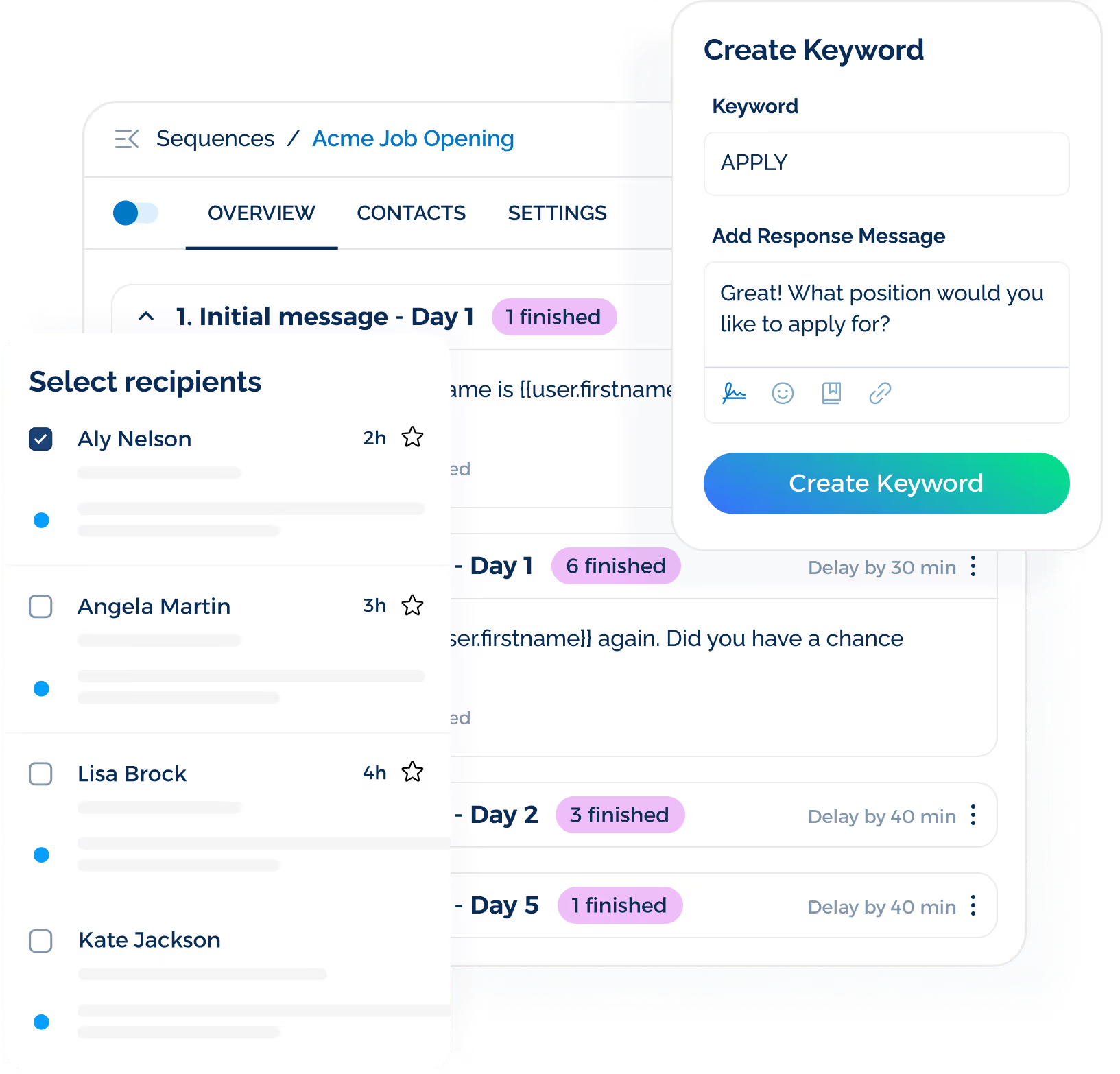
You can send personalized SMS campaigns to large candidate lists without breaking them into small batches. It also flags risky SMS content before delivery and rewrites messages to help you clean up weak messages before they reach candidates.
TextUs adds more ways to turn interest into action. Its custom SMS keywords trigger instant replies and move candidates toward the next step.
Book a demo with TextUs today to see how smarter recruiting texts can increase response rates, keep candidates engaged, and reduce manual follow-up!
2. Job Description Creation and Optimization
A job description begins with various notes about the role, responsibilities, skills, and work setup.
AI brings those details together into a first draft that your talent acquisition team can review and refine for career growth opportunities.
An existing description also benefits from a closer review. AI trims repeated points, clarifies vague wording, and points out missing details such as salary, schedule, location, or reporting structure.
The same content can then be adapted for a careers page, a job posting, a social post, an email, or a text campaign.
3. Recruitment Marketing and Employer Branding
The way you present your business shapes how job applicants see the opportunity before they apply. This also supports stronger relationship building.
AI turns information about your culture, values, benefits, and open roles into content for job ads, career pages, social posts, and recruitment campaigns.
Recruitment data also shows which messages attract stronger interest and which ones need a fresh approach.
Talent leaders can use those insights to refine future campaigns while keeping every message consistent with the employee experience.
4. Candidate Sourcing and Talent Rediscovery
The right candidate may already exist in your database, even if they did not get the role the first time.
AI reviews past applicants, top talent pools, employee referrals, and public professional profiles to surface people whose skills and experience match a new opening.
Talent rediscovery also saves your team from having to start every search from scratch. Past candidates who already know your business may respond faster and require less introduction.
5. Resume Screening and Application Review
A large applicant pool makes it difficult to spot strong candidates early. AI reviews resumes for relevant skills, experience, certifications, education, and other details tied to the role.
The screening process also becomes more consistent when every application is compared against the same job-related criteria. You gain a starting point instead of sorting resumes one by one with no set order.
Minimal human intervention review still matters, especially for passive candidates with transferable skills or less traditional backgrounds. AI should narrow the search rather than making the final decision.
6. Candidate Matching and Job Recommendations
A resume may not tell the full story at first glance. AI compares a candidate's skills, experience, interests, and career history with the requirements of an open role to identify stronger matches.
Some systems rank candidates based on related experience, transferable skills, and overall fit, even when their background looks different from the usual profile.
Job recommendations also give qualified applicants more options. Someone who is not right for one opening may suit another role, which keeps strong candidates from leaving the process too soon.
7. Workforce Planning and Hiring Forecasting
Hiring needs become urgent before teams have enough time to prepare. AI reviews turnover patterns, growth plans, seasonal demand, and past hiring activity to support stronger talent strategies.
These forecasts provide recruitment teams more time to build talent pipelines, plan budgets, and prepare for roles that may become harder to fill. Departments with high turnover or rising workloads also become easier to spot.
8. Recruitment Chatbots and Candidate Support
Candidates will have simple questions before they apply or move to the next stage.
Chatbot AI models provide quick answers about job requirements, work location, interview steps, application status, and other common concerns.
They also guide candidates toward relevant openings, collect basic information, and pass more complex questions to a recruiter. This keeps support available beyond business hours without replacing human insight.
9. Interview Scheduling
Interview scheduling turns into a long thread of availability checks, calendar conflicts, and last-minute changes. AI scheduling tools compare calendars, suggest open time slots, account for time zones, and send invitations.
Text marketing adds a faster way to confirm details and keep candidates informed. You may send interview reminders, meeting links, location updates, or rescheduling notices by text.
Candidates receive clearer instructions, while recruiters spend less time chasing confirmations.
10. Interview Preparation and Question Generation
A strong interview starts with questions that reflect the role, not a recycled list used for every candidate. AI lets you create behavioral, technical, and situational questions based on the job requirements.
The same AI solution may also prepare follow-up prompts, scoring guides, and notes for each interviewer. This gives you a structure and makes candidate responses easier to compare.
11. AI-Assisted Interviews, Transcription, and Summaries
Interviewers divide their attention between the conversation and their notes. AI-assisted interview tools capture transcripts, organize key points, and summarize the candidate’s experience and follow-up items.
Talent acquisition professionals have a cleaner record to review after the call. It’s also easier to compare feedback from several interviews without relying on memory or scattered notes.
12. Skills Assessments and Pre-Employment Testing
Assessments offer a closer look at how candidates approach the work. AI support tests for coding, writing, language skills, problem-solving, customer service, and other role-specific tasks.
Some AI systems adjust question difficulty based on each response or review open-ended answers against a set scoring guide. You gain another source of evidence beyond job titles, interview performance, or first impressions.
13. Interview Evaluation and Candidate Scoring
Interview feedback varies from one interviewer to another, especially when each person focuses on different parts of the conversation.
An AI recruiting assistant organizes notes, compares responses against role-based criteria, and brings major differences in scoring to your team’s attention.
Structured scorecards also let you rate skills, experience, problem-solving, and communication. This makes candidate comparisons clearer and reduces the weight of vague comments or first impressions.
14. Recruitment Analytics and Hiring Performance
Recruitment data means little when it only shows how many people applied. AI turns that information into a valuable view of where candidates come from and which parts of the process slow hiring down.
You may spot that one job board brings plenty of applicants but few qualified candidates, or that interview feedback takes too long in a certain department. Those patterns provide you with a stronger basis for changing budgets, timelines, or workflows.
15. New-Hire Preboarding and Onboarding
The recruiting process doesn't end once a candidate accepts the offer. AI supports the next stage with welcome messages, document reminders, first-day instructions, and answers to common questions.
A new hire may receive different onboarding steps based on their role, location, department, or start date. This makes the experience more relevant and keeps important tasks from getting lost before the first day.
How to Implement AI in Your Recruitment Process
AI-driven recruitment is most effective when you have an established plan. Here are the main steps for introducing it into your entire hiring process.
Step #1: Define the Recruitment Use Case
Choose one problem with a measurable impact. You may want to reduce screening time, improve candidate follow-ups, speed up interview scheduling, or get more value from recruitment data.
A specific target, such as shorter response times or fewer missed interviews, makes it easier to measure whether the change is worth keeping.
Step #2: Map the Current Recruitment Process
You need to lay out every stage from the job opening to onboarding. Then note where delays, repeat work, or candidate drop-off happen.
Look at tasks such as resume review, candidate outreach, interview scheduling, candidate feedback collection, and offer approvals. A process map also reveals where AI fits best without disrupting work that already runs well.
Step #3: Set Success Metrics
Success metrics should be in place before the new tool enters your workflow. Useful measures may include response time, interview attendance, application completion, time-to-hire, candidate engagement, and recruiter workload.
A before-and-after comparison will show whether AI improves the process or adds another layer of software. The results should guide any changes to the setup, workflow, or chosen AI-powered solution.
Step #4: Review Legal, Privacy, and Security Requirements
It's important to understand what candidate data the tool collects, where that data is stored, who has access, and how long the provider keeps it.
Local hiring laws, consent rules, bias requirements, and data protection standards may also affect how the tool is used.
Your legal, HR, IT, and security teams should review the setup together so candidate information stays protected and every automated step remains within policy.
Step #5: Choose the Right AI Recruiting Tools
The best AI recruitment tool depends on the problem your team wants to solve.
Resume screening, interview scheduling, candidate messaging, writing job descriptions, and onboarding each require different features.
Even a strong hiring process can stall when messages arrive late or never reach candidates. TextUs brings AI SMS review and automated outreach into one texting platform.
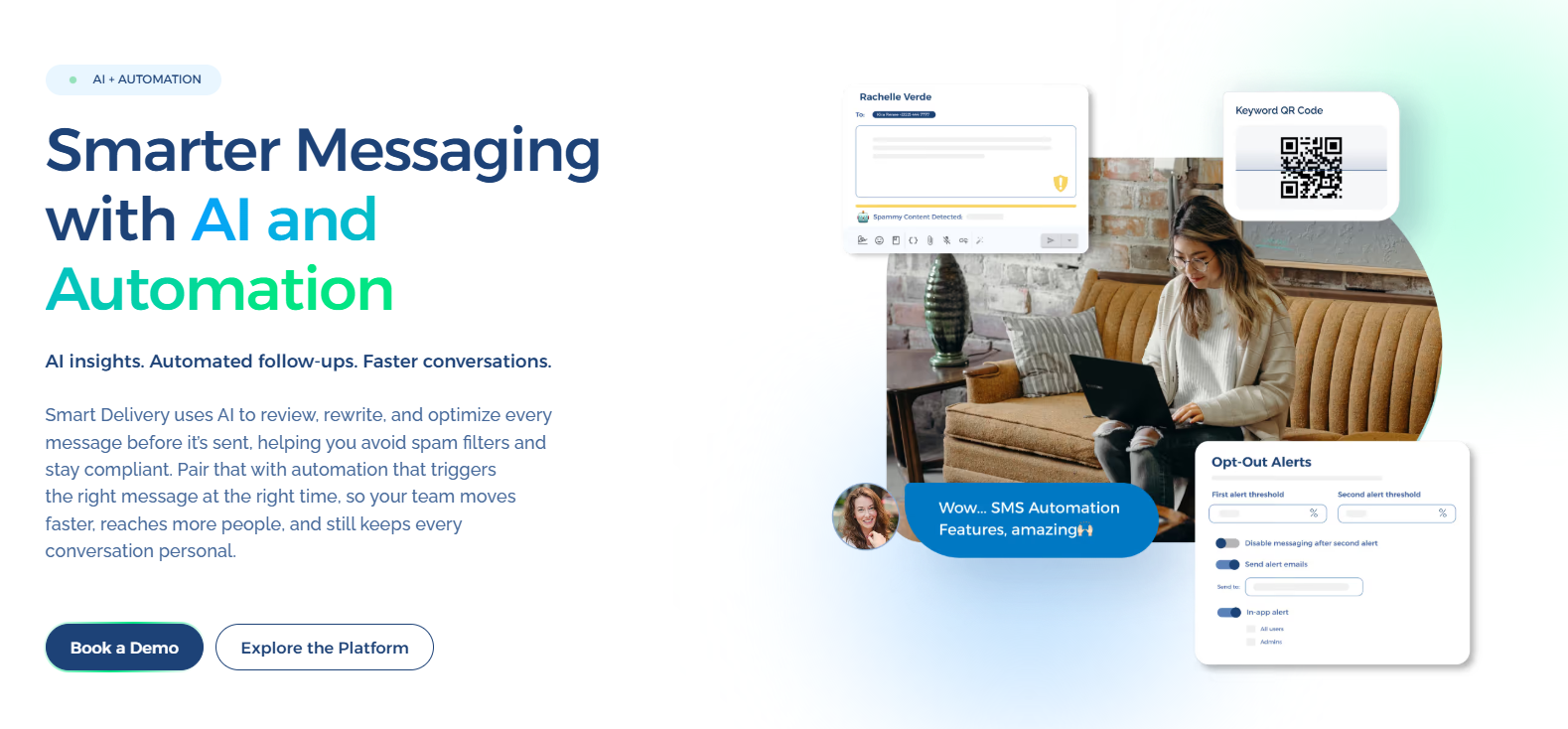
Its AI-powered messaging reviews, rewrites, and improves every message before sending. This helps you reduce spam risk, support compliance, and send recruitment texts that are more likely to reach candidates.
This text recruitment automation tool then carries the conversation forward through interview reminders, application follow-ups, talent pool updates, and urgent hiring campaigns.
Book a demo with TextUs today to see how this platform supports stronger candidate engagement!
Step #6: Train Recruiters and Hiring Managers
A new AI tool only adds value when your team understands how to use it.
Recruiters and hiring managers should know what the platform does, where its limits are, and which decisions still require human judgment.
Training should cover daily workflows, data handling, candidate communication, and the review of AI-generated content or recommendations.
Ongoing support matters after launch. Short refreshers, shared guidelines, and regular feedback sessions keep usage consistent and prevent teams from slipping back into old habits.
Best Practices for Using AI in the Recruitment Process
AI agents should support better hiring decisions without compromising fairness, privacy, or candidate trust. Here are the key steps you should follow when implementing AI in your hiring practices.
Keep Humans Involved in Hiring Decisions
AI should support your human recruiters without taking control of the final decision-making.
Recruiters and hiring managers need the authority to question recommendations, review the evidence, and step in before any rejection, offer, or other major action.
Use Job-Related Selection Criteria
Every screening rule, score, and assessment should connect directly to the role.
You can remove requirements that don't affect job performance, and document why each remaining criterion matters to the position.
Audit AI Recruiting Software
You need to test each AI-powered tool before launch and review its performance using different candidate groups.
Track rejection rates, ranking patterns, and unusual results, then repeat the review after major updates.
Tell Candidates When AI Is Used
Candidates should know when AI affects part of the recruitment process and what data your business collects. Give them a contact for questions and another option when the law or situation calls for one.
Protect Sensitive Candidate Data
Recruitment data may include resumes, contact details, interview records, and assessment results.
You need to limit access, set retention and deletion rules, review vendor security, and keep confidential information out of public AI tools.
Review Generated Content
Job descriptions, outreach messages, interview questions, and candidate summaries all need a human check before use. You have to confirm the facts, remove unsupported claims, and adjust the wording for the audience and hiring stage.
Create an AI Recruitment Policy
Your policy has to cover approved tools, prohibited uses, and human review requirements. It should also name who handles compliance, audits, complaints, and training for recruiters and hiring managers.
Turn Disconnected Recruiting Messages Into Faster Hires With TextUs
You will lose valuable time when candidate conversations sit in separate tools, inboxes, and spreadsheets.
TextUs is an SMS platform that brings those messages closer to the systems your team already uses. You spend more time evaluating candidates instead of copying updates from one platform to another.
It integrates with Bullhorn, Greenhouse, Workday, and Oracle Taleo to keep candidate messages synced with your ATS and support stronger hiring efficiency.
The mobile app, Chrome extension, and web app also help you manage candidate conversations, campaigns, and follow-ups throughout the day.
Shared inboxes keep team responses organized, while personal and shared templates make common messages faster to send without losing consistency.
Book a demo with TextUs today to see how connected recruiting conversations support better teamwork and reduce time to hire!
Continue Reading



Frequently Asked Questions
How can AI be used in recruitment?
AI supports several parts of the hiring process, including candidate sourcing, resume screening, job matching, candidate communication, interview scheduling, assessments, and recruitment reporting.
Your hiring team should still review the results and remain responsible for decisions that affect candidates.
What is the 30% rule in AI?
The 30% rule suggests that AI may automate about one-third of the tasks in many complex roles.
But it doesn't mean 30% of jobs will disappear. Most positions still include work that requires judgment, communication, and human oversight.
Is AI taking over recruiting jobs?
AI is taking over more routine tasks, such as initial screening, scheduling, note-taking, and follow-up messages. However, that doesn’t mean the recruiter role is disappearing.
If you choose to embrace AI in your organization, you’ll still need people to build relationships, lead interviews, negotiate offers, and watch for human bias throughout the process.
Business Texting
Built for Results
Create and convert pipeline at scale through industry leading SMS software