
How Text Marketing for Recruiters Turns SMS Into Hires
Learn how to use text marketing for recruiters to engage candidates and keep the best talent interested. Discover how TextUs can help you out.

Written by
Adam Hamdan
Published
October 15, 2026

Recruiters don't lose candidates only because of pay, job fit, or competition. Many job seekers drop off because communication is too slow or hard to respond to.
Text marketing for recruiters creates a faster way to send messages about job alerts, schedule interviews, and keep the hiring process moving.
In this article, we will cover candidate communication challenges and common use cases for text recruiting.
You'll also learn how to build a recruiting text strategy that keeps candidates engaged from first outreach to placement.
TL;DR
- SMS recruiting lets you communicate with candidates when missed calls, unread emails, interview no-shows, slow replies, scattered follow-ups, and poor candidate experience slow down your hiring pipeline.
- You can use SMS throughout the candidate journey, including job alerts, application follow-ups, interview scheduling, reminders, hiring event invites, screening questions, document requests, offer follow-ups, onboarding reminders, and re-engagement campaigns.
- A strong recruiting text strategy starts with having a goal, organizing candidate segments, obtaining proper consent, choosing the right texting platform, creating templates, personalizing messages, automating workflows, assigning replies, tracking campaigns, and making ongoing improvements.
- TextUs provides staffing firms with a stronger recruiting advantage by combining faster responses, better placement outcomes, and conversation visibility with ATS integrations, analytics, and automation.
Common Challenges That Slow Down the Hiring Pipeline
Recruiting works best when every candidate knows the next step. But communication can break down when calls go unanswered, and emails sit unread.
Here are the common communication challenges multiple recruiters face:
Missed Candidate Calls
Phone calls are still useful in recruiting, but candidates do not always pick up when they see an unknown number.
Some are at work, in class, commuting, or unable to take a call during the day. By the time they listen to a voicemail, they may have already moved forward with another opportunity.
SMS recruiting makes it easier to start conversations when candidates have a quick moment to read and reply. Instead of depending on one missed phone call, you can send a simple follow-up.
Low Email Response Rates
Email is ideal for longer details, but it's not always the best channel for fast recruiting updates.
Candidate inboxes are crowded with job alerts, newsletters, application confirmations, and personal messages. A recruiter’s email can get buried before the candidate even sees it.
Text marketing is a more direct way to send time-sensitive updates. You can use it for quick reminders, interview confirmations, screening questions, and application nudges.
This approach makes email and texting work alongside each other. Individual candidates still get the full details, but they also get a fast reminder that action is needed.
Interview No-Shows
Some qualified candidates forget the interview time. Others lose interest because they have not heard from the hiring team since the interview was scheduled.
Recruiting text messages can reduce no-shows by keeping the interview top of mind. A reminder text can confirm the date, time, interview format, and next step in one short message.
This gives candidates a quick way to confirm attendance. It also provides you with an early signal when someone needs to reschedule, instead of finding out after the interview slot is missed.
Slow Hiring Timelines
A delayed response can push back phone screens, interviews, assessments, offers, and onboarding.
In highly competitive hiring markets, that delay causes strong candidates to accept another role.
Text marketing shortens the time between each step. Rather than waiting for a candidate to check email or return a voicemail, sending texts with one specific action moves the process forward faster.
SMS helps you schedule faster, answer candidate questions sooner, and keep the whole process from stalling.
Disorganized Follow-Ups
You will manage multiple candidates for different roles, hiring stages, and locations.
Without a system, follow-ups can slip through. One candidate may get three reminders, while another hears nothing after applying.
Text message recruiting makes follow-up more organized when it connects to one inbox, text templates, scheduled reminders, and candidate segments.
You can review inbound texts, see who replied, who needs attention, and who should receive the next message.
Poor Candidate Experience
Candidates want prompt updates, fast answers, and simple next steps. When communication is scattered, they may assume your company is either uninterested or disorganized.
Candidate text messaging improves the experience by keeping people informed throughout the hiring process. A quick update shows candidates that their application is still moving.
Even when there is no final decision yet, a short message can prevent silence. Candidates need to know where they stand and what happens next.
Use Cases of Text Marketing for Recruiters (and Examples)
Text marketing works best in fast-paced recruiting when you need fast responses, confirmations, or next steps from candidates. The following examples show how staffing firms can use text marketing during common recruiting tasks.
New Job Alerts
You can use text marketing to share relevant openings and engage candidates who have already shown interest in similar roles.
- “Hi [First Name], this is [Recruiter Name] from [Company]. We have a new [Job Title] role in [Location] that may match your background. Reply YES if you want the details.”
- “Hi [First Name], a new [Role Type] opening just became available near [Location]. Are you open to hearing more about it?”
- “[Company] is hiring for [Job Title]. The role offers [Schedule/Key Detail]. Reply INTERESTED if you want the next steps.”
Application Follow-Ups
Some candidates start an application but do not finish it, while others submit an application and miss the next update.
- “Hi [First Name], you started your application for the [Job Title] role. You can finish it here: [Link]. Reply HELP if you have questions.”
- “Hi [First Name], this is [Recruiter Name] from [Company]. We received your application for [Job Title]. Are you still interested in moving forward?”
- “Hi [First Name], your application for [Job Title] is almost complete. Please submit the last step here: [Link].”
Interview Scheduling
SMS can be used to text candidates for availability and to schedule the interview faster. This reduces long email threads and makes it easier for candidates to respond with a time that works.
- “Hi [First Name], this is [Recruiter Name] from [Company]. Are you available for a 15-minute phone screen tomorrow?”
- “Hi [First Name], we would like to schedule your interview for the [Job Title] role. Please reply with a time that works for you this week.”
- “Hi [First Name], are you available for a video interview on [Date] between [Time Range]? Reply YES or send another time that works.”
Interview Reminders
Interview reminders are among the most effective ways to use text marketing because they can reduce no-shows.
- “Reminder from [Company]: Your interview for the [Job Title] role is on Friday at [Time]. Reply YES to confirm.”
- “Hi [First Name], your interview with [Company] is today at [Time]. Please use this link to join: [Link].”
- “Reminder: Your in-person interview for [Job Title] is on [Date] at [Time] at [Location]. Reply RESCHEDULE if needed.”
Hiring Event Invitations
You can use text marketing to invite candidates to job fairs, open interviews, campus events, virtual hiring events, and walk-in hiring days.
- “[Company] is hosting open interviews for [Role Type] roles on [Date] at [Location]. Reply EVENT if you want the details.”
- “Hi [First Name], we are inviting candidates to our hiring event on [Date]. Would you like to attend?”
- “[Company] has a virtual hiring event for [Job Title] roles on [Date]. Reply YES, and we’ll send the registration link.”
Candidate Screening
Text marketing supports early screening when you need quick answers before moving a passive candidate forward.
- “Hi [First Name], quick question for the [Job Title] role: Are you available to work [Schedule]? Reply YES or NO.”
- “Hi [First Name], do you currently have a valid [Certification/License] for the [Job Title] role?”
- “Hi [First Name], are you still interested in a [Full-Time/Part-Time/Contract] role in [Location]?”
Document Collection Reminders
You need candidates to submit resumes, IDs, certifications, references, background check forms, or onboarding documents.
Send document links only through a secure, company-approved portal. Do not ask candidates to send identification, background-check information, banking details, or other sensitive records directly by SMS.
- “Hi [First Name], this is [Recruiter Name] from [Company]. Please upload your [Document Name] through our secure candidate portal by [Date]: [Link]. Reply here if you need help accessing the portal”
- “Hi [First Name], we are still missing your [Document Name] for the [Job Title] role. Please send it here: [Link].”
- “Reminder from [Company]: Please complete your background check form by [Date]. Use this link: [Link].”
Offer Follow-Ups
Text marketing can be used once the offer is sent because candidates may miss the email or need a quick reminder.
- “Hi [First Name], we sent your offer letter for the [Job Title] role to your email. Please reply once you receive it.”
- “Hi [First Name], your offer from [Company] is ready for review. Please check your email and reply here if you have questions.”
- “Hi [First Name], just checking in on your offer for the [Job Title] role. Are you ready to move forward?”
Onboarding Reminders
Once a candidate accepts the offer, SMS can guide them through the steps before their start date.
- “Welcome to [Company], [First Name]. Your orientation starts on [Date] at [Time]. Please bring [Required Items].”
- “Hi [First Name], a reminder to complete your onboarding forms before your first day. Link: [Link].”
- “Hi [First Name], your first day is [Date] at [Time]. Please arrive at [Location] and ask for [Contact Name].”
Re-Engagement Campaigns
You can use text marketing to reconnect with past applicants, former contractors, seasonal workers, and inactive talent pools.
- “Hi [First Name], this is [Recruiter Name] from [Company]. We have new openings that may match your background. Are you open to hearing more?”
- “Hi [First Name], are you still looking for work in [Role Type]? We have a few openings in [Location].”
- “Hi [First Name], we worked with you before and wanted to check if you are open to new opportunities. Reply YES if you want details.”
How to Build a Text Marketing Strategy for Recruiting
A strong text marketing strategy for recruiting starts with specific goals, clean candidate data, and messages that match each hiring stage.
Here are the key steps to build an effective text marketing strategy for your hiring process:
Step #1: Define Your Hiring Process Goals
Start by identifying what you want SMS marketing to improve in your recruitment process.
Your goal should connect to a real hiring challenge, such as slow candidate replies, missed interviews, incomplete applications, low hiring event attendance, or weak engagement with past applicants.
Clear goals allow you to decide which potential candidates to text, what initial message to send, when to send it, and what action you want candidates to take next.
Step #2: Identify Your Candidate Segments
Text messaging becomes more effective when candidates receive messages that match their role interest, location, availability, and hiring stage.
Start by organizing your candidate list into simple groups. You can segment contacts by job type, location, experience level, certification, schedule preference, application status, or past activity with your team.
Step #3: Collect Candidate Consent
Before you send recruiting texts, make sure candidates have agreed to receive SMS messages from your business.
You may collect consent through job applications, career site forms, talent community sign-ups, hiring event registrations, referral forms, or job alert opt-ins.
Your opt-in form should also include your company name, the type of messages candidates may receive, expected message frequency, possible carrier charges, and opt-out instructions.
Also, include HELP instructions, STOP instructions, and links to your terms and privacy policy.
Step #4: Choose the Right Text Recruiting Platform
Your text recruiting software should make candidate communication faster, easier to manage, and simple to connect with your current recruiting process.
TextUs is built for talent acquisition teams that need to reach prospective candidates faster, reduce time-to-fill, and achieve placement goals through high-response, conversational texting.
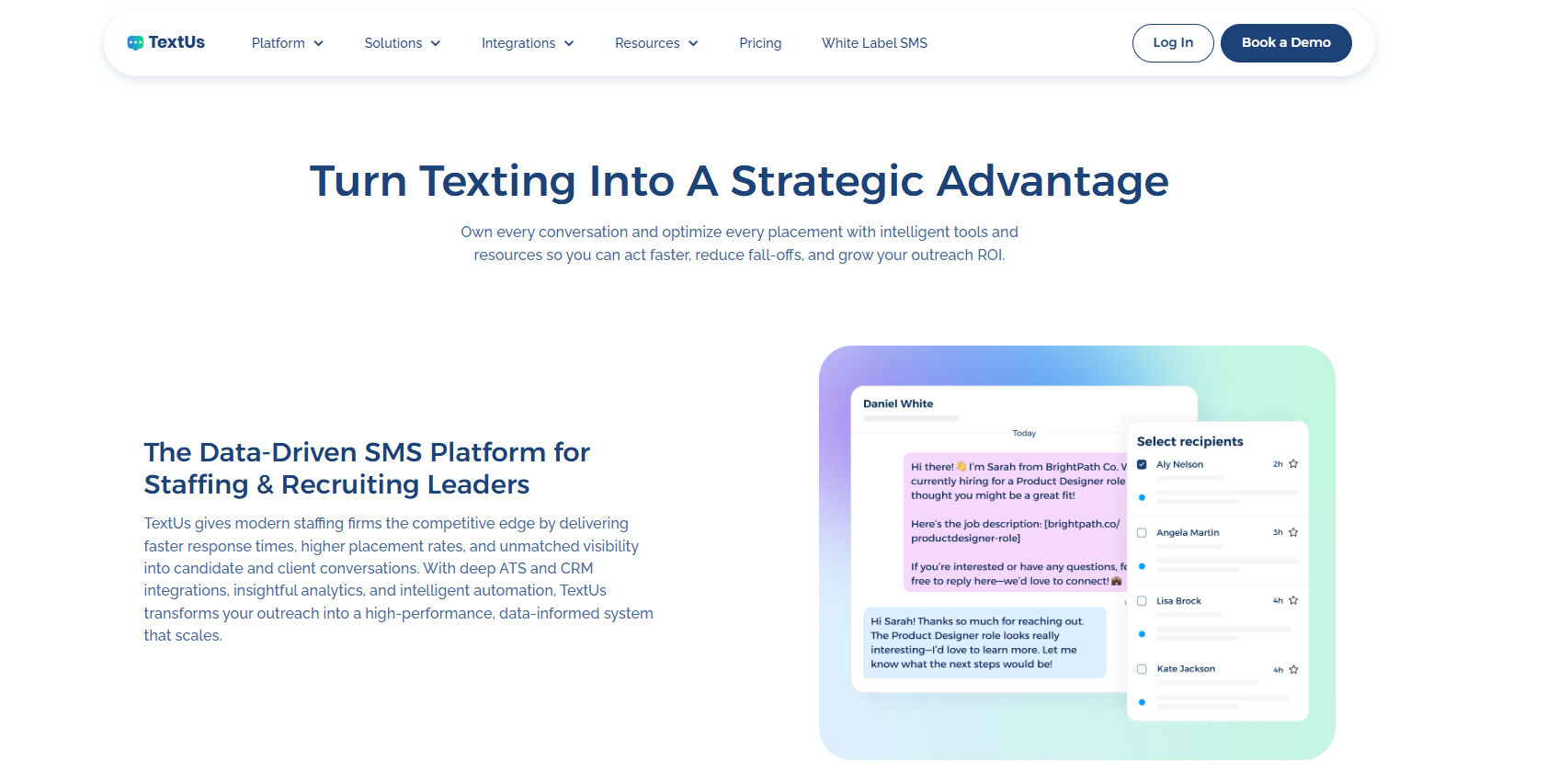
With TextUs, you can send SMS campaigns for job postings, interview reminders, hiring event invites, and re-engagement messages.
You can also manage 1:1 conversational SMS. Candidates may ask questions, confirm interest, share availability, or move to the next step without waiting for emails or missed calls.
TextUs also provides recruitment automation features that reduce repetitive follow-ups. You can set up workflows for application nudges, interview confirmations, document reminders, onboarding steps, and candidate reactivation campaigns.
For staffing companies, TextUs also connects with your applicant tracking system (ATS) to support contact management and note logging. This makes texting a natural extension of your recruiting process.
Book a demo with TextUs today to see how it can help you reach candidates faster and turn more conversations into successful hires!
Step #5: Create Message Templates
Message templates save time and let you send consistent recruiting texts without starting from scratch each time.
You can create templates for common hiring moments, such as job alerts, application follow-ups, interview scheduling, interview reminders, document requests, offer follow-ups, and onboarding reminders.
Templates also make message review easier before texts are sent. It’s easier to check tone, compliance language, personalization, and calls to action before using the message.
Step #6: Personalize Your Messages
A text that mentions the right role, schedule, or interview detail gives the candidate a stronger reason to respond.
With TextUs, dynamic fields make recruiting texts feel more personal without extra work for every message.
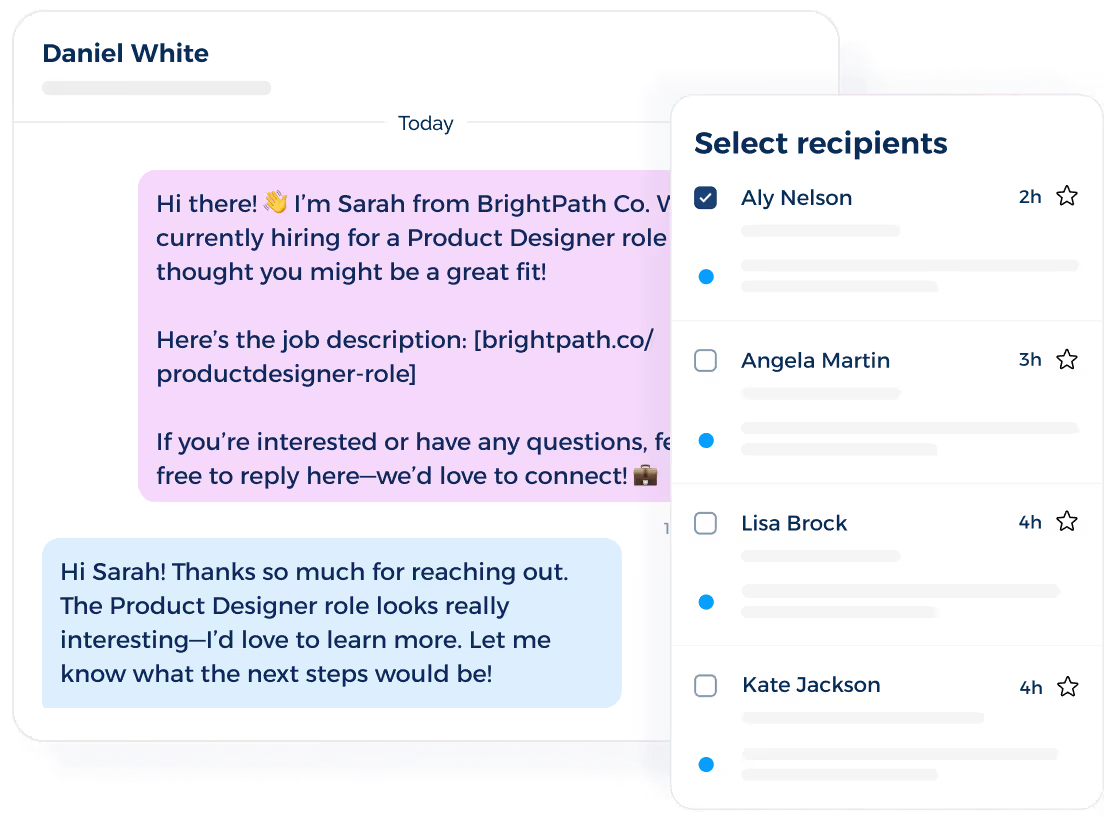
You can insert details like the candidate’s first name, job title, location, application status, interview time, or required document into message templates.
The goal is to make each message specific enough that the candidate understands its purpose.
Step #7: Set Up Automated Recruiting Workflows
Automated recruiting workflows keep candidate communication consistent.
For example, once a candidate schedules an interview, you can send a confirmation text, a reminder before the interview, and a follow-up message after the meeting.
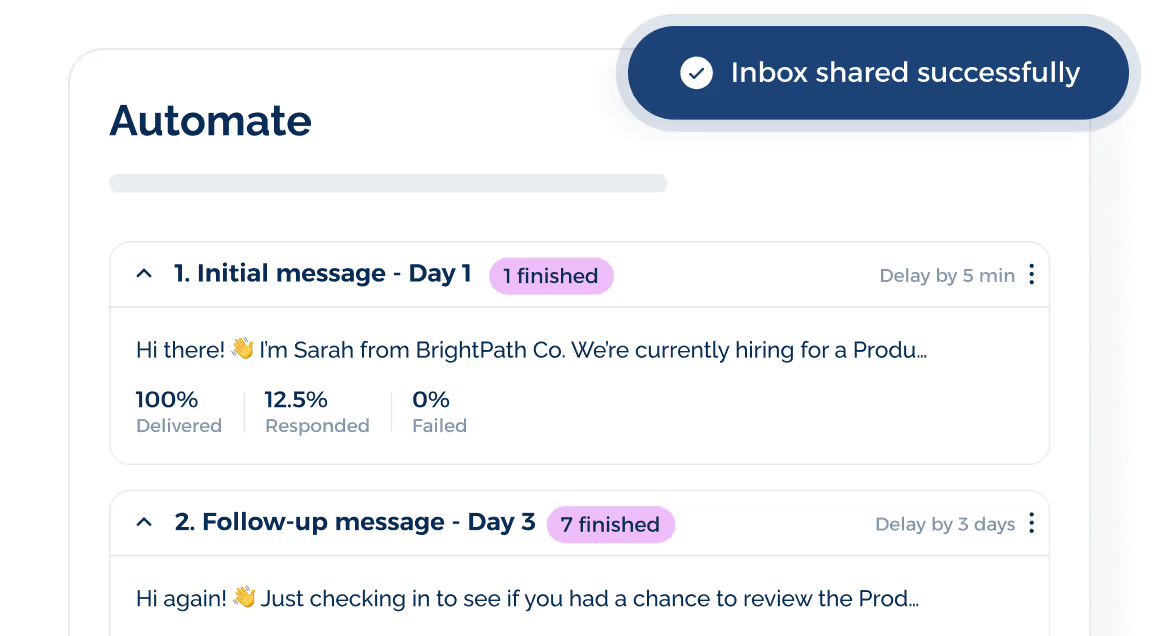
When your text automation software connects with your ATS or recruiting system, candidate activity triggers the next message in the workflow.
Hiring teams spend less time checking spreadsheets, setting reminders, or tracking every follow-up by hand. This creates a smoother process for both your team and the candidate.
Automated messages also reduce gaps between hiring steps. A candidate who forgets to upload a document, confirm an interview, or review an offer can receive a timely reminder before the process slows down.
Step #8: Monitor Replies and Assign Conversations
Text marketing should create real conversations rather than one-way message blasts.
Candidate replies need a specific owner, especially when your team handles several roles, locations, and hiring stages at the same time.
A shared inbox makes this easier because your team can see incoming replies in one place.
With TextUs, conversations are assigned to the right team member. Each candidate gets a faster response from the person who should handle the next step.
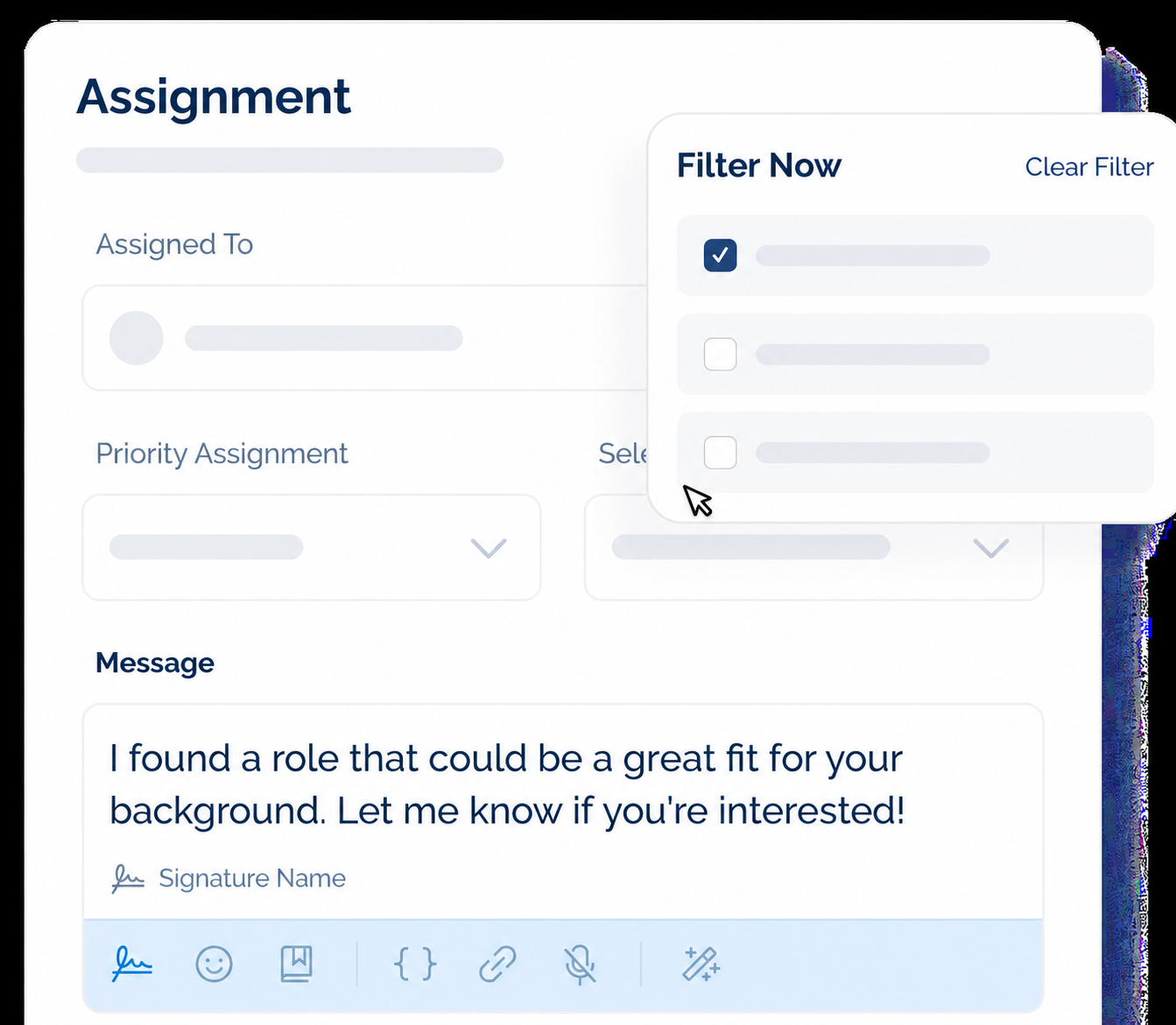
You should also set basic rules for reply management. For example, new applicant replies may go to sourcers, interview questions may go to recruiters, and onboarding questions may go to the hiring coordinator.
TextUs also keeps candidate conversations organized with shared visibility and message history. Your team can see what was sent, who replied, and what action needs to happen next.
Step #9: Track Campaign Performance
Campaign tracking shows how your recruiting texts perform for different roles, candidate segments, and hiring stages.
TextUs provides visibility into key SMS metrics, so you can see which campaigns create the strongest candidate engagement.
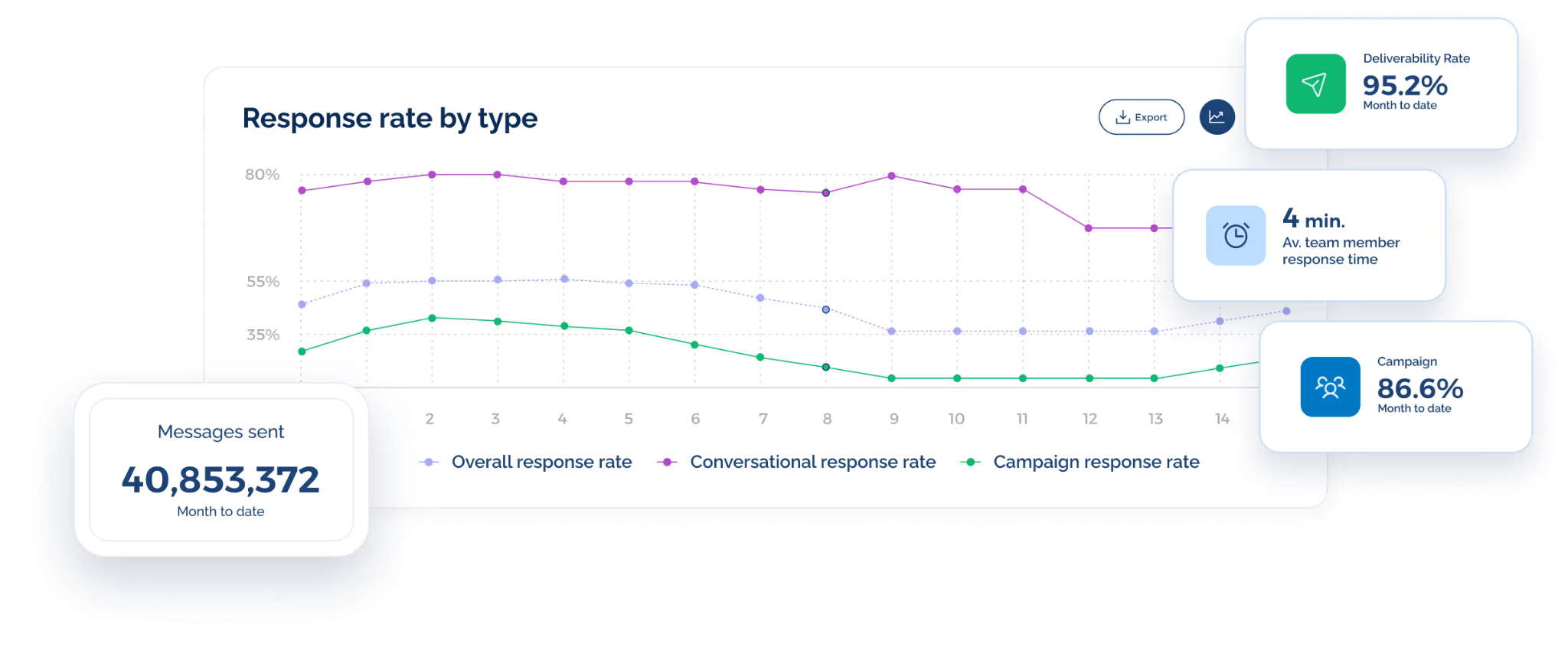
It shows message delivery, response rates, opt-outs, clicks, and other activity tied to recruiting outreach.
These insights make it easier to compare job alerts, interview reminders, hiring event invites, and re-engagement campaigns.
Step #10: Improve Your Recruiting Strategy Over Time
Your first text marketing strategy does not have to cover every recruiting use case right away. A focused start makes it easier to see what candidates respond to and where SMS has the strongest impact.
Higher response rates, booked interviews, completed applications, SMS opt-outs, and placements show which messages are moving candidates forward and which ones need changes.
Candidate replies also reveal patterns your team may miss in reports. Questions about pay, schedule, start dates, or job requirements can show where your messages need more detail.
As your strategy improves, your team can expand into more advanced recruiting workflows.
Recruit Faster With High-Response Text Messaging With TextUs
Candidate attention moves fast, and every delayed reply can cost you a qualified top talent.
TextUs provides you with the SMS features needed to reach candidates quickly, communicate through high-response two-way texting, and keep every conversation moving.
From job alerts and interview reminders to hiring event invites and re-engagement campaigns, TextUs keeps candidate outreach organized from first touch to placement.
With SMS campaigns, 1:1 conversations, shared inboxes, ATS integrations, automation, analytics, and AI message quality tools, TextUs can help you stay ahead in a crowded hiring market.
Book a demo with TextUs today to see how it can give your team a competitive edge and turn faster conversations into more placements!
FAQs About Text Marketing for Recruiters
How to tell if a text from a recruiter is real?
A legitimate recruiter identifies their name, company, and the role they are contacting you about. You should also verify that a real person represents the company before sharing personal information.
Is text message marketing legal?
Yes, text message marketing is legal when your business follows consent, privacy, and opt-out rules. You must get explicit permission, identify the sender, keep messages short, and honor STOP requests.
What is the 70/30 rule in hiring?
The 70/30 rule in hiring usually means most of your effort should go toward candidate engagement, while the rest focuses on promoting the role.
Throughout the candidate journey, texts should support real conversations, not just push job openings or repeat the same pitch.
Can you give me an example of text message marketing?
In text hiring, a recruiter might send, “Your interview is tomorrow at 2 PM. Reply YES to confirm,” which candidates may receive on any mobile device.
Continue Reading



Frequently Asked Questions
Business Texting
Built for Results
Create and convert pipeline at scale through industry leading SMS software