
How to Get Short Codes for Text Messaging
Learn how to get short codes for text messaging and explore the steps to do it. Discover how TextUs can help you obtain a short-code number with ease.

Written by
Adam Hamdan
Published
July 9, 2026

An SMS short code can turn a simple text prompt into a powerful customer action.
With one easy-to-remember number, you can invite people to join offers, receive alerts, enter campaigns, or respond to your business in seconds.
But getting a short code is not as simple as choosing a number and sending texts right away. You need to choose the right code type, prepare campaign details, and wait for carrier approval before the short code goes live.
In this article, we will explain how to get short codes for text messaging, what the application process includes, how much it can cost, and what your business needs to prepare before launch.
TL;DR
- A short code is a five- or six-digit texting number that provides a memorable way to send campaigns, alerts, reminders, verification messages, and keyword-based opt-ins.
- Short code costs start with the monthly lease fee. Still, your total cost can also include setup, carrier review, message usage, MMS, provider support, platform fees, and pricing differences by country.
- To get a short code, you first need to define the use case, confirm that a short code is the right fit, choose between a random or vanity code, and lease the number.
- After that, you have to work with a texting provider to prepare the application, submit it for carrier review, respond to feedback, configure keywords, set up auto-replies, and launch the campaign.
- TextUs can guide you through dedicated short code setup, application prep, carrier approval, campaign launch, and ongoing message management from one compliant texting platform.
What Is a Short Code?
A short code, also known as a short number, is a five- or six-digit number used to send and receive SMS messages. You may have seen one before in prompts like “Text JOIN to 12345” or “Reply YES to confirm.”
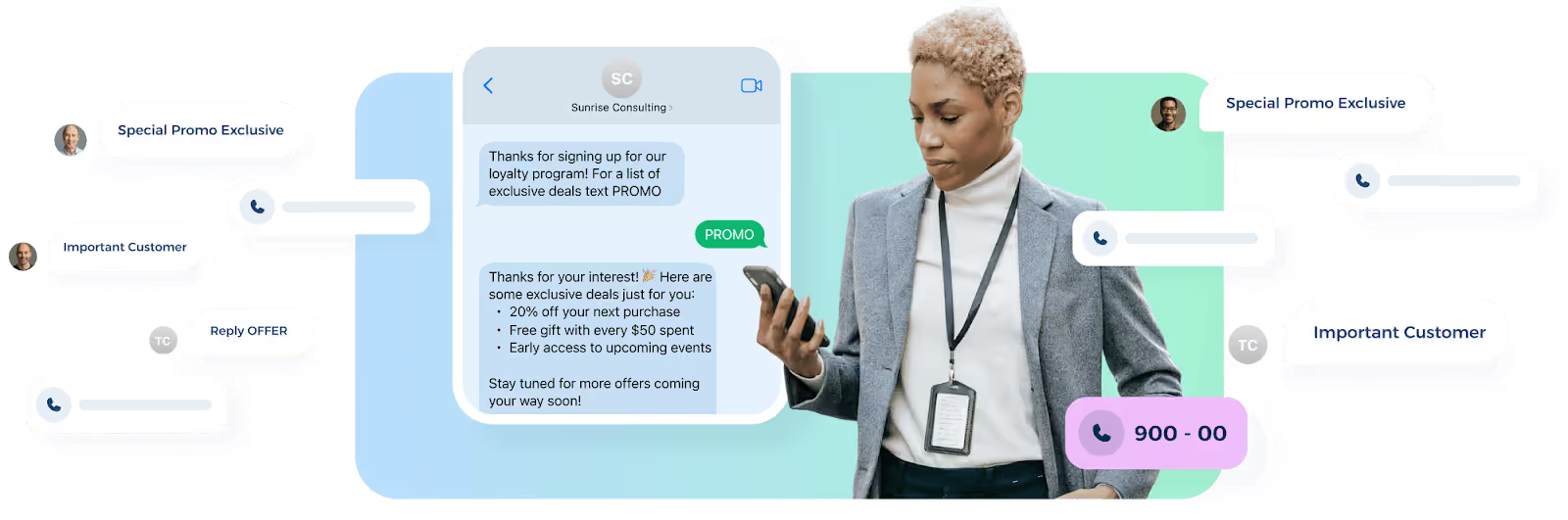
Since they're shorter than standard phone numbers, they're easier to promote via websites, ads, flyers, events, emails, and in-store signage.
Short codes work for SMS marketing campaigns, customer alerts, appointment reminders, event updates, verification messages, and keyword-based opt-ins.
How Much Does It Cost to Get a Short Code?
The cost depends on the type of SMS short code you choose and the provider you work with. Here are the main costs you should review before getting a new short code.
Short Code Lease Fees
In the U.S., the Short Code Registry lists random short codes at $500 per month. Select, or vanity, short codes are listed at $1,000 per month.
These prices cover the short-code lease but don’t include the full cost of running a messaging program.
Random Short Code Cost
A random short-code number is assigned to your business, so it has a lower lease cost.
This option is ideal if you need a dedicated short code but don’t need a custom number. It’s often the more practical choice when the campaign will use QR codes, forms, links, or digital opt-ins.
Vanity Short Code Cost
A vanity short code costs more because you choose a specific number when it’s available.
This option can be useful when you want a short code that customers can remember from ads, signs, radio, events, or other marketing materials. It may be worth the higher cost if recall is important to your campaign.
Additional Setup Costs
Your business should also budget for costs beyond the lease.
The Short Code Registry states that businesses may need to factor in one-time setup fees and per-message costs for inbound and outbound usage.
Provider fees, platform fees, MMS enablement, carrier fees, and campaign support can also affect the final price.
Message Usage Costs
Short code text messages may include charges for each SMS or MMS message sent and received.
Your final cost can depend on message volume, SMS or MMS usage, provider pricing, carrier fees, and the tools included with your texting platform.
Provider Support Costs
Some providers charge for setup support, campaign review, number registration, integrations, reporting, or ongoing account management.
Before moving forward, ask your short code service what is included in the price. You should also confirm which fees are separate from the lease, such as setup support, platform access, or carrier review assistance.
International Cost Differences
Short code pricing can change in other countries because carrier requirements and approval steps vary.
If your business texts customers in many countries, ask your provider how each market handles short code setup and carrier approval.
How to Get Short Codes for Text Messaging
Getting short codes for text messaging starts with choosing the right type of short code, preparing your campaign details, and submitting your application for carrier review.
Here are the key steps you need to take to obtain numbers for short code messaging:
Step #1: Define Your Text Messaging Use Case
This step shapes the rest of the application. Carriers need to understand why you want a short code, who will receive your messages, and what kind of texts your business plans to send.
Your SMS use case may include promotional messages, appointment reminders, customer alerts, event updates, recruiting updates, order notifications, or lead follow-ups.
A specific use case makes it easier to write your campaign description, prepare sample messages, and build an opt-in flow that matches what subscribers expect.
Your opt-in flow should also match what subscribers expect before sending SMS through your short code.
Step #2: Decide if a Short Code Is the Right Fit
A short code is ideal if you need a number for high-volume text messaging campaigns.
Short codes offer a memorable way for customers to opt in, receive updates, and recognize your business. They also work well for keyword campaigns, alerts, and larger outreach programs that need high throughput.
But before you move forward, compare your needs with other SMS number types.
If you only send a small number of messages, long codes may be a better starting point. A toll-free number may also work if you need a business-friendly texting option with broader recognition.
Step #3: Choose Your Code Type
You have to choose between a random short code and a vanity short code. Both number types can support text messaging campaigns, but they differ in cost, control, and brand recall.
A random short code is assigned to your business and may be randomly generated. This option is more practical when your goal is to launch a text messaging program without paying extra for a custom code.
A vanity short code lets you choose a specific number when it's available. This option can be useful if you want a number that is easier to remember or better suited for promotions.
Your choice depends on how your business plans to promote the short code. If customers will mostly opt in through links, forms, or QR codes, a random short code may be enough.
If customers need to remember the number from an ad, sign, or spoken message, a vanity short code may be worth considering.
Step #4: Lease Your Short Code
Leasing the short code reserves the number for your business, but it does not mean your campaign has final approval yet.
Wireless carriers still need to review your campaign details before the short code can send or receive messages.
This is why preparation is important before you lease. You have to know the campaign use case, opt-in method, sample messages, message frequency, terms, privacy policy, and support details.
Step #5: Choose a Text Messaging Provider
A business texting provider plays a major role in getting your short code approved.
Since short codes require carrier review, opt-in details, campaign information, and message setup, you need a provider that can guide the application process from the start.
TextUs is a short code texting platform that works with your team to determine which type of dedicated short code best fits your business needs.
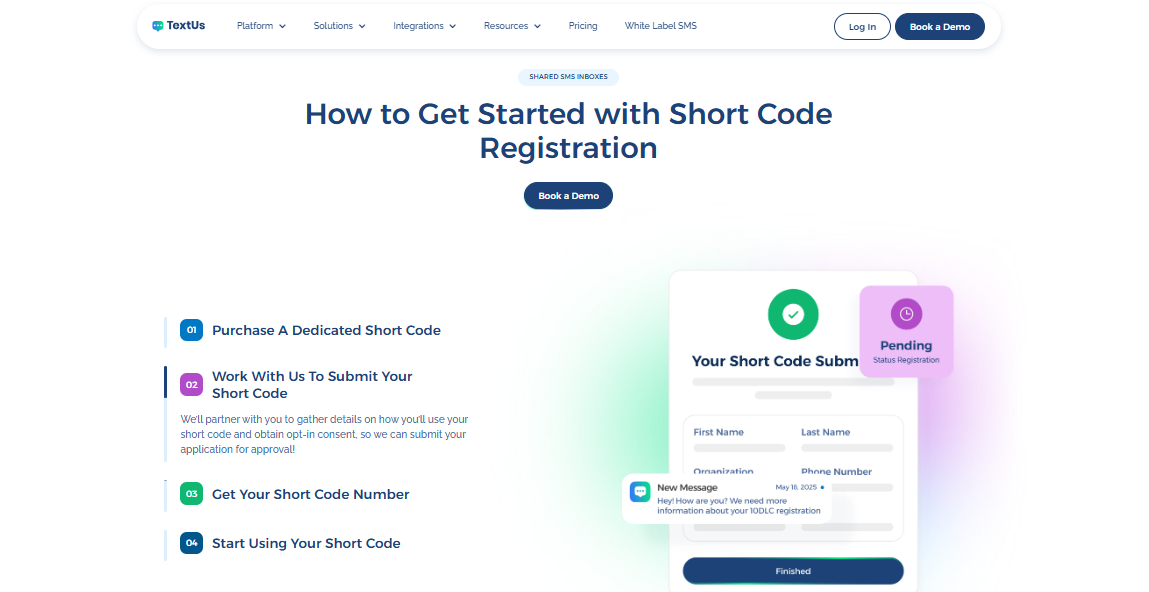
This includes considering how you plan to use the short code, what kinds of messages you want to send, and how customers will give consent to receive texts from your business.
TextUs can also help gather the details needed for your short code application. It could be campaign use case, opt-in method, sample messages, message frequency, HELP and STOP responses, and other approval requirements.
If you want a guided path to short code texting, TextUs can help you choose, prepare, and manage your dedicated short code. Book a demo today!
Step #6: Prepare Your Short Code Application
Your short code application gives carriers the details they need to review your text messaging program. Your application should include the following details:
- Business name
- Brand website
- Campaign use case
- Sample messages
- Opt-in method
- Opt-out instructions
- HELP instructions
- Terms and conditions
- Privacy policy
- Message frequency
- Customer support contact
- Proof of consent collection
Your SMS opt-in language has to tell subscribers who is texting them. It should also explain what messages they will receive and how they can stop further messages.
Step #7: Submit Your Short Code Application
Once your application is ready, your text messaging provider can send it to the mobile network for review.
The vetting process checks your business details, consent process, sample messages, terms, and privacy policy.
After mobile carriers approve the application, TextUs will set up your short code for use. The approval process usually takes six to eight weeks. You can use that time to prepare campaign assets, opt-in forms, message templates, and team workflows.
Step #8: Respond to Carrier Feedback
After your short code application is submitted, mobile carriers may return feedback before approval.
This does not always mean your application was denied. In many cases, carriers just need specific details before they move your campaign forward.
For example, they may ask you to explain how subscribers give consent, add message frequency, update broken links, or make your sample texts match the actual campaign.
You have to respond to these requests as soon as the information is ready. Prompt answers prevent extra review rounds and keep the registration process moving.
Step #9: Configure Keywords, Auto-Replies, and Compliance Messages
SMS keywords are the words customers text to your short code to start an action. Each keyword should connect to the right list, campaign, or follow-up sequence.
Here are a few examples:
- JOIN for list opt-ins
- VIP for exclusive offers
- DEALS for discounts
- HELP for support instructions
- STOP for opt-outs
An organized flow makes it easier to manage opt-ins, route replies, track engagement, and keep your short-code campaign aligned with subscriber expectations.
You can also set automated messages for each keyword, so subscribers receive the appropriate message.
Step #10: Launch Your Messaging Campaign
At this stage, the goal is to make your short code easy to understand and use.
You can promote the short code in places where your audience already interacts with your brand.
This may include your website, landing pages, emails, social media posts, QR codes, store signage, receipts, event materials, ads, and customer service scripts.
Your call to action should be direct and specific. For example, “Text VIP to 12345 for exclusive offers” is clearer than asking customers to “sign up for updates” without explaining what to do next.
Before sending your first campaign, check that your team can manage replies, track opt-ins, and review performance from your SMS marketing platform.
This makes it easier to respond to customers, collect customer feedback, and spot issues after launch.
Launch Dedicated Short Code Campaigns With TextUs
Your audience expects fast, relevant communication from the brands they trust.
Short code texting gives you a reliable way to send promotions and follow-ups through a dedicated business texting channel.
With a cloud-based SMS shortcode service like TextUs, you can manage carrier-approved messaging, keyword automation, campaign creation, follow-up workflows, and reporting without piecing together separate tools.
TextUs allows you to secure a dedicated short code, prepare your campaign for approval, and send mass text messages at every stage of the customer journey.
Book a demo with TextUs today and see how it can turn short code texting into a stronger communication engine for your business!
Continue Reading


Frequently Asked Questions
Can a person use a short code to text?
Yes. A person can text a short code if a business has an active short code program. For example, users can text a keyword like “JOIN” or “VIP” to sign up for updates.
However, short codes are made for business and organization messaging programs, not personal texting.
How to generate a short code?
You don’t generate a short code yourself. You will need to lease one and submit a campaign application for carrier review.
Short codes are five- or six-digit numbers assigned to a single business or organization. A provider like TextUs can help you choose the short code type, prepare the service approval form, and set it up after approval.
How do I turn on short code messaging?
For businesses, you turn on short code messaging by leasing a short code, getting carrier approval that can take several weeks, and setting it up through a texting provider.
For consumers, short-code texting may need to be enabled through their mobile carrier or phone settings if messages are blocked.
Business Texting
Built for Results
Create and convert pipeline at scale through industry leading SMS software