
Mass Texting for Education: Improve Campus Communication
Learn how mass texting for education can improve school communication and explore common use cases. Discover how TextUs can help you out.

Written by
Published
July 2, 2026
.jpeg)
A missed school message can turn into a late form, an empty seat, a missed class, or one more call to the front office.
For educational institutions, even a small communication gap can slow down updates between students, parents, staff, applicants, and faculty.
Short message service (SMS) creates a direct line to reach students, parents, staff, and applicants when the update needs attention.
In this article, we will explain the benefits of mass texting for education, the common use cases, and how the best app for mass texting helps you send personalized messages for better student engagement.
TL;DR
- Mass texting allows schools, colleges, and training programs to send SMS updates for emergency alerts, attendance, class changes, admissions follow-up, payments, staff notices, and school events.
- Schools can use education text messaging to reach parents, students, staff, faculty, applicants, alums, donors, and adult learners with short updates that are easy to read and act on.
- The common use cases of mass texting include emergency alerts, attendance notices, schedule changes, assignment reminders, registration updates, admissions texts, financial aid reminders, event announcements, transportation alerts, campus housing updates, and alums outreach.
- A strong SMS setup needs the right platform, clean contact records, consent, contact groups, message templates, staff texting rules, campaign testing, and regular review of campaign results.
- TextUs is an SMS platform that turns mass texting into better engagement with SMS campaigns, two-way messaging, flexible integrations, AI-powered messaging, compliance tools, and campaign analytics.
How Mass Texting Improves School Communication
School messages can get missed in email, paper notes, apps, or phone calls.
Text messaging remains a fast way to share safety alerts, schedules, events, admissions updates, payments, and class reminders to current and prospective students.
Here are the key benefits of using mass texting:
Faster Emergency Communication
In an urgent event, schools need to send the same message to many people at once. A mass text can alert parents, prospective students, teachers, and staff in seconds.
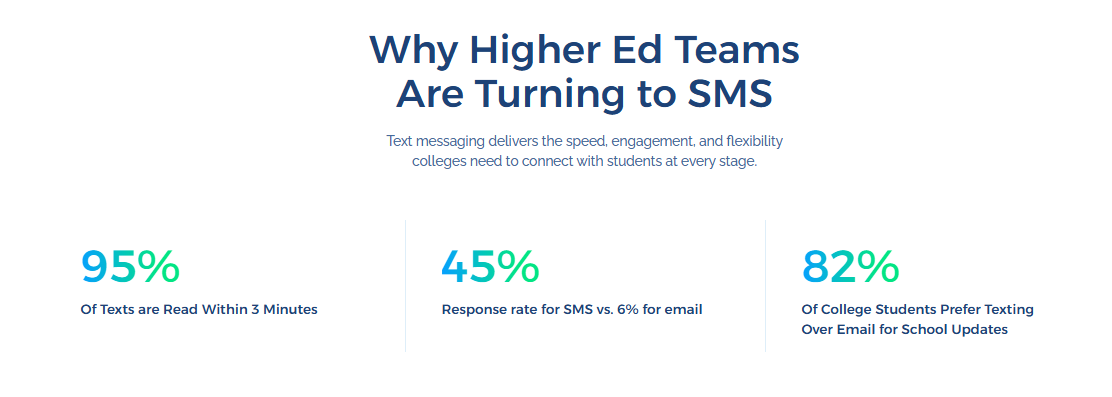
The message can share what happened, what action people need to take, and where the next update will appear. Short alerts also help limit rumors during tense school situations.
Better Parent Communication
Parents need school updates they can read fast. Two-way texting makes it easier to share reminders about attendance, school events, pickup changes, forms, and schedule changes.
A short message also saves front-office staff from making multiple phone calls for the same update. Parents get the main details, then reply or call if they need more help.
Stronger Student Communication
Students may miss school emails, portal alerts, or app posts. School SMS messages can bring attention to class dates, upcoming deadlines, advising, registration, and student support.
Colleges, universities, and training programs can use SMS to guide students through each step. A short reminder can help a student act before a missed form, class, or deadline turns into a bigger problem.
Higher Attendance for School Events
People may plan to attend an event, then forget the date or lose the details. A text reminder can bring the event back to mind before open houses, parent meetings, webinars, fairs, games, and campus activities.
The message can include the date, time, place, and a link in a single short note. Schools can also send a final reminder near the event so more people show up prepared.
Faster Admissions Follow-Up
Admissions staff need to keep prospects engaged from first inquiry to enrollment. Texting can help students remember forms, campus visits, missing files, and deposit dates.
A text message feels easier to answer than a long email. It also helps applicants take the next step while their interest is still fresh.
Improved Staff and Faculty Coordination
Higher-ed institutions also need two-way communication for internal updates. Mass texting can share scheduled messages, helpful resources, meeting reminders, training notes, and urgent campus notices.
Teachers, office staff, coaches, substitutes, and department leads can receive the same message at the same time. That keeps school operations easier to manage during busy days.
Clearer Payment and Tuition Reminders
Payment reminders need a careful tone. Texting can remind families or students of due dates, account tasks, lunch balances, tuition, or fees in a short, respectful way.
A message may point people to a secure portal, billing office, or account page for more details. Private payment details can stay out of the text, while the next step stays easy to follow.
Use Cases of Mass Text Messaging for Education
Mass SMS marketing supports students in many parts of school life. Here are the most common use cases of mass texting for education:
Emergency School Alerts
You can send SMS notices for weather closures, safety concerns, power outages, campus closures, lockdown alerts, or early dismissal.
A strong alert should name the school, state the issue, and give the next step. Emergency notices also support other communication channels, such as email, portals, apps, and calls.
Example
“Lincoln School Alert: Classes are canceled today due to severe weather. Please check the school portal for make-up details.”
Attendance Notifications
Attendance text messages help schools contact parents or guardians when a student is absent or late. Each student receives attendance alerts based on school records and contact settings.
For colleges and training programs, attendance texts can remind students about missed sessions, required labs, or program rules tied to attendance.
Example
“Westview School: Your student was marked absent today. Please reply C to confirm or call the front office.”
Class and Schedule Changes
Class schedules can change due to teacher absence, room changes, testing days, school trips, weather, or program updates.
Texting helps students and families receive updates before they arrive at the wrong place or miss a session.
You can send these texts to one class, grade level, program, or campus group.
Example
“Reminder from Northside Academy: Grade 8 science class will meet in Room 204 today.”
Assignment and Exam Reminders
SMS lets you remind students about tests, quizzes, projects, papers, and due dates. These messages work best when they are short and focused on one task.
Teachers, tutors, and program staff may send reminders, so students have enough time to prepare and don't miss deadlines.
Example
“Reminder: The final project for Business 101 is due Friday at 5 PM in the student portal.”
Enrollment and Registration Reminders
Colleges, universities, and training programs can text students about course registration, enrollment forms, orientation, campus resources, and seat deadlines.
These messages are useful when students need to log in, submit a form, choose classes, or complete an account task.
Example
“City College: Fall registration ends Friday. Log in to your student portal to choose classes.”
Admissions Text Messaging
Admissions offices can use SMS to follow up with prospects, applicants, and accepted students. Texts can remind students about campus tours, missing files, interview dates, test scores, and deposit dates.
A short admissions message can keep the process moving without asking students to read a long email.
Example
“Hi Maya, Greenfield College still needs your transcript to finish your application. Please upload it by Friday.”
Financial Aid and Scholarship Reminders
Financial aid offices can text students about aid forms, missing documents, award letters, and scholarship dates. These reminders can help students avoid missed forms that could slow down enrollment.
Because financial aid can involve sensitive information, the text should be brief and direct students to a secure account or an office contact for more details.
Example
“Greenfield College: Your financial aid file has missing items. Please check your student portal today.”
Parent-Teacher Conference Reminders
Parent-teacher conferences are easier to manage when families get a reminder before the meeting. A text can share the date, time, location, and link for online meetings.
Schools can also send a confirmation request so office staff knows who plans to attend.
Example
“Reminder from Lincoln School: Your parent-teacher conference is tomorrow at 4:30 PM in Room 12.”
School Event Announcements
School events need reminders so families, students, and staff know when and where to go. SMS can send announcements about fairs, performances, games, workshops, webinars, and fundraisers.
A message can include the main event detail and a link for sign-up, tickets, or more information.
Example
“Join us for Family Night on Thursday at 6 PM in the gym. RSVP here: [link].”
Transportation and Bus Updates
Bus and pickup changes can cause stress for families. Text alerts can share route changes, late buses, early pickup notes, or drop-off updates.
These messages are best sent to the parents or guardians tied to the route or group affected.
Example
“Bus 12 is running 15 minutes late today. Students will remain with staff until pickup.”
Campus Housing Updates
Colleges can use text messages for housing updates, move-in dates, room check reminders, maintenance notices, and residence hall events.
SMS is useful when current students need a quick reminder before a housing deadline or campus move.
Example
“Campus Housing: Move-in starts Saturday at 9 AM. Please bring your student ID and housing pass.”
Alumni and Donor Communication
Schools and colleges can also text alumni and donors for event invites, giving days, reunion notes, and fundraising reminders.
These messages should be respectful and easy to opt out of, since alumni and donor communications differ from urgent student or parent notices.
Example
“Greenfield Alumni: Reunion Weekend starts June 14. View the event schedule here: [link].”
Continuing Education and Training Program Updates
Adult learners and training students may juggle work, family, and classes.
Text reminders can help them keep track of live sessions, payment dates, coaching calls, tests, and program milestones.
SMS can also bring inactive students back into the program with a short check-in.
Example
“Reminder: Your certification class meets tonight at 7 PM. Join through the student portal.”
How to Start Using Mass Texting for Education
A strong mass-texting setup also requires consent, contact groups, staff rules, and message templates.
Here are the main steps to start using educational text messaging in a safer, more useful way.
Step #1: Choose the Right Platform for Mass Texting
TextUs can turn bulk messaging into personalized outreach with text message campaigns, two-way messaging, media-rich messages, tracking, and built-in tools for safer texting.
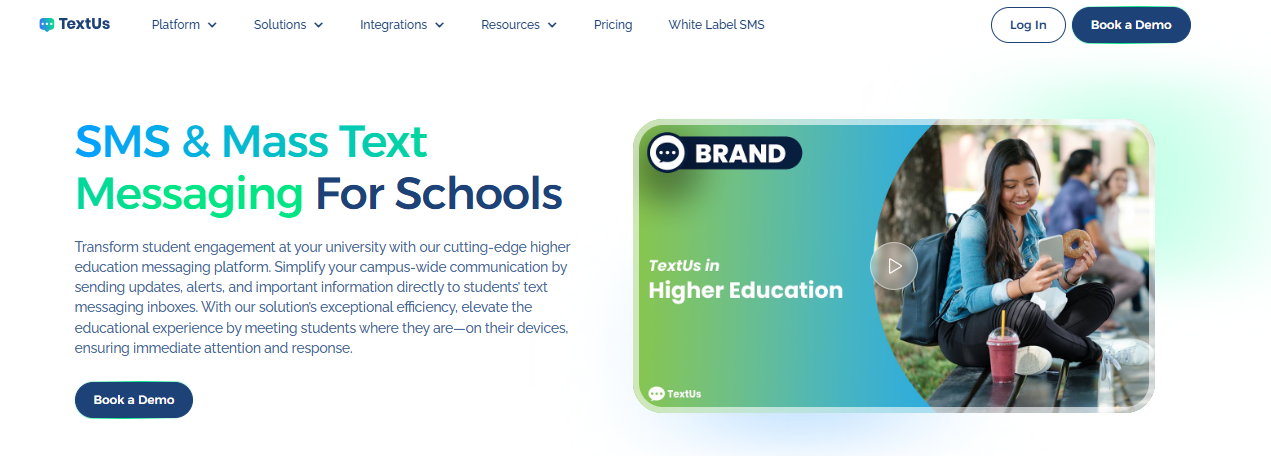
If you run schools, colleges, and training programs, you can send smarter SMS campaigns that go beyond plain text. Your texts include PDFs, images, GIFs, links, and calls to action.
These key features are useful for open house invites, admissions updates, job fairs, upcoming events, parent reminders, and program offers.
TextUs also includes built-in A/B testing to compare different message versions and learn which gets more replies, clicks, or sign-ups.
This school SMS service also shows performance from send to conversion. You can review delivery rates, click tracking, response rates, and campaign results.
SMS compliance and security are also important for education texting. TextUs supports opt-in and opt-out management, keyword-triggered replies, consent workflows, and message audit trails.
It also supports secure data storage, encryption, admin oversight, and role-based access controls. These features help you protect contact data, manage SMS consent, and send messages more responsibly.
If you want to turn school updates, admissions reminders, and student follow-ups into two-way conversations, book a demo with TextUs today!
Step #2: Collect and Organize Contacts
Old phone numbers can lead to missed updates, so schools should review contact records before sending mass texts. Each person should also be linked to the type of messages they need to receive.
For example, parents may need attendance alerts and event invitations, while students may need class updates, registration dates, and campus notices.
Good contact records help schools send personalized messages to people's mobile devices. They also make future updates easier to manage as classes, grades, programs, and school terms change.
Step #3: Get Consent and Set Expectations
Consent can come from enrollment forms, admissions forms, event sign-ups, parent forms, or student communication settings.
The sign-up language should indicate what kinds of texts they may receive. Examples include school alerts, class reminders, event notices, payment reminders, admissions updates, and student support messages.
People should also know how to stop non-urgent texts if they no longer want them. A simple SMS opt-out process helps schools respect the preferences of parents, students, and applicants.
Step #4: Build Contact Groups
SMS segmentation lets you sort people based on shared details, such as grade level, class, campus, department, program, role, interest, status, or past action.
For example, a K-12 school may create groups for Grade 3 parents, senior students, bus route families, athletic families, and after-school club members.
A college may create segments for new applicants, admitted students, housing residents, financial aid contacts, and online learners. It also supports alumni communication for reunions, giving days, and campus updates.
TextUs also supports engagement-based contact views, so your staff can see who may need attention based on response activity and engagement level.
Admissions, student support, and event teams follow up with the right contacts after a campaign.
Step #5: Create Message Templates
Message templates save time for school updates that repeat. A good business text message should include the school name, the reason for the message, the date or time, and one next step.
You can prepare approved text drafts for attendance notices, class reminders, event alerts, tuition prompts, admissions follow-up, weather alerts, and staff notices.
TextUs adds more value with campaign tools, links, media, and tracking. It lets you add PDFs, images, GIFs, or links when a plain text update is not enough.
Book a demo with TextUs today.
Step #6: Train Staff on Texting Rules
Sensitive details, long policy notes, grades, health records, and private account data should be handled with care.
You also need to set rules for who can send mass texts, who can answer replies, and when messages can be sent. Emergency alerts may need a different approval process than event reminders or class updates.
Training helps staff use educational text messaging effectively. They should know how to handle incoming messages from parents, students, applicants, and faculty.
Step #7: Test Your First Campaign
Start with a small campaign before sending messages to a large group. A parent meeting reminder or event notice helps school staff test the full process before bigger sends.
The first test should check the sender name, message length, links, contact list, and reply flow. School staff should also review who gets replies and how those replies should be answered.
TextUs makes this step safer with AI-powered smart messaging. Before a message goes out, this texting software can flag high-risk wording and suggest a better rewrite.
School staff doesn't have to guess which words may cause issues. AI in texting can use rewrite suggestions to reduce compliance risk, maintain the school's voice, and convey a stronger message.
Once the process is ready, you can use mass texting for larger updates, admissions reminders, parent notices, student follow-ups, and event campaigns.
Step #8: Review Results and Improve
After each campaign, you have to review the comprehensive analytics. Look at delivery rates, replies, clicks, opt-outs, and feedback from students, parents, and staff.
High replies may show strong interest or a need for more support. Low clicks may mean the message needs a better link placement or a simpler call to action.
Opt-outs may also show that messages are too frequent or not useful enough for the audience.
You can use the results to improve future education text messaging. Better contact groups, stronger templates, and smarter send times can help schools build a more helpful SMS plan over time.
Make Education Texting More Personal and Action-Based With TextUs
Missed messages can turn into missed classes, late forms, empty seats, and lost student interest.
TextUs helps schools and higher education institutions keep students, faculty, staff, and applicants informed through real-time SMS updates people can read fast.
From enrollment reminders to class notices, campus events, and payment prompts, this SMS software keeps communication moving through two-way SMS messaging that does more than send alerts.
With TextUs, it's easier to create text message campaigns for key student and faculty touchpoints. Reminders go out for application steps, registration dates, tuition deadlines, academic events, and support follow-ups.
This higher education texting platform also connects with leading campus management systems for a smoother way to link contacts, messages, and follow-ups.
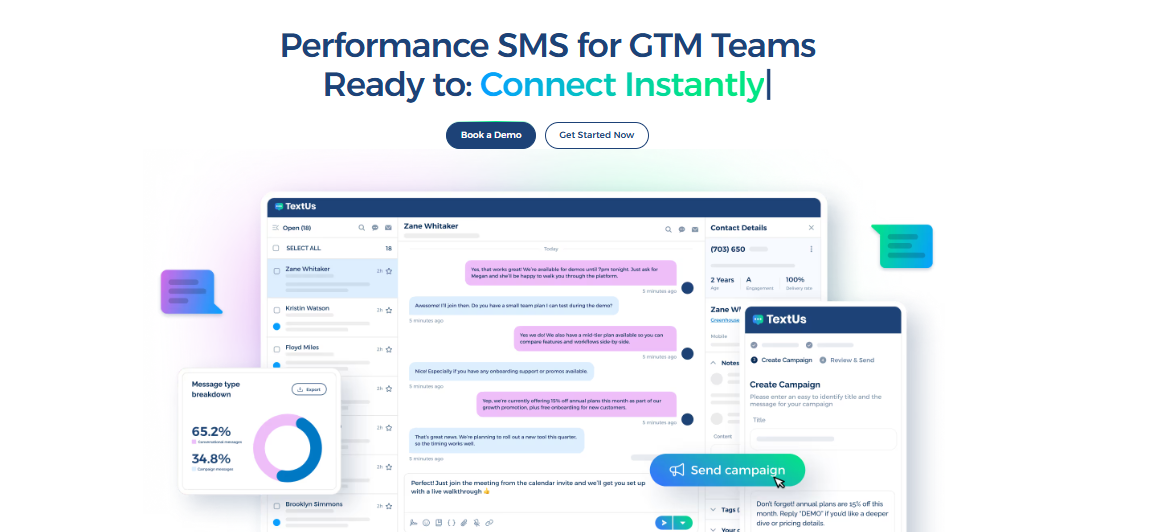
Book a demo with TextUs today and see how a smarter mass SMS tool can improve modern campus communication!
Continue Reading



Frequently Asked Questions
What is mass text messaging for schools?
Mass text messaging for schools is a way to send SMS updates to many students, parents, staff, or applicants at once.
Schools use a bulk SMS communication tool for alerts, reminders, events, attendance notices, admissions follow-up, and schedule changes.
Is RCS cheaper than SMS?
Rich Communication Services (RCS) is not always cheaper than SMS. Cost depends on the mobile carrier, country, provider, message type, media use, and campaign setup.
SMS is still the better choice for school mass texting because it reaches most mobile phones and usually comes at a lower cost.
What does ADHD texting look like?
ADHD texting is a casual phrase people use to describe how ADHD can affect text habits.
For some people, it may look like fast replies in short bursts, long gaps before a reply, forgotten messages, missed details, or jumping between topics.
Business Texting
Built for Results
Create and convert pipeline at scale through industry leading SMS software