
How a Reservation Text Message Can Improve Booking Efficiency
Learn how to use a reservation text message to improve your booking efficiency. Discover how TextUs can improve your customers' booking experiences.

Written by
Adam Hamdan
Published
April 6, 2026

Customers expect quick confirmation and easy communication. Yet many businesses still rely on phone calls and manual follow-ups that create delays.
A reservation text message offers a faster and more reliable way to manage bookings.
You can send messages to confirm reservations, share important details, and keep customers informed. Each message stays accessible, which allows guests to review their plans, respond, and stay on schedule.
In this article, we'll break down the benefits of reservation text messaging and how you can apply them to improve your booking process.
TL;DR
- Reservation text messages improve customer convenience through faster booking, easy access to details, and quick confirmation or cancellation.
- Businesses use different message types, such as confirmations, reminders, updates, waitlist alerts, and follow-ups, to manage reservations at every stage
- Writing effective messages requires keeping them short, including key details, using a professional tone, and adding response options.
- Setting up reservation text messaging involves choosing the right SMS platform, building workflows, integrating systems, creating message templates, and testing your campaign performance.
- TextUs makes reservation management easier with SMS automation, CRM integrations, and real-time messaging for better communication flow.
How Text Reservations Improve Customer Convenience
Missed bookings, no-shows, and slow responses can disrupt your entire reservation process.
Text messages keep your communication smooth and easy to handle. Here are the main benefits customers can expect from reservation text messages.
Book Reservations Without Filling Long Forms
Booking a reservation no longer requires filling out long forms on a website. Customers can send messages or use a reservation button to start the process for added convenience.
This approach saves time and removes extra steps that slow down booking. It also makes it easier for clients who prefer quick actions on their phone.
View Reservation Details Anytime
Customers can access their reservation text message at any time without logging in to a website or searching through email.
All important details, such as the date, address, and number of guests, are included in the message. This makes it easy to double-check plans before a visit.
Confirm or Cancel Reservations in Seconds
Customers can confirm a reservation with a quick reply, which removes the need for phone calls or waiting on hold.
Changes can also be made just as easily. If plans shift, the recipient can send a message to request a new time or inform the business right away, which helps keep schedules accurate and up to date.
Types of Reservation Text Messages
Reservation text messages come in different forms based on the stage of the booking. Each type supports a specific purpose, from confirming a reservation to sending updates and follow-ups.
Reservation Confirmation
A confirmation message is sent right after a booking is completed. It includes important details such as date, time, address, and number of guests so the recipient can verify the reservation.
Examples:
- Hi [Name], your reservation is confirmed for [Date] at [Time]. Please review the details and keep this message as your reference.
- Hi [Name], your booking is set for [Date] at [Time]. Use this secure link to enter your credit card details and confirm your reservation: [Link].
- Hi [Name], your reservation is confirmed. Check your details and reply if you need a change before your visit.
Some messages also include links to review booking details or add payment if required. This message acts as the main record that customers can refer to before their visit.
Reservation Reminder
A reminder message is sent before the scheduled time to keep the reservation top of mind. It includes a friendly reminder along with key details and a prompt to confirm or cancel.
Examples:
- Hi [Name], just a reminder about your reservation on [Date] at [Time]. Reply YES to confirm.
- Hi [Name], don't forget that your booking is scheduled for today at [Time]. Let us know if anything changes.
- Hi [Name], we look forward to seeing you at [Time]. Reply if you need to cancel or adjust.
This type of message helps reduce no-shows and keeps schedules accurate. Customers can respond quickly, which allows businesses to adjust bookings if needed.
Reservation Update
An update message is used when there are changes to a reservation. This can include time adjustments, location updates, or special notes related to the booking.
Examples:
- Hi [Name], your reservation has been moved to [New Time] on [Date]. Please confirm.
- Hi [Name], we’ve updated your booking time. Reply if the new schedule works for you.
- Hi [Name], your reservation details have changed. Let us know if you need another option.
Customers can also receive a message if the business needs to reschedule. Timely updates are useful for bookings tied to a specific event or time-sensitive plan.
Waitlist Reservation
A waitlist message informs customers when a slot becomes available. This is common in restaurants and busy services where guests may need to wait for an opening.
Examples:
- Hi [Name], a table is now available at [Time]. Reply YES within 10 minutes so our restaurant staff can prepare.
- Hi [Name], we have an open slot for you. Let us know if you’d like to take it.
- Hi [Name], your waitlist request is now available. Reply to confirm your reservation.
The message may include a prompt to confirm the new time or respond within a set period. Quick replies allow you to fill open spots instantly.
Follow-Up Reservation
A follow-up message is sent after the visit to continue communication. You may ask customers to leave a review, share feedback, or confirm future bookings.
Examples:
- Hi [Name], thank you for your visit today. We’d love your feedback.
- Hi [Name], we hope you enjoyed your visit. Feel free to reply if you’d like to book again.
- Hi [Name], thanks for choosing us. Let us know if you want to schedule your next visit.
This message can also include links for support or updates. It gives customers a chance to request assistance or check new offerings, such as an updated menu, for their next visit.
How to Write an Effective Reservation Text Message
A well-written message keeps communication simple and easy to understand. Here are the key steps to follow when writing a reservation text.
Keep Messages Short and Easy to Scan
Most people check messages quickly, so your SMS message needs to present key information. Short sentences and simple structure make it easier for the recipient to understand the message at a glance.
Text abbreviations can be used, but only when they are common and easy to understand. Short forms like “PM” or “RSVP” are acceptable, while unclear abbreviations can confuse the person reading the message.
Avoid adding extra lines that do not support the main purpose of the message. A concise format keeps attention on the action, which leads to faster response and fewer errors.
Include All Important Details
Details such as date, time, address, number of guests, and service type should be present in every message. Complete information allows the recipient to review and verify the booking without needing to contact the business.
Including payment details or a secure SMS URL can also support bookings that require advance payment. Customers can check, verify, and pay if needed before the visit.
Use a Friendly, Professional Tone
A good business text message should be respectful and easy to understand. It should present information in a way that sounds natural while still maintaining a professional standard.
A friendly tone can make the message more welcoming and encourage a response. A simple greeting and a respectful closing help create a positive interaction with the recipient.
Professional tone keeps the message appropriate for all customers, especially when sharing important details, links, or payment information. It also supports trust, which is important for any reservation process.
Add a Response Option
A reservation text message should guide the recipient on what action to take next. Response options such as confirm, cancel, or request a change make the process simple to follow.
A short prompt like “Reply YES to confirm or NO to cancel” speeds up the response. You can update bookings without waiting or sending follow-up messages.
Response options also support better schedule management. When guests reply right away, businesses can adjust reservations, fill open slots, or inform others on the wait list.
How to Set Up Reservation Text Messaging for Your Business
Reservation text messaging improves how businesses handle bookings and client communication. Here are the quick steps to set it up for your business.
1. Choose the Right SMS Platform
The best SMS marketing platform shapes how your reservation text message system performs day to day. TextUs stands out by connecting with systems your business already uses.
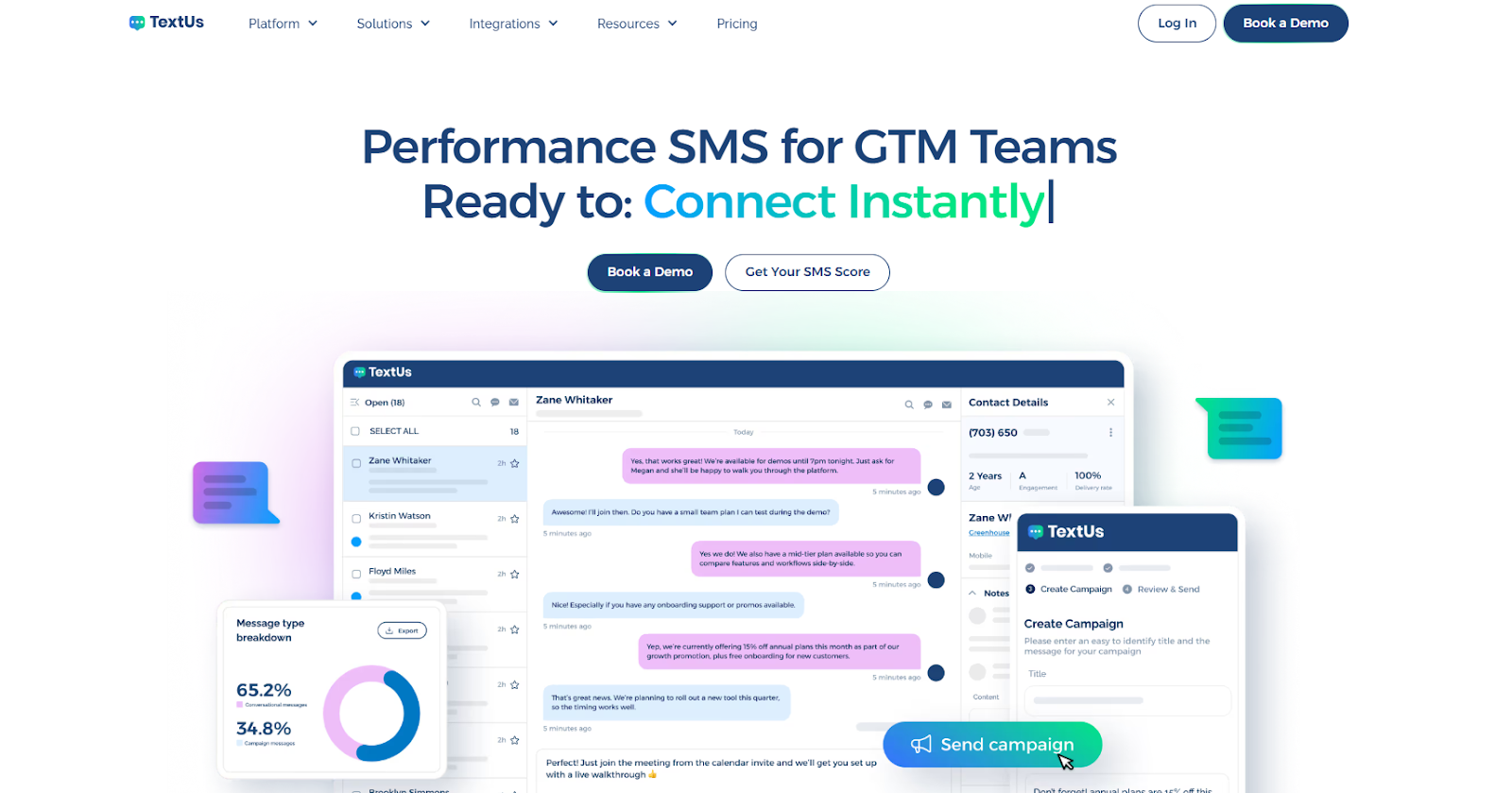
Reservation details, guest information, and past interactions stay synced in one account. It keeps every message organized from booking to follow-up.
Your staff can manage reservations, send messages, and track responses in real time. From confirming bookings to sending a friendly reminder before a visit, every step stays connected and easy to manage.
SMS automation also supports routine tasks like reminders, follow-ups, and updates. Messages can include personalization such as the guest's name ot reservation time based on customer preferences.
Security remains a priority as well. TextUs supports secure messaging and protects payment details so that customers can verify information and complete actions with confidence.
2. Build Reservation Workflows
A structured flow keeps communication consistent and makes sure every customer receives the message they need at each point.
Start with the full reservation cycle, from the moment a customer sends a request to the follow-up after the visit. Each stage should include a specific message, such as confirmation, friendly reminder, update, or post-visit review request.
Once a booking is confirmed, the system can send automated messages based on timing, such as a reminder before the reservation or a follow-up after the visit.
Workflows should also support quick response handling. If a guest replies to confirm, cancel, or request changes, the system can update the booking and inform staff right away.
3. Integrate With Booking Systems
A connection between your SMS platform and booking system keeps reservation details updated at all times.
TextUs integrates with tools like Salesforce and HubSpot, where customer and reservation data are already stored. This setup allows you to send messages based on actual booking activity without relying on a separate reservation system.
Customers receive accurate information each time a message is delivered. They can review details, verify their reservation, and reply with ease.
4. Create Message Templates
Message templates make it easier to launch messages without writing each one from scratch. They allow you to keep communication consistent while saving time during daily operations.
Templates should cover key stages of the reservation process. This includes confirmation messages, friendly reminder texts, updates, and follow-up messages after the visit.
Each template can be saved inside your system and reused whenever needed. Staff can quickly select a template, add a few details, and send messages.
They also support better coordination within your team. Everyone sends messages using the same format to ensure consistent communication for all clients.
5. Test and Optimize Your Campaigns
Text messages should be checked for correct details, working links, and proper delivery to the recipient.
You may send sample messages to review how they appear on different devices. This allows you to verify formatting, timing, and overall message flow.
SMS performance should also be reviewed over time based on response and customer interaction. Look at how many guests confirm, cancel, or request changes after receiving messages.
Small updates can improve results, such as adjusting message timing or refining the wording.
Turn Text Messages Into Better Booking Experiences With TextUs
Missed calls, delayed replies, and scattered updates create gaps that impact both your staff and your guests.
TextUs brings everything into a single, connected workflow where messages, responses, and reservation details stay organized and easy to manage.
You can send confirmations, follow-ups, and reminders, while your team tracks every interaction and responds with speed. Customers stay informed, your staff stays prepared, and no important update gets lost.
If you are ready to simplify reservations and improve how you communicate with every guest, book a demo with TextUs today!
Continue Reading



Frequently Asked Questions
Are reservation text messages effective for small businesses?
Reservation text messages work well for small businesses that manage bookings and customer visits. They provide a simple way to send messages, confirm reservations, and stay in contact with clients.
Service-based businesses and small hotel operations can manage appointments without relying on phone calls or complex systems. Text messaging also keeps schedules more predictable.
Can customers reply to reservation text messages?
Yes, most systems support conversational messaging, which allows customers to reply directly to a reservation text message. They can confirm, cancel, or ask questions through the same message thread.
TextUs makes this process easy by tracking every response in real time. Staff can view replies, continue the conversation, and manage reservations without switching between tools.
Is reservation text messaging compliant with regulations?
Reservation text messaging must follow rules related to customer consent and data privacy. You need permission before sending SMS messages and must include an option for the recipient to opt out.
TextUs supports SMS compliance by providing tools that manage consent, opt-out requests, and secure handling of customer data. You can send messages while keeping information protected and aligned with regulations.
Business Texting
Built for Results
Create and convert pipeline at scale through industry leading SMS software