
Text-to-Apply Software: Benefits, Features, and Setup Guide
Text-to-apply software reduces candidate drop-off and slow follow-up. See how TextUs helps people apply by SMS and keeps replies organized.

Written by
Adam Hamdan
Published
November 16, 2026

Long forms, account sign-ups, document uploads, and slow responses give candidates more reasons to leave before you ever get the chance to speak with them.
Text-to-apply software lets job seekers start an application by texting a keyword or scanning a QR code. The first reply may collect basic information, ask screening questions, or send a link to the full application or interview scheduler.
In this article, you’ll learn the benefits of text-to-apply software, the features to look for when choosing a platform, and the steps for building your own text-to-apply setup.
TL;DR
- Text-to-apply software helps you reach candidates faster, reduce application drop-off, support high-volume hiring, and create a simpler mobile experience.
- The best text-to-apply software includes keywords, QR codes, automation, screening, scheduling, ATS integrations, shared inboxes, reporting, compliance controls, and reusable templates.
- A successful text-to-apply setup starts with the right platform, priority roles, a business texting number, simple keywords, a mapped candidate journey, and visible campaign promotion.
- TextUs supports text-to-apply recruiting with SMS keywords, QR codes, automated sequences, shared inboxes, two-way messaging, and recruiting system integrations.
Why Use Text-to-Apply Software for Recruiting
Text-to-apply software offers a faster way to connect with interested candidates and guide them into the recruiting workflow. Here are the main reasons recruiters use Text-to-Apply software for hiring.
Reach Candidates Faster
Many job seekers search for roles, read messages, and respond to recruiters from their phones. Text-to-apply meets candidates on the device they already use throughout the day.
A keyword QR code gives candidates a simple way to express interest. From there, you can collect basic details and guide them toward the next hiring step before the role is closed.
Reduce Application Drop-Off
Long forms create more chances for candidates to leave before they finish. Account creation, résumé uploads, and multiple required fields add more steps before recruiter contact.
Text-to-apply keeps the first interaction short. Candidates provide the information you need first, then continue to screening or the full application when appropriate.
Start Candidate Conversations
A delayed response risks losing candidates to another employer. Text-to-apply starts communication as soon as someone responds to your job ad, sign, or campaign.
Automated replies acknowledge candidate interest and provide the next step. Then, you take over once the conversation requires personal attention.
Reach More Candidates Offline
Recruiting doesn't have to start on a job board. A text-to-apply keyword extends candidate capture to stores, job fairs, warehouses, restaurants, vehicles, and other physical locations.
You could place a keyword or QR code on an image, poster, flyer, or hiring sign. Each placement turns candidate interest into a trackable recruiting entry point.
Support High-Volume Hiring
Large applicant volumes put pressure when you need to respond, screen, and schedule interviews within a short period. Text-to-apply reduces repetitive first-step communication through automated replies and screening flows.
It also lets you organize applicants by role, location, or hiring group. You'll spend more time on candidates who meet the basic requirements.
Improve the Candidate Experience
Job seekers want a process that respects their time. A short text conversation feels more accessible than a lengthy application when someone is exploring a role from a phone.
Candidates also have a familiar place to ask questions, confirm interview details, or respond to a recruiter. That connection keeps communication active throughout the recruitment cycle.
Features to Look for in a Text-to-Apply Software
The right text-to-apply software supports more than the first candidate response. Here are the core features to look for when you compare platforms.
SMS Keywords and QR Codes
Custom keywords let candidates respond to your job ads, signs, career fair materials, and other recruiting campaigns from their phones.
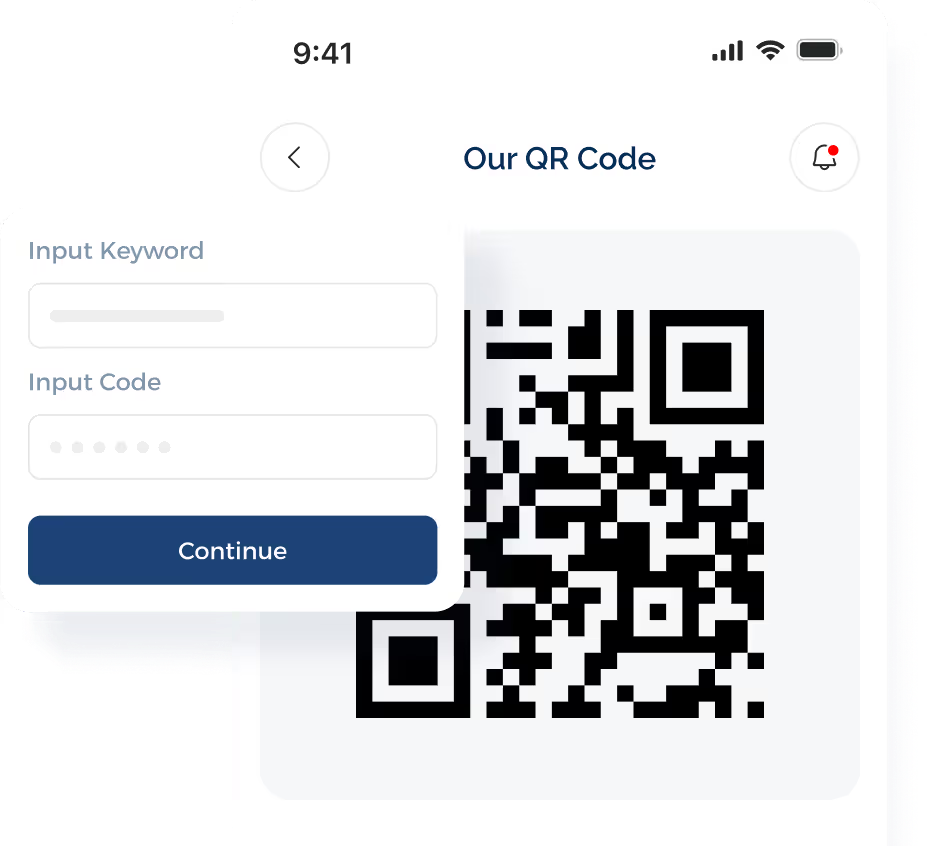
QR codes serve as another format for applicants who prefer scanning instead of typing a keyword.
Automated Candidate Responses
Fast first responses matter when candidates are considering several employers.
Automated messages let you acknowledge interest, share job details, send application links, or ask the first screening question without waiting for a recruiter to reply.
Two-Way Candidate Messaging
Candidates will still have questions after the automated steps. Conversational SMS keeps those conversations with your recruiting team, so you can discuss the role, answer concerns, and continue follow-up in the same channel.
Candidate Screening Workflows
Screening workflows let you collect data such as availability, certifications, shift preference, location, and required experience before spending time on a longer conversation. Based on those answers, you decide which applicants move to the next stage and in what order.
Interview Scheduling
Built-in interview scheduling reduces the back-and-forth that comes with finding a time. Candidates choose from your available slots, while confirmations and reminders keep both sides informed before the meeting.
ATS and Recruiting Integrations
Your texting platform should connect with the recruiting systems you already rely on.
ATS integrations keep applicant details, hiring stages, and conversation history tied to the candidate record instead of storing them in a separate file.
Shared Inbox and Recruiter Assignment
A shared inbox keeps candidate conversations visible when several recruiters handle the same hiring campaign. Assignment controls also show who owns each conversation, so you avoid duplicate contact and missed follow-ups.
Recruiting Automation
SMS marketing automation takes care of repeatable communication tied to candidate actions or hiring stages.
You set workflows for application follow-up, screening, interview reminders, status updates, and re-engagement while keeping recruiter involvement where personal judgment is needed.
Candidate Segmentation
SMS segmentation lets you organize applicants by role, location, qualifications, campaign source, or hiring stage. A sortable candidate view makes it easier for you to narrow the list when a specific hiring need takes priority.
Analytics and Reporting
Recruiting reports show you how candidates move from first contact through later hiring stages. This makes response rates, application activity, interview bookings, opt-outs, and campaign results easier to compare.
Compliance and Opt-Out Controls
Consent tracking, opt-out management, suppression controls, and message records belong in any recruiting texting platform you evaluate. These safeguards support your compliance process while respecting candidate communication preferences.
Message Templates
Reusable templates save time on application follow-ups, interview confirmations, reminders, and status updates. You still have room to adjust each version based on the candidate, role, and stage of the hiring cycle.
How to Set Up Text-to-Apply for Recruitment
A well-planned text-to-apply process makes candidate entry faster and keeps your recruiting steps organized from the start.
Below are the main steps to set up a workflow that fits your recruitment needs.
Choose the Right Text-to-Apply Platform
You need to choose a text recruiting software that matches your hiring volume, recruiting process, and current systems.
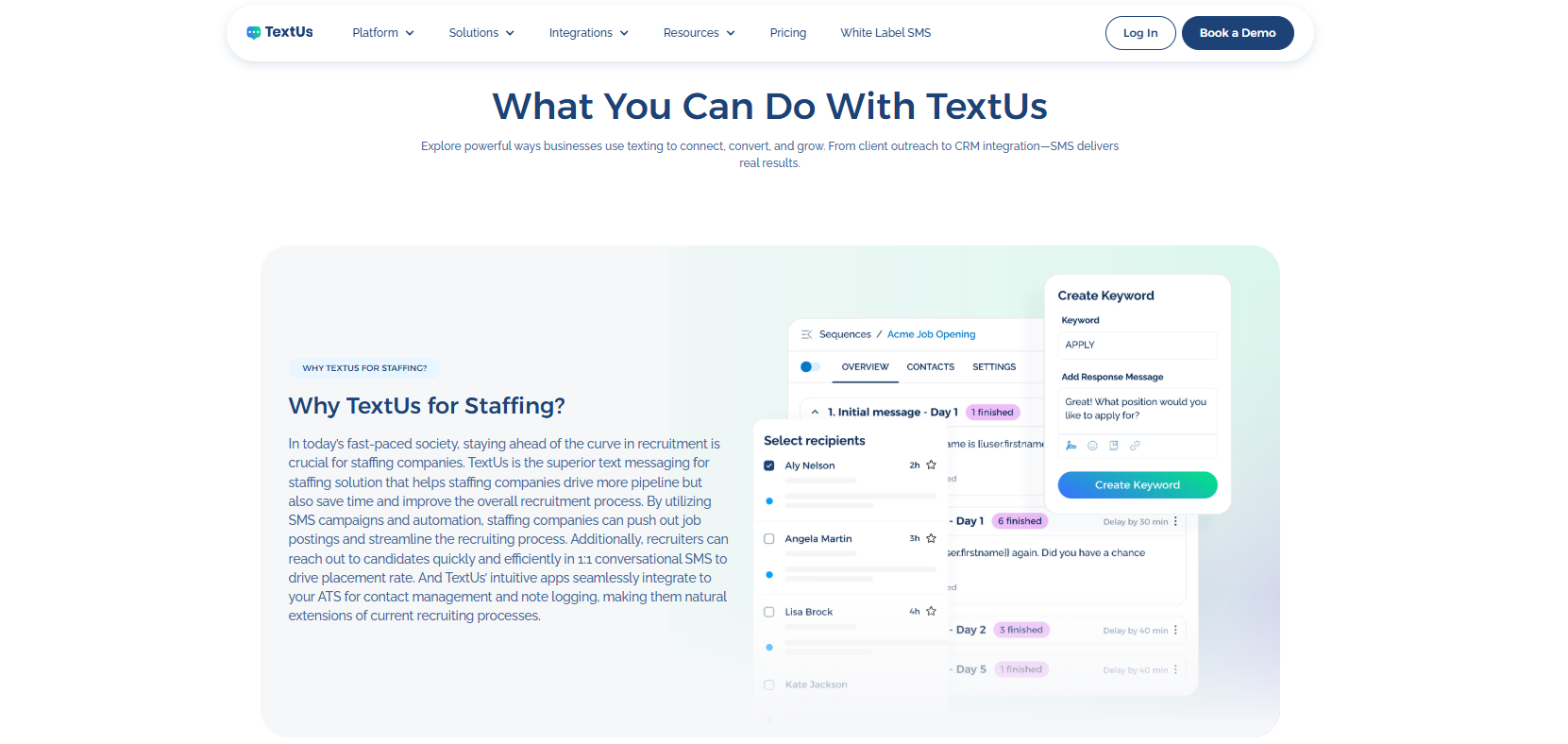
TextUs supports text-to-apply through SMS keywords, QR codes, automated sequences, and two-way messaging. Reusable templates also reduce the need to pull message text manually from a clipboard.
Candidates can text keywords to express interest, while QR codes create another entry point from job ads, posters, career fairs, and other recruiting materials.
Replies flow into a shared inbox where your team continues the conversation and handles follow-up.
Connections with recruitment automation software tools such as Bullhorn, Greenhouse, Workday, and JobDiva also keep candidate communication connected to your existing tools.
If you're ready to shorten the path from job interest to recruiter conversation, book a demo with TextUs today!
Choose the Roles You Want to Promote
Interested people lose interest if the application process feels too long. You can focus first on openings where speed and easy access influence candidate response.
Hourly, seasonal, frontline, high-volume, and hard-to-fill positions are good starting points, especially when you expect a lot of applicants.
You can pick a few priority roles first, then compare response and completion rates. Expand text-to-apply to other openings once you know which approach fits your recruiting pipeline.
Select Your Texting Number
Your business text number becomes the contact point candidates use to start the process.
Depending on your platform, options include 10DLC, toll-free numbers, or short codes, each with different registration and messaging requirements.
Your number also needs to support the campaigns you plan to run. Review message volume, candidate access, team usage, and carrier requirements before launch. If the number cannot handle the planned campaign, applicants may be unable to reach you.
Create a Short Text-to-Apply Keyword
A short, recognizable keyword makes the first step easier for candidates. Simple options such as APPLY, JOBS, NURSE, DRIVER, or WAREHOUSE connect the keyword to the role or hiring campaign.
Spelling and length also affect how easy the keyword is to remember. Keep each keyword tied to one role, location, or hiring topic, so candidates know what they're responding to.
Build the Candidate Journey
A structured text-to-apply journey from first contact through recruiter follow-up. You need to map what happens after a candidate texts your keyword so every step leads naturally into the next stage.
The process starts with an automated welcome message, followed by a few screening questions about role fit, availability, location, or required qualifications.
Here's an example:
- Candidate texts: “WAREHOUSE”
- Automated reply: “Hi Cris. Thanks for your interest in our Warehouse Associate role.”
- Screening question: “Are you available for evening shifts? Reply YES or NO.”
- Next step: Candidates who reply “YES” receive a link to choose an interview time.
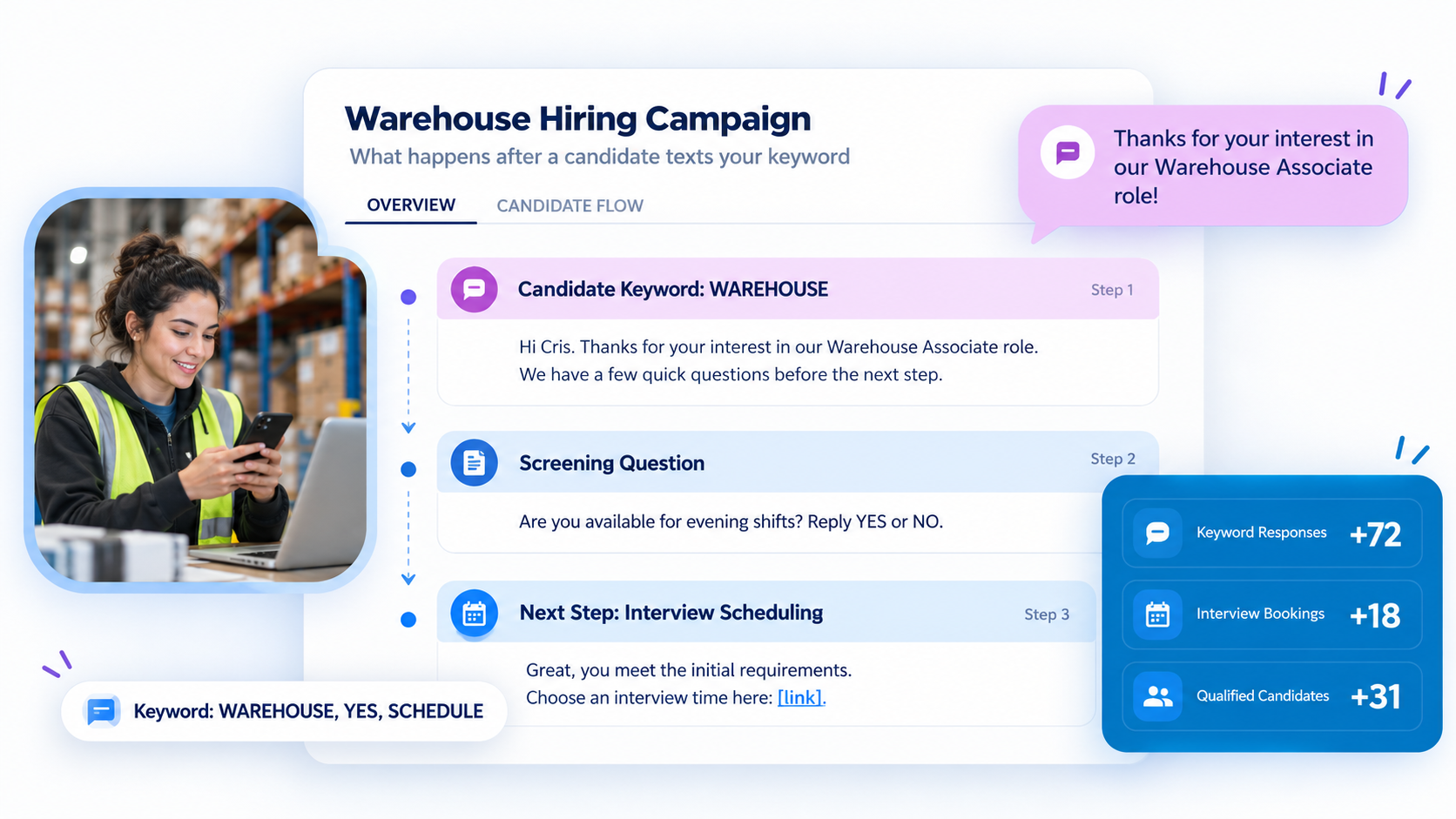
Qualified candidates then receive the next action. Scheduling links or booking buttons direct them to available slots before you take over for personal follow-up and interview communication.
Promote Your Text-to-Apply Campaign
Candidate visibility determines how much response your text-to-apply campaign receives.
You can place your keyword and QR code on job ads, career pages, social posts, hiring signs, flyers, employee referral materials, and event displays where job seekers already see your openings.
It's also important to keep the copy short and tell candidates what to text, which role it relates to, and what happens after they respond.
Build a Better Text-to-Apply Experience With TextUs
You'll lose valuable candidates when the application process takes too long, or follow-up comes too late.
TextUs shortens that gap with text-to-apply tools such as SMS keywords, QR codes, automated responses, and two-way messaging.
Your team can manage replies from a shared inbox, follow up through automated sequences, and connect conversations with recruiting systems. This keeps candidate communication connected from first interest through screening, scheduling, and recruiter follow-up.
Book a demo with TextUs today to see how a text-to-apply feature helps you reach candidates faster and move qualified applicants into your hiring process!
FAQs About Text-to-Apply Software
What texting software is best for nonprofits?
The best option depends on your audience, message volume, and communication needs. TextUs is the best texting software for nonprofits that need more structured outreach.
The platform supports group broadcasts, automated reminders, keyword auto-responses, and sequences for fundraising updates, volunteer opportunities, events, and organizational announcements.
How much does Textedly cost?
Textedly starts at $29 per month for 500 messages, with higher plans based on monthly message volume.
TextUs is a great alternative if you need more recruiting-focused texting features and higher included volume. Its Pro plan starts at $299 per month with 5,000 messages and five phone numbers.
It also comes with SMS and MMS messaging, campaigns, automation, integrations, and Smart Delivery tools.
What is the best texting app for work?
The best texting app for work depends on how your team plans to use SMS. TextUs supports business text messaging for recruiting, sales, and workforce communication.
It offers bulk SMS capabilities, shared team inboxes, automated campaigns, mobile and web access, plus integrations with CRM and ATS platforms.
Continue Reading



Frequently Asked Questions
Business Texting
Built for Results
Create and convert pipeline at scale through industry leading SMS software