
Recruiting Workflow Automation: Reduce Hiring Bottlenecks
Learn how recruiting workflow automation works and explore common use cases. Discover how TextUs can help you automate candidate communication.

Written by
Adam Hamdan
Published
July 30, 2026

Recruiting slows down when approval sits untouched, an interview invite gets missed, a candidate waits too long, and a recruiter spends another hour chasing updates.
Recruiting workflow automation closes those gaps by cutting the manual effort behind interview coordination. It saves valuable recruiter hours without turning the process into a cold, hands-off system.
In this article, we will break down how automation addresses common recruiting challenges, where it fits into your process, and how to create an effective workflow strategy.
TL;DR
- Automation reduces administrative work, speeds up hiring stages, improves candidate communication, increases visibility, and connects scattered recruiting tools.
- Recruitment workflow automation supports candidate communication, job approvals, descriptions, postings, sourcing, referrals, applications, screening, assessments, interviews, background checks, offers, rejections, onboarding, feedback, and reporting.
- You can build a recruitment automation strategy by mapping the current process, finding bottlenecks, choosing one use case, defining rules and human checkpoints, connecting the right tools, testing a small pilot, and improving it through performance data.
- TextUs turns candidate interest into action with stronger messages, instant keyword replies, faster follow-ups, and connected conversations.
What Problems Does Recruiting Workflow Automation Solve?
Recruiting teams lose time to time-consuming tasks, slow handoffs, and scattered communication between multiple tools.
Here are the main problems recruiting workflow automation is designed to address.
Too Much Manual Administrative Work
Hiring teams spend a large part of the day updating records, sending follow-ups, scheduling interviews, preparing documents, and chasing missing feedback.
Manual recruiting also increases the chance of missed steps, duplicate entries, and outdated candidate information.
Important conversations and decisions may receive less attention because admin work takes over the recruiting process.
Slow Movement Between Hiring Stages
Job candidates remain in one stage longer than expected because the next task depends on someone noticing and taking action.
A recruiter may wait for feedback, while a hiring manager may not realize that a decision is overdue. These gaps extend the hiring timeline and leave candidates uncertain about what comes next.
Inconsistent Candidate Communication
Candidate communication depends on each recruiter’s workload, habits, and available time. Some applicants receive frequent updates, while others hear nothing for days or weeks.
Messages may also arrive late, repeat information, or conflict with updates sent through another channel. This makes it harder to consistently evaluate the candidate experience.
Limited Visibility During the Hiring Process
Recruiting data often sits in various spreadsheets, inboxes, calendars, and applicant tracking systems (ATS). This makes it difficult to see which passive candidates are active and where delays are happening.
Managers may lack a clear view of open roles, interview progress, pending approvals, or recruiter workload. Teams may only notice a problem after a candidate drops out or a hiring deadline has already passed.
Disconnected Recruiting Tools
Many hiring processes rely on separate systems for applications, messaging, scheduling, assessments, background checks, and onboarding.
Candidate records may not match if you use multiple systems, and communication history may remain separate from the main profile.
These gaps make it harder to understand the full candidate journey or confirm that every step has been completed.
Use Cases of Recruitment Workflow Automation
Workflow automation can support many parts of the hiring process. Below are the main use cases that show where recruitment process automation fits in each stage.
Candidate Communication Automation
Candidate communication plays a major role in building relationships before, during, and after an active hiring process.
Email still has a place for formal details and longer messages. But text marketing supports candidate relationship management strategy through job alerts, follow-ups, and re-engagement messages.
Short text updates keep your company visible without waiting for candidates to visit a job board or check a full email inbox.
Qualified candidates may open a scheduling link, confirm an interview, ask a question, or respond to a request without digging through their inbox.
Texting also makes the process feel more direct and less one-sided. You get faster replies, fewer missed interviews, and a clearer way to keep high-quality candidates moving toward the next step.
Text automation software like TextUs supports your outreach automation through personalized SMS campaigns, automated sequences, shared conversations, and two-way texting.
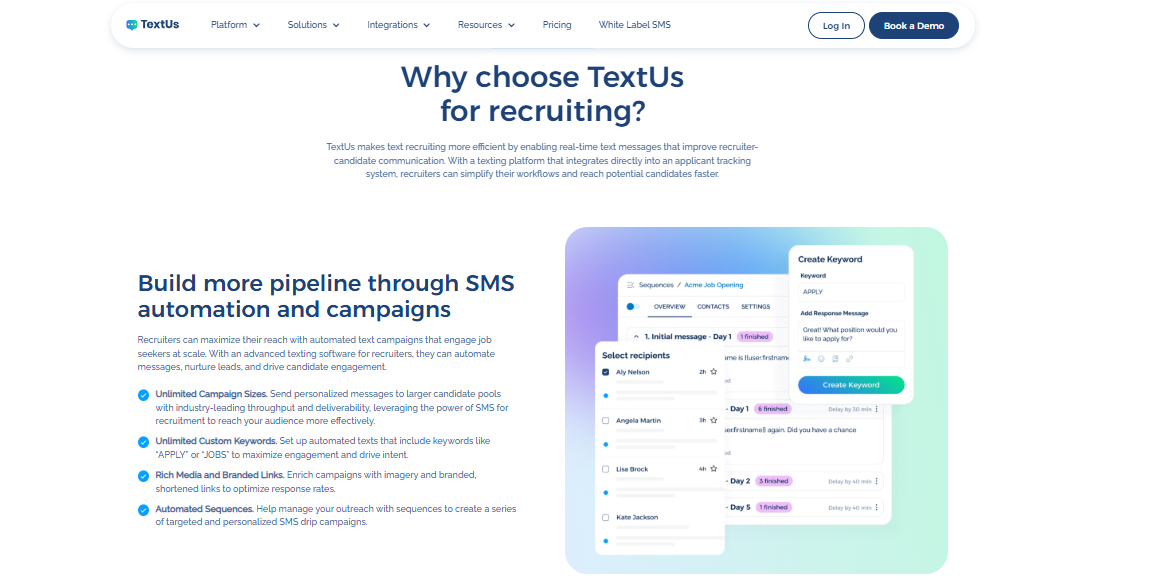
Book a demo with TextUs today to see how you can spend less time chasing replies and more time talking to candidates who are ready to move forward!
Job Requisition and Hiring Approval Automation
Every hire starts with a request, but that request can sit in limbo when it needs sign-off from several people.
Automation keeps the approval process moving by sending each request to the correct person based on the role, department, location, or hiring level.
The workflow can also check whether key details are complete before the request moves forward.
Job Description Creation and Approval
You may need input from the hiring manager, HR, legal, and department leaders, which can turn one draft into a long chain of edits and approvals.
With automation, you can start with an approved template, add the role details, assign reviewers, track comments, and see which person still needs to sign off.
The workflow also flags missing information, such as salary range, location, reporting structure, or required skills, before the description moves forward.
Job Posting and Distribution
Once the job description is approved, the next step is getting it in front of the right people. Posting the same role on several job boards, career pages, and social channels can take time.
Automation lets you post jobs on multiple channels from a single workflow. You can keep the title, location, salary, and role details consistent without copying the same information.
The workflow can also track where each applicant came from and remove the listing once the role closes. This helps you avoid outdated posts, duplicate listings, and extra work for every hiring platform you use.
Candidate Sourcing Automation
Finding strong candidates means searching through past applicants, talent databases, job boards, and professional networks. That process can take hours before you even send the first message.
Candidate sourcing automation helps you narrow the search by matching profiles with the skills, experience, location, or qualifications tied to an open role.
You can also organize people into talent pools, assign them to the correct recruiter, and flag past applicants who may suit a new opportunity.
Employee Referral Automation
Referrals bring in diverse candidates, but the process gets messy once several people submit names through email, forms, or chat.
You may end up chasing missing details, checking whether a referral already exists, and updating employees one by one.
Automation allows you to collect candidate information, create a record, assign the referral to a recruiter, confirm receipt with the employee, and track progress without digging through separate messages.
The automated system can also notify employees when their referral reaches a new stage or qualifies for a reward.
Application Management Automation
Applications pile up fast, especially when you recruit for several roles at once. You need to sort records, check for missing details, remove duplicates, and assign candidates before you even begin your review.
Automation keeps that work organized from the moment someone applies. You route the best candidates by role or location, flag incomplete applications, detect duplicate records, and assign each person to the same recruiter.
The workflow can also send an application confirmation and create the next review task. This makes it easier for you to see which applications need attention first.
Resume Parsing and Screening Automation
Resume review can become one of the slowest parts of recruiting when every application needs a manual first pass. You spend hours looking for the same details, such as experience, education, certifications, skills, and location.
An AI-powered parser pulls those details into a structured candidate profile, so you do not have to search through each document line by line.
Screening rules can then sort applicants based on the minimum job requirements and flag profiles that need closer review.
Pre-Screening Question Automation
Pre-screening questions help you sort out the basics before you spend time on a call.
You ask about work authorization, location, salary expectations, shift preference, certifications, start date, or travel requirements at the start of the process.
Automation sends the questions after a candidate applies and records each answer in the same profile. The workflow can then move qualified applicants forward, flag uncertain responses, or send incomplete submissions back for review.
Candidate Assessment Automation
Assessments add another layer of work when you need to send tests, track deadlines, review completion, and move results into the candidate record.
The process becomes harder to manage when several roles use different assessments or when candidates need repeated reminders.
Automation sends the correct assessment based on the role or hiring stage, then records the result once the candidate completes it. You may also trigger reminders for incomplete tests and receive an alert when a score is ready for review.
Interview Scheduling Automation
Scheduling turns into a long back-and-forth. One missed reply can delay the process and leave candidates waiting without a confirmed time.
Automation allows candidates to choose from available interview slots while the system checks recruiter and interviewer calendars.
It can also create calendar events, add video meeting links, account for time zones, and send confirmations once the interview is booked.
SMS makes scheduling easier because a clickable URL reaches candidates on the device they check throughout the day.
Campaign scheduling lets you prepare candidate texts in advance and choose the date and time they go out.
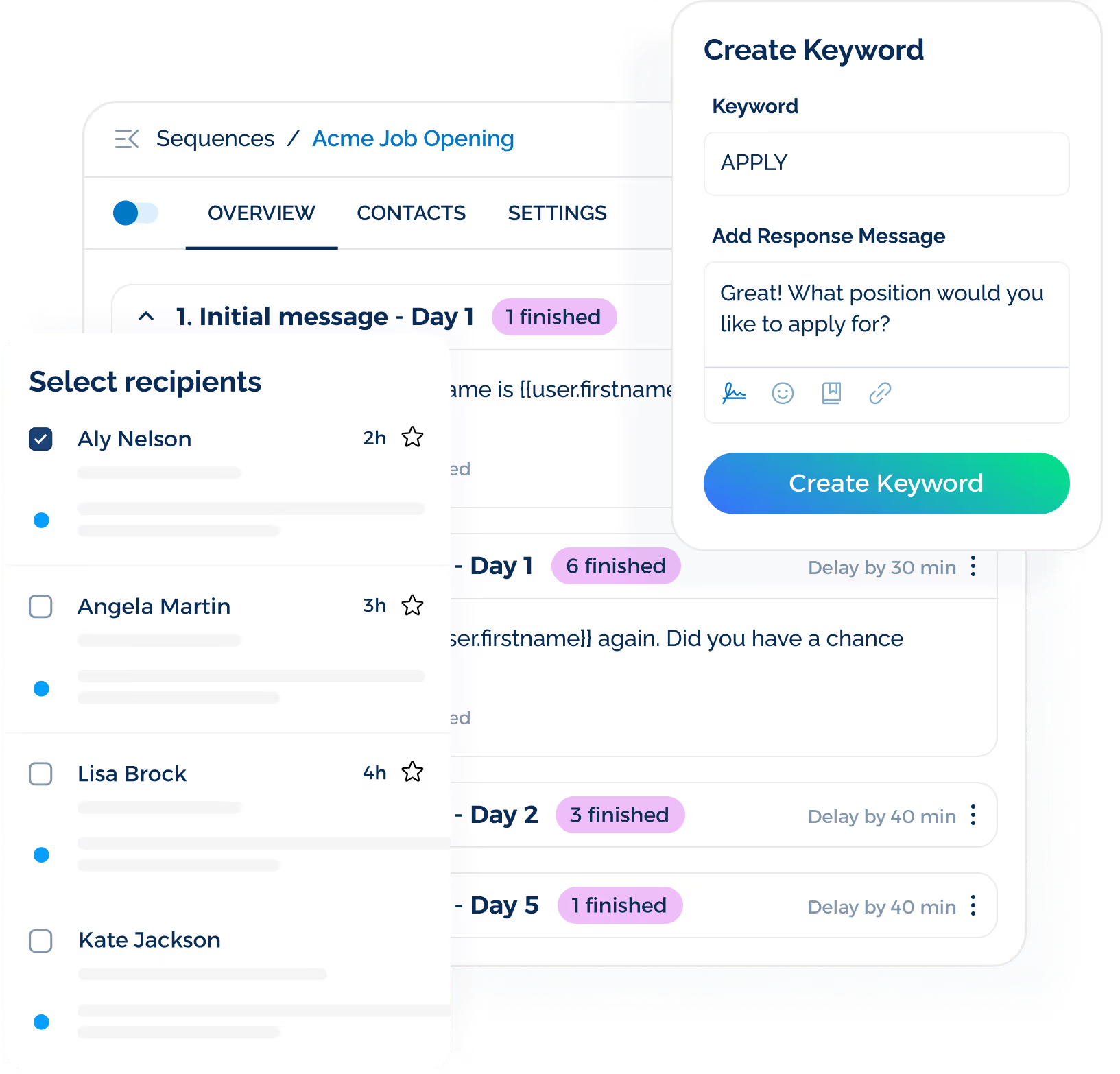
You collect faster responses, reduce missed invitations, and let candidates confirm or change their interview time without searching through a full email inbox.
Background and Reference Check Automation
Automation starts the correct check once a candidate reaches a set point in your workflow. This removes much of the manual work involved in checking documents and provider updates.
You can send consent forms, request missing information, notify approved providers, and track completion without chasing every update by hand.
The workflow also alerts you when results are ready or when a check needs closer review. Sensitive information stays limited to authorized users.
Offer Approval Automation
Offer approval becomes a bottleneck when compensation, budget, start date, and contract terms need sign-off from several people. You end up chasing updates in email threads while the candidate waits for an answer.
Automation sends the offer to the correct reviewers based on the role, salary range, department, or seniority level.
The workflow can also flag offers that fall outside approved salary bands or include missing details before they move forward.
Offer Letter Generation and Signature
Offer letters take time to prepare when you need to copy candidate details, salary terms, start dates, and job information into separate documents.
Automation pulls approved details into a standard offer letter template, sends the document for electronic signature, and records each update in the candidate profile.
You'll see when the offer was opened, signed, declined, or sent back with questions. The workflow can also send reminders before the deadline and alert you when the candidate takes action.
Candidate Rejection and Closure Workflows
Rejection is one of the most sensitive parts of recruitment. But it's also one of the easiest steps to delay when your workload is full.
Applicants wait for updates long after a decision has been made, which can leave a poor impression of the hiring process.
Automation helps you close the loop based on the candidate’s stage. It lets you send one message to early applicants and a separate follow-up to finalists who invested more time in the process.
The workflow can also record the rejection reason, update the candidate’s status, and add qualified applicants to a talent pool for future roles. You can pause the automated message when a candidate deserves a phone call or a direct note from you.
Preboarding and Onboarding Handoffs
The hiring process does not end once a candidate accepts the offer. You still need to pass information to HR, payroll, IT, security, and the hiring manager before the new hire’s first day.
Automation moves approved candidate data into the next workflow without repeated entry.
It creates an employee record, sends required forms, requests equipment, sets up system access, schedules orientation, and assigns tasks to the people involved.
You may also send reminders when documents remain incomplete or when a department has not finished its part. This keeps small delays from turning into first-day problems.
Candidate Feedback Collection
Candidate feedback shows you where the hiring process feels clear and where it starts to lose people. Without a set process, those insights stay buried in inboxes, informal comments, or one-off conversations.
Automation lets you send a short survey after an interview, rejection, offer decision, or completed onboarding step.
You may ask about communication, scheduling, interview structure, response time, and how well the role matched the original description.
The workflow collects responses in one place and flags repeated concerns, such as long wait times, unclear updates, or confusing interview steps.
Recruiting Analytics and Reporting
Recruiting data often lives in separate ATS, spreadsheets, inboxes, and HR tools. This makes it harder for you to see where candidates drop off or which roles take the longest to fill.
Automation pulls that information into one reporting view and updates it as top candidates move through the process.
You'll be able to track time-to-hire, time in stage, interview attendance, candidate response rates, offer acceptance, and hiring manager delays without building every report by hand.
How to Build a Recruitment Automation Workflow Strategy
A strong recruitment automation strategy starts with a clear view of your current process, priorities, and hiring goals.
Here's how you can build a workflow that supports your recruiters, managers, and talent acquisition teams:
Step #1: Map Your Current Recruiting Workflow
Start by documenting how a role moves from the initial hiring request to an accepted offer and onboarding handoff.
Your map should also cover sourcing, candidate referrals, interviews, offers, and onboarding throughout the talent acquisition process.
Common trouble spots include delayed approvals, manual data entry, interview scheduling, missing feedback, candidate follow-ups, and updates spread across recruiting automation platforms.
Note where your staff repeat the same work or wait for someone else to respond. This manual process may take up a large part of the recruiter's week.
Step #2: Find the Largest Workflow Roadblocks
Once the workflow is mapped, look for the stages that depend on manual follow-up, approval, data entry, or communication.
Common inefficiencies in your recruiting tasks include slow application reviews, interview scheduling, missing feedback, offer approvals, and candidate responses that sit unanswered.
You may also review how long candidates remain in each stage and where drop-off tends to happen. A stage with frequent delays or missed updates is often a strong place to introduce automation.
Step #3: Choose One High-Impact Use Case
A focused first step keeps the project manageable and shows whether automated recruiting improves your operations.
Strong starting points include candidate communication, interview scheduling, application confirmations, feedback reminders, and offer approvals.
Choose the use case based on hiring volume, recruiter workload, candidate drop-off, and the time lost to manual tasks. The first workflow should address a real bottleneck rather than add automation for its own sake.
Step #4: Define the Trigger, Conditions, and Actions
Every automated workflow needs a starting event, conditions, and a defined action. These automation rules determine when the workflow begins and what happens next.
Each condition should follow clear predefined criteria tied to candidate stage, job type, location, or response status.
For example:
- Trigger: A candidate moves to the interview stage
- Rule: The candidate has a valid phone number
- Action: Send a scheduling text and assign the reply to the recruiter
Include stop conditions, delays, and exception paths so the workflow does not continue when a candidate replies, withdraws, or opts out.
Step #5: Decide Where Human Input Is Required
Some parts of recruiting still depend on human judgment, context, and personal communication.
Interviews, final decisions, sensitive rejections, candidate concerns, and offer negotiations should remain under recruiter control.
A manual override also gives you room to handle unusual cases. Recruiters need a way to pause or adjust automation when a situation requires more attention.
Step #6: Select Recruitment Automation Tools
Your recruiting automation software stack may include an ATS, CRM, scheduling platform, assessment software, background check service, electronic signature tool, and HRIS.
But strong integrations matter as much as individual features. Candidate records, hiring stages, interview details, and task updates should move between systems.
Texting software is also worth adding to your stack. SMS supports outreach, interview scheduling, reminders, status updates, document prompts, and candidate re-engagement.

TextUs connects candidate texting with the ATS or CRM already in place. Targeted campaigns, automated sequences, shared conversations, and two-way replies keep communication tied to the broader recruiting workflow.
Book a demo with TextUs to see how automated texting fits into your current recruiting stack!
Step #7: Test and Launch a Small Pilot
A controlled test helps uncover problems before the workflow reaches a larger candidate group.
Standard and unusual scenarios should include candidate replies, missing contact details, duplicate records, cancellations, opt-outs, failed integrations, and overdue tasks.
A small pilot may focus on one role, department, location, or recruiter group. This approach makes errors easier to spot and correct before the workflow expands.
Step #8: Measure and Improve Performance
Metrics such as candidate response rate, time in stage, interview attendance, offer acceptance, recruiter workload, and workflow errors show whether the change made a real difference.
Performance data should guide the next round of changes. Weak response rates may point to poor timing, unclear copy, or broad audience segments, while repeated delays may signal a broken handoff between systems.
Candidate communication deserves its own review as well. Text delivery, reply speed, opt-out rate, and follow-up performance reveal which messages keep people engaged and which parts of the sequence need work.
TextUs Supports Your Recruiting Workflow Automation
Your ATS keeps the hiring process organized, but candidate conversations can happen somewhere else.
TextUs brings candidate texting into the recruiting systems you already use without forcing you to replace your ATS or CRM. Here are the main ways it keeps candidates informed throughout your recruiting workflow.
Connect Texting With Your ATS and CRM
TextUs connects with recruiting and customer relationship platforms such as:
- Bullhorn
- Greenhouse
- Salesforce
- HubSpot
- Workday
- JobAdder
- JobDiva
It also supports other ATS, HRIS, and CRM systems through integrations, APIs, webhooks, and Zapier.
This connection keeps candidate details and text conversations close to the records you already review. It reduces manual input when recruiters need to record messages or update candidate activity.
Recruiters no longer need to rely on personal phones or search through separate tools to understand what happened.
Send Targeted SMS and MMS Campaigns
A new role does not need to go to every contact in your database. TextUs Campaigns let you select groups based on factors such as job interest, hiring stage, location, experience, or recruiter assignment.
Merge fields add details such as the candidate’s name, job title, location, or recruiter. It keeps outreach personal even when the same opportunity goes to a larger group.
MMS also provides more context when a plain-text message is not enough. Depending on your plan, campaigns may include images, PDFs, GIFs, calendar files, contact cards, and other supported attachments.
Build Automated Candidate Sequences
One message is not always enough to get a response. TextUs Sequences can send drip campaigns, so follow-up does not depend on another task sitting on your calendar.
Each step follows a schedule set in advance. This removes recurring scheduling tasks from your calendar while keeping candidate follow-up on track.
TextUs also includes recruiting sequence blueprints that serve as a starting point. Message content and timing remain editable, so the workflow may reflect the role, audience, and hiring stage.
Use Keywords to Capture Candidate Intent
SMS keywords turn a short candidate response into the start of an automated workflow.
Terms such as APPLY, JOBS, INTERESTED, YES, SHIFTS, or INFO may trigger a prepared reply with job details, screening questions, or the next step.
A keyword may also enroll the candidate in a sequence. Someone who texts “JOBS,” for example, might receive available roles first, followed by an application link and a reminder if no action follows.
Multi-step keyword responses allow the conversation to become more specific. After the first keyword, a candidate may choose a location, department, or shift through another short response.
Review Message Quality Before Sending
A recruiting message may contain useful information yet still face delivery problems due to its wording, formatting, or links.
TextUs includes a Message Quality Indicator that reviews text as it is written and flags content with a higher risk of spam filtering. Admins may also add custom flagged terms based on internal guidelines, brand preferences, or recruitment policies.
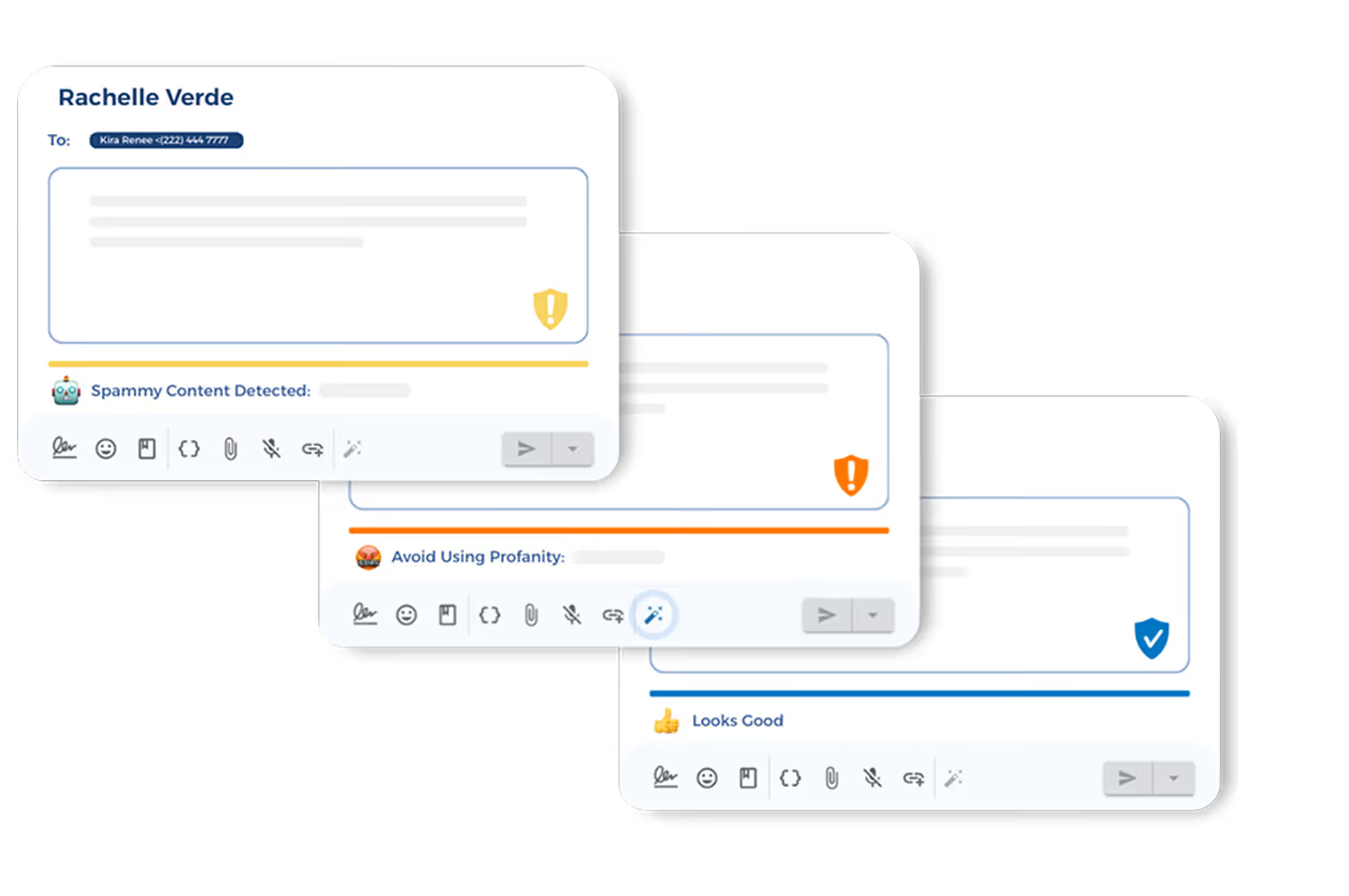
Smart AI Rewrite provides another option when the message receives a flag. This AI tool creates revised versions that remove detected quality issues, which you may review and edit before sending.
The review takes place before the campaign reaches candidates. You get a chance to clean up weak copy instead of finding the problem after delivery and response rates drop.
Manage Two-Way Candidate Conversations
Recruiting automation should not trap candidates in a one-sided message sequence. TextUs brings replies into a shared inbox, where recruiters may view past messages and continue the conversation.
Conversation assignment directs each reply to the recruiter responsible for that candidate. Assigned users receive an automated notification after a new inbound message.
The inbox supports automated outreach without removing human interaction from the hiring process. A campaign may start the conversation, but you take over when a candidate asks a question.
Track Recruiting Text Performance
TextUs campaign analytics show what happens after a message goes out. Reports include recipients, delivery rate, reply rate, failure rate, link clicks, and click-through rate for supported campaign features.
You may compare which job campaigns receive replies, which messages lose attention, and which follow-ups bring candidates back into the process.
A/B testing also compares different message variations. TextUs tracks the response rate for each version and identifies the top performer, so future outreach draws from actual candidate behavior.
Turn Recruiting Automation Into Candidate Action With TextUs
A workflow only works when candidates respond, confirm, schedule, and complete the next step.
TextUs brings that action into the process through timely SMS outreach that reaches people beyond the usual email follow-up.
Campaigns, automated sequences, keywords, and shared conversations support each stage without making communication feel robotic.
Interview reminders, job alerts, application prompts, and onboarding messages stay focused on one clear action, while recruiters step in when a personal response matters.
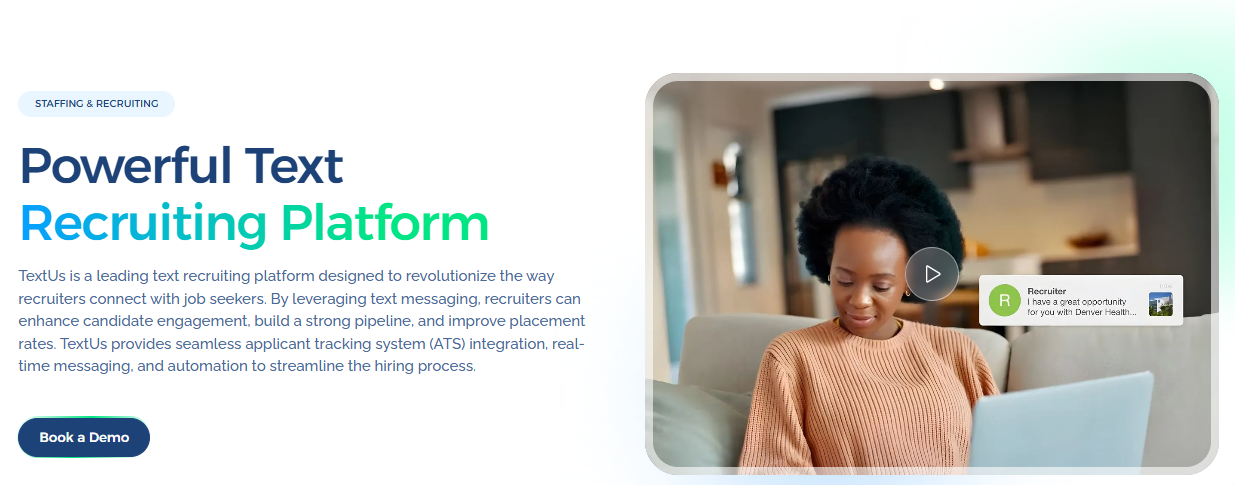
Book a demo with TextUs today to see how candidate texting turns more hiring activity into replies, interviews, and placements!
Continue Reading



Frequently Asked Questions
How can I automate my recruitment process?
Start by finding repetitive tasks such as scheduling, follow-ups, application updates, and feedback reminders. Recruiting automation tools use triggers and rules to handle these steps while you remain in control of hiring decisions.
What is the 70/30 rule in hiring?
The 70/30 rule means a candidate meets about 70% of the role’s main requirements and can learn the remaining 30%. It encourages you to consider strong candidates who may not match every detail in the job description.
What are the seven stages of the recruitment process?
The seven common stages are identifying the hiring need, creating the job description, sourcing candidates, screening applications, interviewing candidates, making an offer, and onboarding the new hire.
Business Texting
Built for Results
Create and convert pipeline at scale through industry leading SMS software